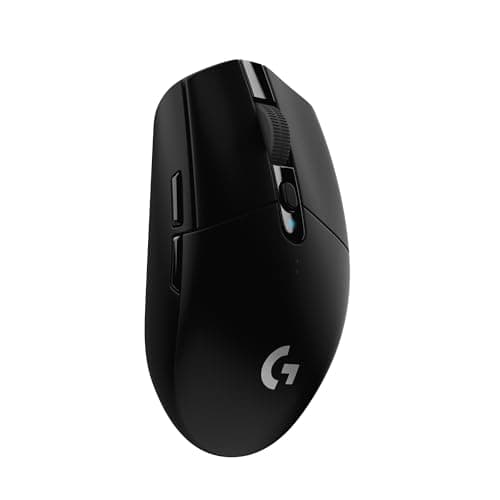
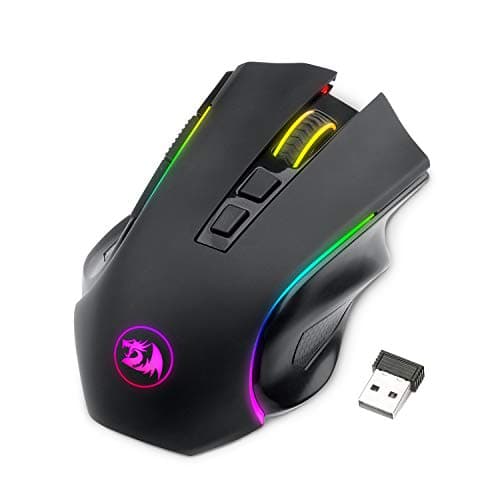
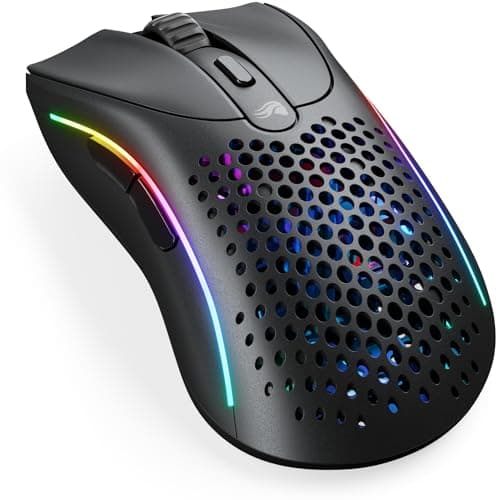
This bracket has changed more than any other in the mouse market, and the reason is that the expensive parts stopped being expensive. A low-latency 2.4GHz radio and a sensor that tracks perfectly at any speed a human can move used to be flagship features. They are now table stakes, which means a mouse under fifty dollars is no longer a compromised version of a good mouse — it is a good mouse with fewer luxuries.
Only three mice in our registry currently sit under $50 with a live wireless listing, and we would rather publish three honest picks than pad the list with wired mice or something unavailable. Every price here is pulled live from Amazon and carries the date we retrieved it, so if a flagship dips into this bracket during a sale the table will say so. We do not run a testing lab and never claim to — our methodology page sets out exactly what our scores are.
What you still give up under $50
Three things, and it is worth knowing which ones you care about. First, battery technology: at this price you get either a replaceable AA or a modest rechargeable cell, not a 90-hour internal battery with a charging dock. Second, polling rate — the flagships advertise 4,000Hz or 8,000Hz wireless polling, which this bracket does not do. Third, shell materials and switch grade: you will not get a magnesium chassis or optical main switches rated for 100 million clicks.
Of those, only the battery is likely to affect you day to day. The polling-rate gap is almost entirely theoretical: going from 1,000Hz to 8,000Hz saves well under a millisecond, costs battery life, and in our polling rate explainer we show why it is the most oversold number in the category.
Weight is the one spec that is not oversold
Mouse mass is the variable with the clearest effect on how a session feels after three hours. A heavy mouse needs more force to start and stop, every single flick, and that accumulates into forearm fatigue rather than inaccuracy. The market moved from roughly 100 grams to roughly 60 over a decade for exactly that reason.
The Model D 2 Wireless at a listed 66 grams is the striking thing about this bracket — it is in the same weight class as mice costing three times as much. The G305 at 99 grams with its battery installed is a generation behind on this one spec, and whether that matters depends entirely on your grip and how long you play. Our lightweight versus heavy guide separates where the consensus is well supported from where it is just fashion.
AA or rechargeable
This is a genuine fork rather than a budget compromise. A replaceable AA cell means a mouse that is never out of action: when it dies you swap the battery and keep playing, and in five years it will still take a battery you can buy in a supermarket. Logitech rates the G305 at 250 hours on one cell, which is months of normal use.
A sealed rechargeable cell means less weight and no battery hatch, but it also means a component with a finite cycle life soldered inside a mouse. When a lithium-polymer cell reaches the end of its life, the mouse does too, unless you are willing to open it. Neither choice is wrong; pick the failure mode you prefer to live with.
2.4GHz, Bluetooth, or both
For gaming you want the 2.4GHz dongle. A dedicated radio link holds a tighter, more consistent connection than Bluetooth, which is shared, negotiated, and tuned for power saving rather than response time. Every pick here ships 2.4GHz.
Bluetooth is a second mode rather than a competitor, and two of these three have it. Its value is a laptop with no spare USB port, a tablet, or a travel bag where a lost dongle means a dead mouse. The Model D 2 and the M602 both offer it; the G305 does not, and if you want one mouse for a desktop and a work laptop that is the deciding spec. Our Bluetooth versus 2.4GHz guide has the measured gap.
Shape outranks every number here
Two of these three are right-hand ergonomic shells with a pronounced hump; the Model D family is the lighter, more modern interpretation of that shape. If you use a fingertip grip or you are left-handed, an ergonomic shell is the wrong tool whatever its sensor does, and no spec on the table will tell you that.
Measure your hand before you shop. Our grip styles explainer covers which shapes suit palm, claw and fingertip holds, and if you already know your hands are large, read our big-hands roundupbefore committing — lighter mice are frequently smaller mice, and a 66-gram shell that is too short for you is a worse mouse than a 99-gram one that fits.
If your budget is genuinely flexible, the honest comparison is upward rather than sideways. Our full wireless roundup covers the $100-plus tier, and our under-$100 page is the bracket where 4,000Hz polling and premium switches start appearing. Neither will make you a better player than the mouse at the top of this page.
Which one, by what you want from it.
You want the modern ultralight feel: the Glorious Model D 2 Wireless, listed at 66 grams with a current sensor and Bluetooth as well as 2.4GHz.
You want a mouse that never needs charging: the Logitech G305 LIGHTSPEED, at a rated 250 hours on one AA. Also the cheapest serious option here.
You want extra buttons and three connection modes for the least money: the Redragon M602 Griffin, with seven buttons and 2.4GHz, Bluetooth and USB-C.
You have a fingertip grip or you are left-handed: none of these three comfortably. Read the grip-style guide first and look at an ambidextrous shape instead, even if it costs more.