If you want one recommendation and no homework, buy the AOC Q27G41ZE. It is a 27-inch 1440p IPS panel that AOC rates at 240Hz, and it costs a fraction of everything else on this page — which makes it the sensible way to find out whether you actually benefit from 240Hz before spending OLED money on it. 240Hz sounds like a straightforward upgrade — more Hz, better — but it comes with two conditions people skip past. First, a 240Hz panel only shows you 240 frames a second if your graphics card can produce 240 frames a second in the game you are playing; run it at 90fps and you have bought refresh rate you are not using. Second, raw Hz is only half of motion clarity: a panel also has to change each pixel fast enough to keep up, and a slow panel at 240Hz still smears. The four monitors below all do 240Hz honestly; what separates them is panel type, ports, size and price.
240Hz is only worth it if your GPU can feed it
A refresh rate is a ceiling, not a promise. A 240Hz monitor redraws the screen up to 240 times a second, but it can only show a new image when your PC hands it one — so the benefit is capped by your frame rate, which is capped by your graphics card and the game. In a light competitive title like a top-down shooter or an older esports game, a strong card will happily push frames into the couple- hundred range, and 240Hz pays off in lower latency and clearer motion. In a heavy, modern single-player game with the settings turned up, the same card might sit at 80–120fps, and a 240Hz panel is doing nothing a 165Hz one would not have done for less. Be honest about the frame rates you actually hit in the games you actually play, and buy the refresh rate that matches. Our 144Hz vs 240Hz guide works through exactly where the jump is worth it and where it is not.
The corollary is a warning about tearing. Whichever panel you pick, turn on its variable refresh rate (G-SYNC / FreeSync), which syncs the monitor to your fluctuating frame rate and removes tearing without the input-lag penalty of old V-Sync. Which flavor you have matters far less than people think — our G-SYNC vs FreeSync guide explains why.
It is also worth separating the two things high refresh actually buys you, because they are not the same. The obvious one is smoother, clearer motion — the world moves in more, smaller steps, so a panning camera or a strafing target is easier to read. The subtler one is lower latency: at 240Hz a fresh frame is available to your eyes roughly twice as often as at 120Hz, which shaves a few milliseconds off the gap between your input and seeing its result on screen. In a competitive shooter that responsiveness is often the real prize, more than the visual smoothness. But both benefits still depend on your GPU producing the frames in the first place — the monitor cannot show you motion your PC never rendered.
Response time is the other half of motion clarity
Here is the part the spec sheet buries. A monitor's refresh rate tells you how often it can draw a new frame; its response time tells you how fast each pixel can actually change color to display that frame. If the pixels transition slower than the refresh rate demands, the old image smears into the new one — ghosting — and you lose the clarity the high Hz was supposed to buy. This is why a fast IPS panel at 240Hz can look visibly cleaner than a slow VA panel at the same 240Hz, and why OLED, with near-instant per-pixel response, looks cleaner still. Raw Hz and response time are a pair; you need both. We break down what the numbers mean in our response-time explainer, and because we do not run a lab, the honest reference for how a panel behaves in motion is measured data from independent reviewers like RTINGS and Blur Busters, who publish the overdrive and pixel-response figures a manufacturer's “1ms” sticker does not.
IPS or OLED: the panel decision at 240Hz
Every panel here is fast enough to earn its 240Hz, but they split into two camps:
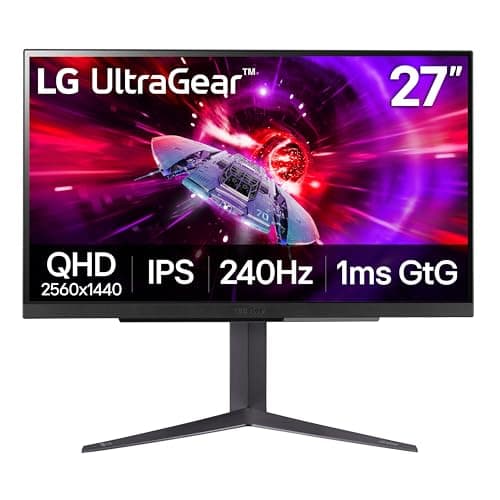
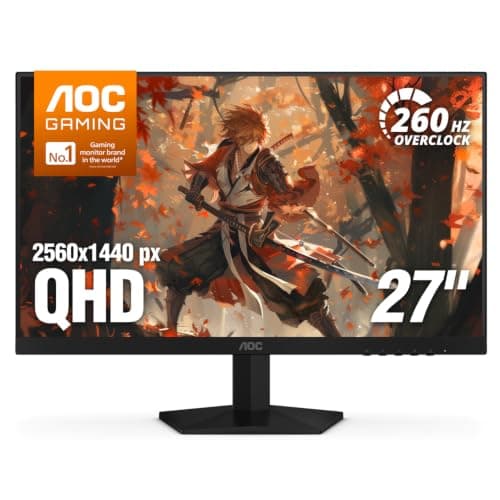
- Fast IPS (the 27GR83Q and the AOC Q27G41ZE) gives you accurate color, wide viewing angles and clean, well-controlled motion, with pixel response quick enough that 240Hz genuinely looks like 240Hz. Its one weakness is black level: in a dark room the blacks glow slightly gray, because the backlight never fully switches off. For most people in most rooms, a fast IPS is the no-regrets default.
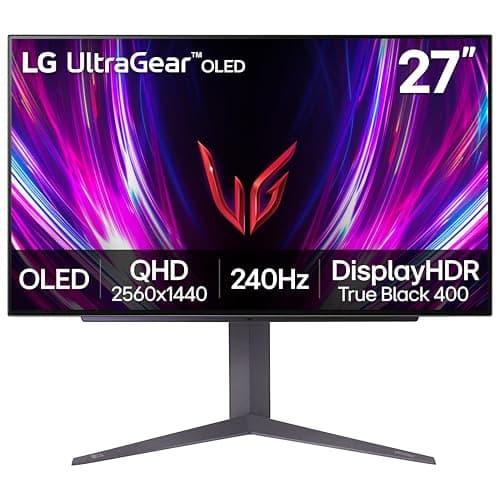
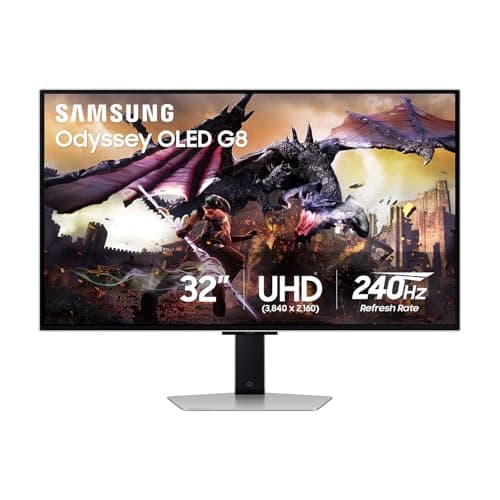
- OLED(the LG 27GS93QE and the Samsung Odyssey OLED G8) lights every pixel individually and switches each fully off for black, so contrast is effectively per-pixel and motion is near-instant — the best-looking option on the page by a wide margin. The costs are real: they are the most expensive here, and OLED carries a manageable burn-in risk from static HUDs and taskbars over years of use, which the panels mitigate with care features you should leave on. Our OLED vs IPS guide weighs that trade-off in full.
How the ranking shakes out
The AOC Q27G41ZEtakes the top spot because it delivers the thing this page is about — 1440p at a rated 240Hz — for a fraction of what everything else here costs. For a PC player on DisplayPort that is the whole job, and spending four times as much buys you panel technology rather than more frames. Its honest limits are that 240Hz is DisplayPort-only, so a console plugged into it is capped, and its “HDR Ready” label means it accepts an HDR signal rather than displaying real HDR. The LG 27GR83Qis the HDMI 2.1 all-rounder, and it is the one pick here that gives a PS5 or Xbox Series X a high-refresh 120Hz output — it sits at the bottom of the list because the cheaper AOC delivers the same 1440p 240Hz to a PC over DisplayPort, not because it is a worse monitor. If a console shares the desk, it is the pick, and the live prices in the table at the top of this page are what the comparison actually turns on.
The AOC Q27G41ZE is the frames-per-dollar pick: 240Hz and 1440p on a fast IPS panel for the least money on the page, with a G-SYNC Compatible rating and an unusually generous three-year zero-bright-dot warranty. Buy it if you play competitive shooters on a PC and your graphics card can actually feed those frames. The honest limitation is the ports: it has HDMI 2.0 only, so 240Hz is DisplayPort-only, and a PS5 or Series X plugged into it is capped at 60Hz— if a console is in the mix, this is the wrong monitor and our best monitors for PS5page is the right list. Its “HDR Ready” label also just means it accepts an HDR signal, not that it displays real HDR; treat it as an SDR panel. Both IPS picks also appear on our best 1440p monitors and best under $500 pages.
The two OLEDs are the best-looking screens here and the most expensive. The LG 27GS93QE OLEDis 27-inch 1440p 240Hz with per-pixel blacks and near-instant response — once you have seen it, IPS can look broken — but it eats the whole budget and asks you to mind the burn-in care features and accept lower full-screen brightness than a bright LCD. The Samsung Odyssey OLED G8is the flagship: a 32-inch 4K (3840×2160) QD-OLED at 240Hz, the most dramatic desk upgrade on the page. It carries the same OLED burn-in caveat, costs the most by a clear margin, and — because it is 4K and very high refresh — demands a top-end graphics card to exploit fully. That last point loops straight back to the opening rule: at 4K 240Hz, only the strongest cards get anywhere near feeding it. If 4K is the goal, our best 4K monitors page has the wider field.
Size and resolution: 27-inch 1440p versus 32-inch 4K
Three of these are 27-inch 1440p panels and one — the Samsung — is a 32-inch 4K screen, and the gap is bigger than the numbers suggest. At 27 inches, 1440p lands at a sharp, comfortable pixel density and is far easier for a graphics card to drive at 240Hz than 4K, which is why it is the resolution we point most high-refresh gamers to. The Samsung's 4K (3840×2160) spreads roughly twice the pixels across a larger 32-inch panel: sharper and more immersive, but a much heavier load, and at 4K 240Hz only the strongest cards get anywhere near feeding it. If your priority is hitting high frame rates in competitive games, the 27-inch 1440p panels are the pragmatic choice; the 32-inch 4K OLED is for the player who wants the best-looking, most immersive screen and has the GPU and budget to match. Our best 1440p monitors and best 4K monitors pages line up each resolution on its own terms.
HDR, stands and warranty: the details that separate them
HDR is the spec most abused on gaming monitors, so treat the labels with suspicion. The 27GR83Q carries DisplayHDR 400, which is a step above a bare HDR10 sticker but still entry-level — better than nothing, not transformative. The AOC's “HDR Ready” means only that it accepts an HDR signal, not that it displays real HDR, so treat it as an SDR panel. The two OLEDs are where HDR actually comes alive, because per-pixel black levels are what make bright highlights pop against a dark scene; that is a genuine reason to want OLED, alongside the motion clarity — just weigh it against the burn-in caution and the higher price.
The unglamorous details matter too. The 27GR83Q pairs its panel with a full tilt, height and pivot stand and LG's better factory calibration — the kind of everyday quality-of-life that cheaper panels drop first. The AOC leans harder on value, but backs it with an unusually generous three-year zero-bright-dot panel warranty, which is reassuring on a budget buy. Whichever you choose, enable variable refresh, and on the OLEDs leave the panel-care features switched on; they exist to manage the one real long-term risk OLED carries, and they do their job quietly in the background.
Match the monitor to your GPU and your ports, not the biggest number
Two questions settle this page. First, can your graphics card feed 240Hz in the games you play? If yes across the board, any panel here is fair game; if only in lighter titles, buy for the experience you have most of the time rather than the peak. Second, is a console sharing the desk? If so, an HDMI 2.1 port is the deciding feature, because the AOC and both OLEDs will not give a PS5 or Series X the same high-refresh output over HDMI 2.0 — our best monitors for PS5 page ranks for that job specifically. Settle those two and the rest is taste: fast IPS for a no-fuss all-rounder, OLED if the image is what you care about most and the budget and GPU can reach it. If you would rather start from your budget than your resolution, our how to choose a gaming monitor guide lays out the whole decision, and every price on this page is pulled live and date-stamped so the value ranking stays honest.
Two companion pages close the loop on those two questions. For the first, what GPU do you need for 1440p 144Hz has the pixel arithmetic and a ten-minute method for measuring what your own card actually delivers before you commit to a refresh rate. For the second, HDMI vs DisplayPort for gaming has the version-by-version bandwidth table, which is what decides whether a 240Hz panel gives you 240Hz or quietly hands you 60. And if shooters specifically are the reason you want the refresh rate, our best gaming monitors for FPS page starts from the 24-inch competitive standard rather than from the headline Hz.
If 240Hz turns out to be more refresh than your graphics card can feed, spending the same money on resolution instead is the sensible alternative — our best monitors under $400 page ranks the 4K and mini-LED panels in this price bracket.