If you want one recommendation and no homework, buy the 8BitDo Ultimate 2 Wireless. It puts Hall-effect sticks and triggers, a low-latency 2.4GHz dongle and a charging dock together for roughly the price of a plain first-party pad — the drift-resistant hardware you normally pay flagship money for, without the flagship price. Stick drift is the single most common way a controller dies: the stick starts registering movement you never made, your character wanders, your aim creeps, and no amount of recalibration fixes it for long. Hall-effect controllers attack that problem at the source. Instead of a physical wiper scraping across a resistive track, they read the position of a small magnet with a magnetic sensor — nothing touches, so nothing wears out. The five pads below all use that technology; what separates them is which platforms they work on, whether they are wired or wireless, and how much the shell and software feel like the money you paid.
Why conventional sticks drift — and why Hall-effect ones don't
A normal thumbstick sits on top of two potentiometers— one for the horizontal axis, one for the vertical. Each potentiometer is a small strip of resistive material with a metal wiper that physically drags along it as you move the stick. The console reads the voltage at the wiper and turns it into a position. It is a cheap, proven design, and it has exactly one fatal weakness: the wiper and the resistive track are in constant contact, so they wear. Over months of play the track develops flat spots, dust and skin oil work into the contact, and the voltage the controller reports at rest stops matching true center. That mismatch is drift — the stick tells the game it is being pushed when your thumb is nowhere near it.
A Hall-effect stick removes the contact entirely. It fixes a tiny magnet to the base of the stick and places a Hall sensor nearby; as the stick tilts, the magnet moves and the sensor measures the change in the magnetic field around it. Because the sensor never touches the magnet, there is no track to wear flat and no wiper to lose contact, so the reading stays honest for far longer. That is the whole pitch, and it is a real one: Hall-effect is the closest thing the category has to a drift-proof stick. We go deeper on the mechanism, including where it is not a magic bullet, in our Hall-effect vs potentiometer sticks guide, and if your current pad has already started to wander, the how to fix controller stick drift guide walks through the fixes worth trying before you replace it.
One honest caveat up front: Hall-effect protects the sticks (and, on some pads, the triggers). It does nothing for the buttons, bumpers, cables or software, which is why build quality and platform support still decide the ranking. A drift-proof stick on a pad that will not connect to your machine is no use to you.
What actually makes a Hall-effect pad worth buying
Once every pad on the shortlist has the drift-resistant sticks, three things separate a good buy from a frustrating one:
- Platform licensing.This is the big one and the least obvious. A controller has to be recognized by the machine you plug it into. The 8BitDo pads here are built for PC, Android and Nintendo Switch — they are not licensed for Xbox consoles and will not pair with one. The GameSir G7 HE is the opposite: officially licensed for Xbox, so it just works on an Xbox Series X|S and Windows with no workarounds.
- Sticks only, or sticks and triggers. Some pads put Hall sensors under the analog triggers too, so the trigger travel stays accurate for the life of the pad. The Ultimate 2, the G7 HE and the Nova Lite 2 all cover sticks and triggers; the cheaper Ultimate 2C and the retro-focused Pro 2 use Hall-effect on the sticks and leave the triggers conventional.
- The parts Hall-effect does not touch. Shell feel, face-button crispness, remap software, connection options and whether a charging dock is in the box. This is where a budget pad gives up ground to save money, and where the more expensive picks earn their keep.
We do not run a controller lab, so we lean on documented specs, manufacturer compatibility notes and long-run owner reports rather than measurements we did not take — our methodology spells out exactly how we score.
How the ranking shakes out
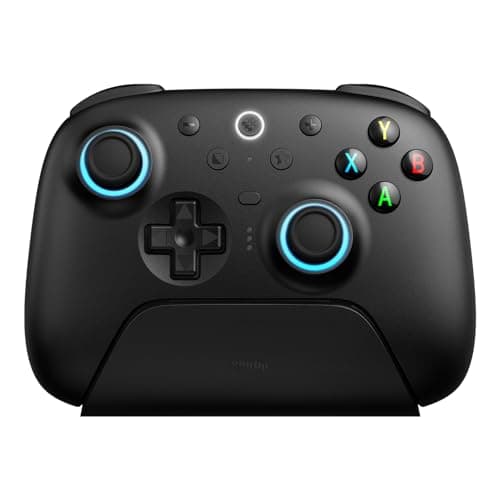
The 8BitDo Ultimate 2 Wirelesstakes the top spot because it is the most complete drift-resistant package for the money. You get Hall-effect on both the sticks and the triggers, a low-latency 2.4GHz dongle rather than Bluetooth-only, a charging dock that keeps it topped up on the desk, and 8BitDo's Ultimate Software for remapping every button, mapping the back paddles and tuning the stick and trigger curves. For a PC, Android or Steam setup, it is the pad we would hand most people. It is a natural fit on our best controllers for PC page for the same reasons.
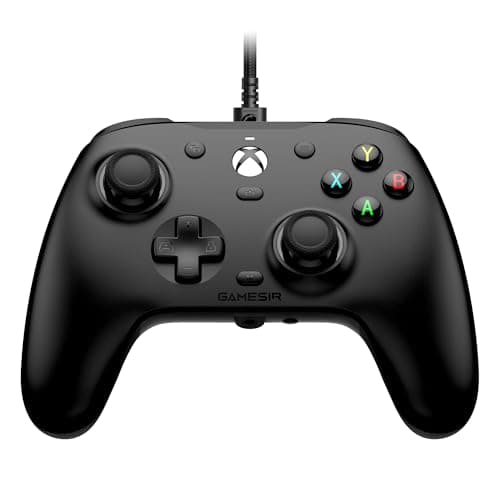
The GameSir G7 HE is the pick for the one buyer the 8BitDo pads cannot serve: an Xbox owner. It is officially licensed, so it works on Xbox Series X|S and Windows without any Steam-Input or remapper fiddling, and it still carries Hall-effect on the sticks andthe triggers, plus back buttons and a swappable, paintable faceplate. The one thing to accept is the cable: there is no wireless mode at all. For a player who games at a desk and does not mind a lead, it is the value standout for Xbox — see the wider field on our best controllers for Xbox page, and our wired vs wireless controller guide if the tether is a sticking point.
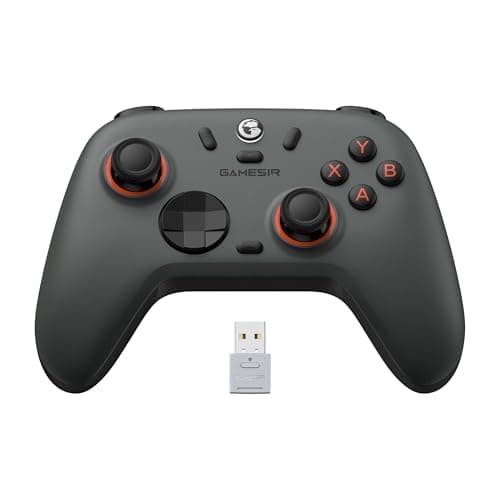
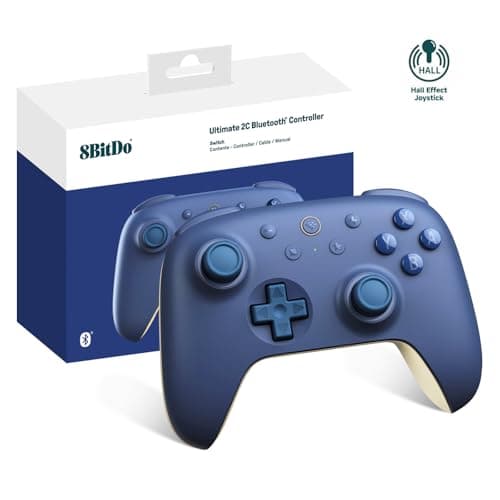
The GameSir Nova Lite 2is the tight-budget pick that does not give up the parts that matter. It keeps Hall-effect sticks and triggers, supports a 2.4GHz dongle, Bluetooth and wired all at once, and runs off a built-in rechargeable battery — drift resistance at the price of a plain wired pad. What you give up is polish: the lighter shell and buttons feel exactly as budget as the price suggests, and a smaller brand's software and long-term support will not match the bigger names. The 8BitDo Ultimate 2Cgoes cheaper still and is the least-expensive honest route to a no-drift pad: Hall-effect sticks, a 2.4GHz dongle in the box and simple rumble, at a price where rivals are still shipping potentiometers. It drops Bluetooth (dongle or wired only), leaves the triggers conventional, and skips back buttons and deep remapping — but for a second PC pad or a first controller that will not wander, it is remarkable value. Both are worth a look on our best controllers under $50 page.
The 8BitDo Pro 2is the specialist. It has Hall-effect sticks, two back buttons and, crucially, one of the best d-pads on any modern controller — the reason it is the standing favorite for 2D platformers, fighting games and emulation. It connects to a PC over Bluetooth or USB-C in X-input mode via a physical mode switch, and because it is built for Switch first, it is equally at home there. The compact, retro-styled shell is less comfortable than a full-size pad on a long AAA session and there is no 2.4GHz dongle in the box, so it is a targeted pick rather than an all-rounder; it also headlines our best Switch controllers page for its d-pad.
The catch nobody mentions: platform licensing
It is worth repeating because it is the mistake people actually make. A controller can have the best sticks in the world and still be useless to you if the machine you own will not talk to it. If you are buying for an Xbox console, the G7 HE is the only pick here that will pair with it — the 8BitDo and GameSir wireless pads are not Xbox-licensed. If you are buying for a PC, a Steam machine, an Android phone or a handheld, all five work, and the Ultimate 2 is the pick. If you are buying for a Switch, the 8BitDo pads and the Pro 2 in particular are the ones built for it. Sony's PlayStation is the odd one out: none of these are PlayStation pads. Valve documents how Steam recognizes and remaps controllers through Steam Input, and Microsoft publishes its own controller compatibility notes — check the machine before the sticks.
Beyond the sticks: back buttons, remapping and connection
Two features separate a pad you tolerate from one you keep reaching for, and neither is Hall-effect. The first is remapping and back buttons. Extra inputs on the underside of the grips let you jump, reload or crouch without lifting a thumb off the stick, which is a genuine advantage in fast games — and software that remaps every button lets you fix a layout you dislike rather than living with it. The Ultimate 2 leads here with full Ultimate Software remapping and back-paddle mapping; the G7 HE and the Pro 2 both add back buttons; the Nova Lite 2 and the Ultimate 2C keep things simpler, which is part of how they hit their price. If deep customization is the reason you are buying a nicer pad, the Ultimate 2 is the one that delivers it.
The second is the connection, and it is worth being precise because “wireless” hides three different things. A dedicated 2.4GHz dongle (in the box with the Ultimate 2, the Nova Lite 2 and the Ultimate 2C) gives low-latency wireless play on a PC. Bluetooth (on the Ultimate 2, the Nova Lite 2 and the Pro 2) is the convenient, wider-compatibility option for phones, handhelds and Switch, at slightly higher latency. And wired— the only mode the G7 HE offers — is the lowest-latency link of all, which is exactly why a cable-tolerant Xbox player loses nothing by choosing it. Match the connection to where you play: a 2.4GHz dongle for a gaming PC, Bluetooth for a phone or Switch, a cable if you sit at a desk and value the lowest latency above all.
Where each pad still asks you to compromise
None of these is perfect, and the honest cons cluster by price. The Ultimate 2 and the Pro 2 are not Xbox-licensed, so an Xbox owner has to look at the G7 HE, and that pad is wired-only with a white shell that shows wear. The Nova Lite 2 and the Ultimate 2C save money on the shell and the feature set — cheaper-feeling buttons, no Bluetooth on the 2C, no deep remapping — so they are the picks when the budget is firm rather than when you want the nicest thing in the hand. And the Pro 2's magic is narrow: its d-pad and compact form are made for 2D and retro play, and on a modern first-person shooter a full-size pad is simply more comfortable. Match the compromise to what you play and none of them will bother you; ignore it and you will feel it every session.
How to choose between them
Start with the platform, because it eliminates most of the list for you. On Xbox, the G7 HE is the answer. On PC, Android or Steam, the Ultimate 2 is the all-round pick, the Nova Lite 2 is the tight- budget version and the Ultimate 2C is the cheapest way in. If your library leans on d-pad-heavy 2D, fighting or retro games — on PC or Switch — the Pro 2 is the specialist worth owning. If you are still weighing whether Hall-effect is worth paying for at all, or how to think about a controller purchase from scratch, our how to choose a gaming controller guide lays out the whole decision. Whichever you pick, every price on this page is pulled live and date-stamped, so the value ranking reflects what these pads actually cost today rather than a number we typed once.