Skip to content
GEAREDGAMING

HUB 03 · Best Value

The Best Mechanical Gaming Keyboards

The switch is the decision, and it is a preference, not a performance number. So we ranked on the things that decide whether you keep the board for a decade: the type, the size, and whether you can change your mind later.

By Stephen V.Updated How we research
#ad

We earn a commission when you buy through our Amazon links, at no extra cost to you. It never affects our rankings, and we say so when the cheaper product is the better buy. How this works.

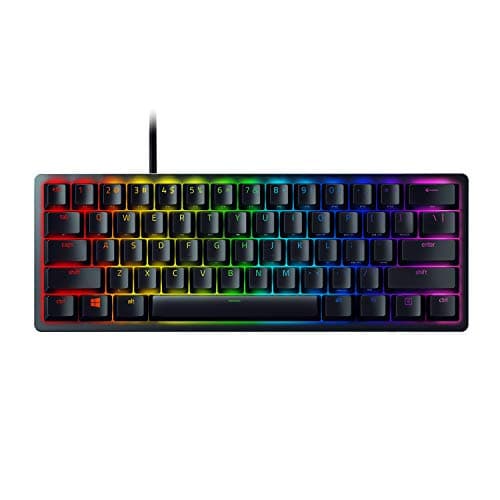
Buy the RK ROYAL KLUDGE RK84. It is mechanical, it is wireless three ways, it is a 75% layout that keeps the keys you actually reach for, and it is hot-swappable — which means the one thing budget boards always get wrong, the switches, is the one thing you can fix without a soldering iron. If you play competitive shooters and want the most mouse room a keyboard can give you, the Razer Huntsman Mini and its linear optical switches are the sharper tool.

The switch is the whole decision, and it is a preference, not a spec

Almost everything written about mechanical keyboards obsesses over the switch, and almost all of it gets the framing wrong. The switch under each key does not make you a better player. It changes how typing feels, and how it sounds, and those two things are entirely a matter of taste. There is no “gaming” switch that wins you rounds. There is only the switch you enjoy pressing a few thousand times a day, and the switch you do not.

The entire taxonomy fits in one sentence. Linearswitches (often sold as red) are smooth from top to bottom, with no bump — the Huntsman Mini uses linear optical switches, and they are the type most competitive players gravitate to. Tactileswitches (often brown) have a small bump partway down that tells your finger the key has registered — the Logitech G413 SE ships with these. Clicky switches (often blue) add a loud click on top of that bump, which is satisfying to you and memorable to everyone you live with. That is the whole map. If you can, try all three on a cheap switch tester before you commit; if you cannot, a linear or a tactile is the safe default and clicky is the one to avoid in a shared room.

Optical versus mechanical: a durability upgrade nobody advertises

A traditional mechanical switch closes a circuit with two pieces of metal touching. Over years of use those contacts can degrade and start registering a single press as two — the “chatter” or double-typing fault that eventually kills a lot of keyboards. The Huntsman Mini's optical switches sidestep this entirely: they actuate by breaking a beam of light, so nothing metal ever touches, and there is nothing there to wear out and start chattering. It is a genuine longevity advantage, and it is the best reason to buy that board that its own marketing barely mentions. We wrote the mechanism up in full in our optical vs mechanical switches guide; the short version is that optical is the more durable of the two, and mechanical is the one you can hot-swap into almost anything.

Hot-swap is the only feature here that changes the maths

A hot-swap keyboard puts each switch in a socket instead of soldering it to the board. When a switch wears out, or when you simply decide you hate it, you pull it with a cheap tool and push a new one in — no iron, no risk, no new keyboard. Two boards here have it: the RK84 and the Redragon K617 Fizz. That single feature is why the RK84 wins this page over the objectively better-built G413 SE. The Logitech is a lovely sealed appliance that will be exactly what it is forever; the RK84 is a slightly rattly platform that can become almost anything. If you already suspect you are the tinkering type, buy into hot-swap now and skip the second purchase.

The membrane board in the room, and why it earned its place

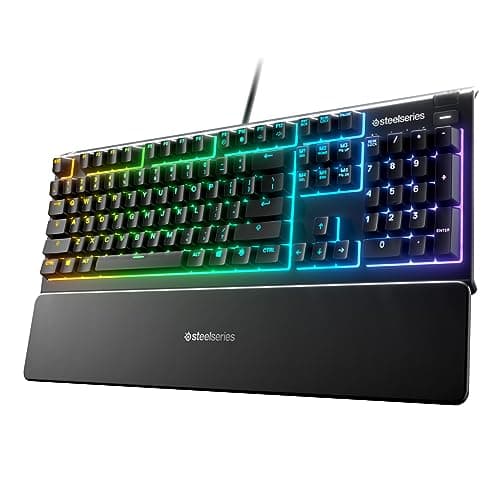
Be clear about one thing up front: the SteelSeries Apex 3 is not mechanical. It is a membrane keyboard, and we are including it on a mechanical page on purpose, because it is the honest budget answer for a particular person and pretending otherwise would not serve you. Membrane switches press down onto a rubber dome, so they feel soft and mushy and have no crisp actuation point — the moment you type on a good mechanical, you will not want to go back. But the Apex 3 is quiet, it is spill-resistant in a way no board here can match, and it comes with a wrist rest. If you take calls at the same desk you game at, or a knocked-over drink is a real risk, it may genuinely be the right choice for you. It is the “feels mechanical-ish” compromise, and we would rather name it as a membrane board than let it pose as something it is not. The full argument is in our membrane vs mechanical keyboard guide.

Size is a real decision, not a style choice

The second-biggest difference between the boards here is how many keys they have, and it is the thing people get wrong most often because a small board looks like a bargain until the first time you reach for a key that is not there.

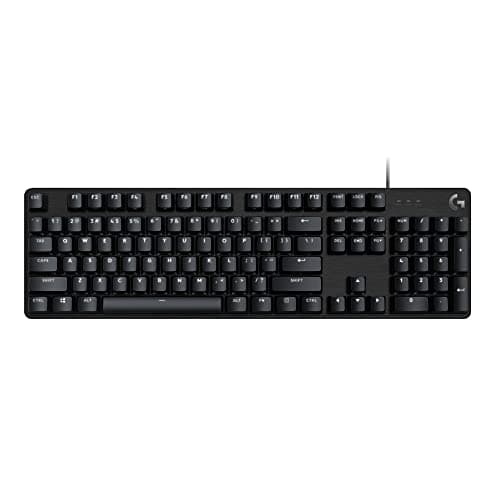
  • Full-size.Everything, including the number pad — the G413 SE is the full-size board here. This is the layout if the same keyboard does spreadsheets, accounting or a dense MMO keybind sheet. It is the wrong one if you play low-sensitivity shooters, because the numpad shoves your mouse hand out to the right.
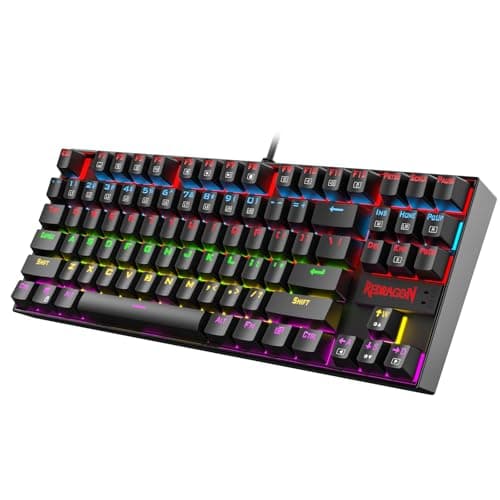
  • TKL (tenkeyless). Drops the numpad, keeps the arrows and the function row. The Redragon K552 is the TKL here, and it is the sensible default for most people: you free up mouse space without giving up any key you reach for by reflex.
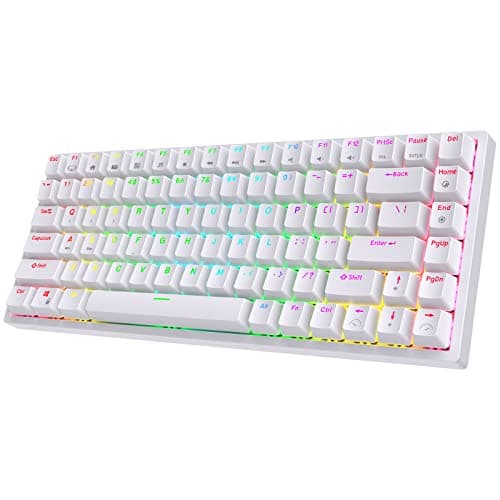
  • 75%.Tighter than TKL, still keeps the arrows and F-row by tucking them in close. The RK84 is a 75% board, and it is the size we think most people should buy — the keys you use, in the smallest footprint that still has them.
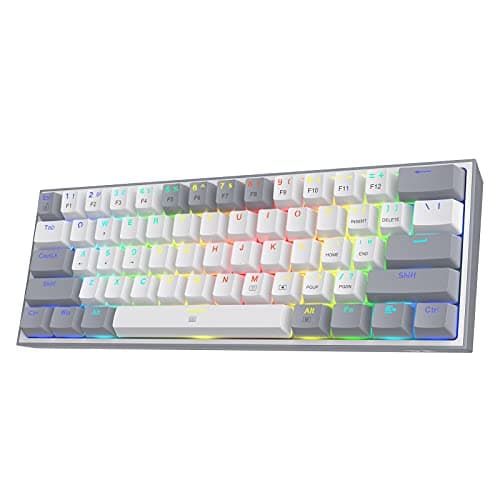
  • 60%.Drops the numpad, the arrows, the F-row and the navigation cluster onto a hidden Fn layer. The Huntsman Mini and the K617 Fizz are both 60%. In a game it is liberating — the desk is enormous. In a spreadsheet it is a daily irritation. Do not buy a 60% board if the same computer does your work.

Wired versus wireless, honestly

Only one board here, the RK84, is wireless, and its triple-mode wireless is a real feather in its cap at this budget. But do not overrate it for a desktop keyboard. A keyboard sits in one place and rarely moves; unlike a mouse, it gains almost nothing from losing the cable in terms of feel. Wireless on a keyboard is a tidiness and flexibility feature — useful if the same board hops between a PC and a tablet, close to irrelevant if it lives bolted to one desk. Buy the RK84 for the hot-swap and the size first; treat the wireless as a bonus, not the reason.

Keycaps: the cheap part that decides how the board ages

The plastic on top of the switches matters more than it looks. Most budget boards, including the Redragon K552, ship with ABSkeycaps — they feel fine new, but the surface polishes to a greasy shine after a few months of use, and the legends can wear off. The Huntsman Mini uses PBTkeycaps instead, a tougher plastic that keeps its texture and its legends for years. It is not a headline feature and nobody sells the board on it, but it is one of the reasons a keyboard still feels good long after you bought it. Keycaps are also, conveniently, the cheapest thing on any board to replace — a fresh PBT set costs little and refreshes a tired keyboard without touching the switches or the case. If a board you otherwise love ships on ABS, that is a fixable flaw, not a reason to walk away.

The short answer

Quick picks

#ProductBest forScorePrice
01
Royal Kludge RK ROYAL KLUDGE RK84
RK ROYAL KLUDGE RK84

Hot-swap, wireless, mechanical, 75%. Nothing else here comes close on features per dollar.

The best keyboard on this page
8.2
$56.89Amazon
02
Razer Razer Huntsman Mini
Razer Huntsman Mini

Optical switches and a 60% footprint. The most 'competitive FPS' board here.

FPS players who want maximum mouse room
7.6
$79.99Amazon
03
SteelSeries SteelSeries Apex 3
SteelSeries Apex 3

Membrane, and honest about it. The spill resistance is the real selling point.

Cheapest usable full-size board
6.8
$54.99Amazon
04
Logitech G Logitech G413 SE
Logitech G413 SE

A plain, solid, full-size mechanical. No RGB, no gimmicks, no regrets.

A mechanical that just works
7.2
$89.99Amazon
05
Redragon Redragon K552 Kumara
Redragon K552 Kumara

The default budget mechanical, and it earned that. A metal-framed TKL that costs less than a nice dinner.

Most people's first mechanical
7.4
$36.99Amazon
06
Redragon Redragon K617 Fizz
Redragon K617 Fizz

Hot-swap sockets on a budget board. That was not supposed to be possible.

Tinkerers and tiny desks
7.2
$39.99Amazon

#ad · Live prices from the Amazon Product API, as of Jul 30, 2026. Where we have no verified live price, we show none — we would rather leave a gap than print a number that has rotted.

In detail

The picks, in full

01
Royal Kludge RK ROYAL KLUDGE RK84

The best keyboard on this page

RK ROYAL KLUDGE RK84

Mechanical, hot-swappable75% layoutBT 5.0 / 2.4G / USB-CRGB
8.2/10

Hot-swap, wireless, mechanical, 75%. Nothing else here comes close on features per dollar.

Switch quality
7
Build quality
7
Ergonomics
8
Features
10
Value
9

Pros

  • Hot-swap sockets mean you can change the switches without soldering — this keyboard grows with you instead of being replaced
  • Triple-mode wireless at a price where most boards are wired-only
  • 75% keeps the arrows and F-row while freeing up serious mouse space

Cons

  • The stock switches and stabilisers are mediocre — the board is a great platform with average parts in it
  • It rattles a bit until you do something about the stabilisers
  • Royal Kludge's software is rough

Don't buy this if…

you want it to be perfect out of the box. This is a board that rewards tinkering; if you never intend to open it, the G413's fixed switches are simply better than these are.

$56.89View on Amazon

$59.895% off

Price as of Jul 30, 2026. Prices change — Amazon's is the one that counts.

#ad · we may earn a commission from this link to RK ROYAL KLUDGE RK84

02
Razer Razer Huntsman Mini

FPS players who want maximum mouse room

Razer Huntsman Mini

Linear optical switches60% layoutAluminium topPBT keycaps
7.6/10

Optical switches and a 60% footprint. The most 'competitive FPS' board here.

Switch quality
9
Build quality
9
Ergonomics
6
Features
7
Value
7

Pros

  • Optical switches actuate on a light beam — no debounce delay, and they cannot develop chatter
  • 60% frees an enormous amount of desk for low-sensitivity aim
  • PBT keycaps that will not go shiny

Cons

  • No arrow keys, no F-row, no nav cluster — everything is a Fn layer, and it is a real adjustment
  • Right at the top of this page's budget

Don't buy this if…

you use the keyboard for work as well as games. Losing the arrows and F-keys is genuinely painful in a spreadsheet, and you will resent it by Wednesday.

$79.99View on Amazon

Price as of Jul 30, 2026. Prices change — Amazon's is the one that counts.

#ad · we may earn a commission from this link to Razer Huntsman Mini

03
SteelSeries SteelSeries Apex 3

Cheapest usable full-size board

SteelSeries Apex 3

Membrane10-zone RGBIP32 water resistantMagnetic wrist rest
6.8/10

Membrane, and honest about it. The spill resistance is the real selling point.

Switch quality
5
Build quality
7
Ergonomics
7
Features
7
Value
8

Pros

  • IP32 water resistance — this is the one board here that survives a knocked-over drink
  • Quiet, which matters more than enthusiasts admit if you share a room
  • Comes with a wrist rest at a price where that's unusual

Cons

  • Membrane switches. They are mushy, and they will feel worse to you the moment you try a mechanical
  • No hot-swap, no upgrade path — what you buy is what you keep

Don't buy this if…

you have ever typed on a mechanical keyboard and liked it. You will not be happy here, and the RK84 is barely more money.

$54.99View on Amazon

Price as of Jul 30, 2026. Prices change — Amazon's is the one that counts.

#ad · we may earn a commission from this link to SteelSeries Apex 3

04
Logitech G Logitech G413 SE

A mechanical that just works

Logitech G413 SE

Tactile mechanicalFull-sizeAluminium top plateWhite backlight
7.2/10

A plain, solid, full-size mechanical. No RGB, no gimmicks, no regrets.

Switch quality
8
Build quality
9
Ergonomics
6
Features
5
Value
8

Pros

  • Aluminium top plate — it is genuinely rigid where the budget boards flex
  • Good tactile switches straight out of the box, no tuning needed
  • White backlight only, which is a feature if you're tired of RGB

Cons

  • No hot-swap. When the switches wear out, the keyboard is finished
  • Wired only
  • Full-size, so it eats desk space you might want for mouse sweeps

Don't buy this if…

you want to modify it later. It is a sealed appliance — excellent, and permanently what it is.

$89.99View on Amazon

Price as of Jul 30, 2026. Prices change — Amazon's is the one that counts.

#ad · we may earn a commission from this link to Logitech G413 SE

05
Redragon Redragon K552 Kumara

Most people's first mechanical

Redragon K552 Kumara

Mechanical (Outemu)TKL · 87-keySingle-colour LEDSteel top plate
7.4/10

The default budget mechanical, and it earned that. A metal-framed TKL that costs less than a nice dinner.

Switch quality
7
Build quality
8
Ergonomics
8
Features
5
Value
9

Pros

  • A steel top plate at this price — it does not flex or creak the way the plastic boards around it do
  • TKL keeps the arrow keys and function row, so it works for games and for actual work
  • The most owned, most documented budget mechanical there is — a fix or a mod is one search away

Cons

  • The switches are soldered in. When they wear out or you outgrow them, the board is finished — there is no hot-swap here
  • Single-colour backlight on this version, not RGB
  • Stock ABS keycaps will go shiny with use

Don't buy this if…

you already know you want to tinker. The hot-swap Redragon K617 Fizz lets you change switches with no soldering iron.

$36.99View on Amazon

Price as of Jul 30, 2026. Prices change — Amazon's is the one that counts.

#ad · we may earn a commission from this link to Redragon K552 Kumara

06
Redragon Redragon K617 Fizz

Tinkerers and tiny desks

Redragon K617 Fizz

Mechanical, hot-swappable60% · 61-keyPer-key RGBDetachable USB-C
7.2/10

Hot-swap sockets on a budget board. That was not supposed to be possible.

Switch quality
7
Build quality
6
Ergonomics
6
Features
8
Value
9

Pros

  • Hot-swap sockets mean you can pull a switch out and drop a new one in with no soldering — an upgrade path almost nothing else this cheap offers
  • The 60% footprint frees a large amount of desk for low-sensitivity mouse sweeps
  • Detachable USB-C cable, so it stores and travels cleanly

Cons

  • 60% means no arrow keys, no function row and no navigation cluster — it all lives on a hidden Fn layer, and that is a real adjustment
  • The stock switches and stabilisers are average — the whole point is that you can replace them
  • Small, light and plastic; it is a platform, not a premium object

Don't buy this if…

you use the same keyboard for spreadsheets or coding. Losing the arrows and F-row hurts for work — buy the TKL K552 instead.

$39.99View on Amazon

$44.9911% off

Price as of Jul 30, 2026. Prices change — Amazon's is the one that counts.

#ad · we may earn a commission from this link to Redragon K617 Fizz

How to actually buy a mechanical keyboard

Pick the size before you pick anything else

Layout is the one property you cannot change after the fact, so decide it first. If the board shares a desk with real work, take full-size or TKL. If it is a dedicated gaming machine and you play at low sensitivity, a 60% board gives you the most room to swing the mouse, and the missing keys genuinely do not matter mid-game. If you want a single answer that covers most people, 75% — the RK84's layout — keeps the arrows and F-row while still freeing real estate. Get this right and everything after it is preference; get it wrong and no switch swap will save it.

Choose the switch on feel, then stop reading spec sheets

Linear is smooth, tactile has a bump, clicky has a bump and a noise. That really is the whole of it. Do not let a review tell you a particular switch is “faster” in any way you will ever perceive — the actuation differences between good switches are measured in fractions of a millimetre and fractions of a gram, and no human reflex resolves them. Pick the feel you like. If you share a room, skip clicky; the sound that delights you is the one a housemate will remember you by.

Prefer hot-swap if there is any chance you will fiddle

Hot-swap turns a keyboard from a product into a platform. On a budget board the stock switches and stabilisers are always the weakest part, and hot-swap means you can fix exactly that part for the price of a handful of switches instead of a whole new board. The RK84 and the K617 Fizz both have it. The G413 SE, the K552 and the membrane Apex 3 do not — what you buy is what you keep. That is not a dealbreaker (a soldered K552 will outlast most people's interest in it), but if you already know you are curious, buy into sockets now.

Budget for stabilisers, not more switches

The rattle you hear on a cheap mechanical board is almost never the switches — it is the stabilisers under the big keys (spacebar, enter, shift). A little lubricant on those is the cheapest, highest-impact modification in the whole hobby, and it is exactly what the RK84 needs to go from “rattly” to “lovely.” A brand-new set of expensive switches will not fix a rattle the stabilisers are causing. Learn which is which before you spend.

Optical is the durability play; steel and aluminium are the build play

If longevity is what you care about, the Huntsman Mini's optical switches physically cannot develop the double-click fault that eventually finishes conventional mechanical switches — a real advantage nobody prices in. If rigidity is what you care about, the metal top plates on the G413 SE (aluminium) and the K552 (steel) are what stop a board flexing and creaking under your hands. The plastic-framed budget boards feel cheaper precisely because they skip that plate.

The membrane exception, one more time

Buy the Apex 3 only if you actively want quiet and spill resistance more than you want the mechanical feel — a shared office, a call-heavy desk, a household that objects to typing noise. If there is any chance you will come to care how the keyboard feels, spend the same money on the K552 and buy mechanical the first time. A membrane board is a fine tool for a specific job; it is a poor consolation prize for the wrong reason.

What not to pay for

RGB. Macro keys you will map once and never touch. “Gaming mode” toggles. Wrist rests that ship free with cheaper boards anyway. Polling-rate numbers on a keyboard, which change nothing you can feel. As with every category on this hub, the specs that get top billing on the box are usually the ones that change your experience least — spend on the size, the switch feel and, if you are the type, the sockets that let you change your mind.
How we picked

We do not run a testing lab

We researched published specifications, third-party lab measurements, manufacturer documentation and aggregated owner reviews, then scored each product against a published rubric. The scores are judgements from documented research — they are notmeasurements we took, because we do not have a lab and we are not going to pretend we do. Where a number came from someone else's lab, we name them and link them in Sources.

Questions

Frequently asked

What is the best mechanical gaming keyboard?
The RK ROYAL KLUDGE RK84 for most people — a hot-swappable, triple-mode wireless mechanical board in a 75% layout, a feature set that did not exist at this price a few years ago. Its stock switches and stabilisers are only average, but because it is hot-swappable, that is a cheap fix rather than a permanent flaw. If you play competitive shooters, the 60% Razer Huntsman Mini with linear optical switches is the sharper tool.
Which switch type is best for gaming: linear, tactile or clicky?
It is a preference, not a performance question. Linear switches are smooth with no bump and are what most competitive players choose; tactile switches add a small bump that many people prefer for typing; clicky switches add a loud click on top. None of them wins you games. Pick the feel you enjoy, and avoid clicky if you share a room.
Are optical switches better than mechanical?
They are more durable. Optical switches actuate on a beam of light with no metal contacts, so they cannot develop the double-click “chatter” fault that eventually affects conventional mechanical switches. The trade-off is that conventional mechanical switches are the ones you can hot-swap into almost any board, which optical designs like the Huntsman Mini generally do not support.
Is a membrane keyboard ever worth buying over mechanical?
Sometimes. The SteelSeries Apex 3 here is membrane, and it earns a place because it is quiet, spill-resistant and comes with a wrist rest — genuinely the right pick if you take calls at your gaming desk or worry about spills. But membrane switches feel mushy next to a good mechanical, so if there is any chance you will care about feel, buy mechanical the first time.
What size mechanical keyboard should I buy?
If the keyboard shares a desk with real work, buy full-size or TKL so you keep the numpad or at least the arrows and function row. If it is a dedicated gaming machine and you play at low sensitivity, a 60% board gives you the most mouse room. For most people a 75% layout like the RK84 is the best compromise — it keeps the arrows and F-row in the smallest footprint that still has them.

Keep reading

Receipts

Sources

We do not run a testing lab, and we do not pretend to. Where a measured number came from someone else's lab, we name them and link them. Where we could not verify something, we say so on the page rather than quietly leaving it out. Read our full method.