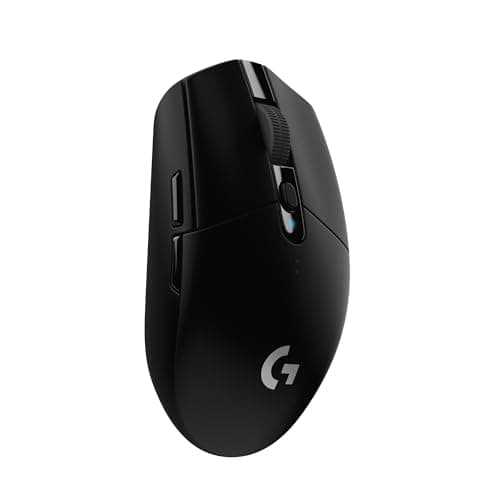
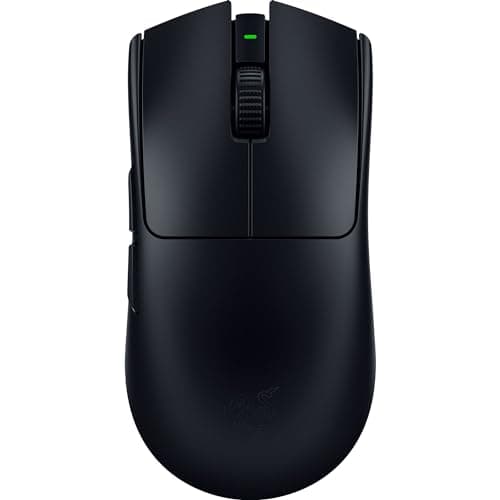
Top pick · Best Mouse Under $100
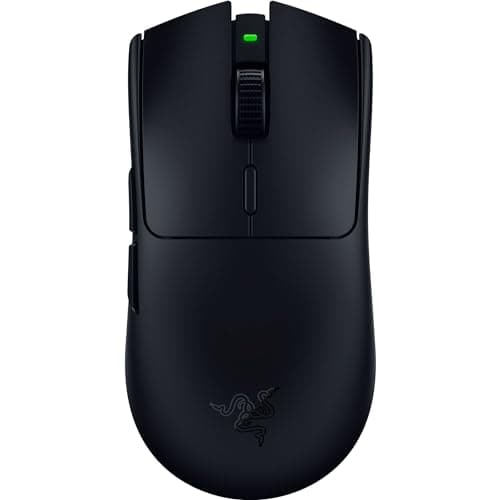
Actual tournament hardware: 54g, a pro-grade sensor and a real 8,000Hz wireless mode. If competitive FPS is why you're here, this is the mouse.
Price as of October 31, 2026. Prices change — Amazon's is the one that counts. #ad · we may earn a commission from this link to Razer Viper V3 Pro
Buy the Razer Viper V3 Pro. Under $100 now buys a genuine tournament mouse — the same symmetrical, roughly 54g, low-latency-wireless hardware professionals actually compete on — and if flick-aim shooters are why you are here, nothing else on this page beats it. If you want the same lightweight feel in an ambidextrous solid shell for less, the Glorious Model O 2 Wireless is the value pick; if you play MMOs or live in a spreadsheet, the button-heavy Logitech G502 X is a different and better tool.
What $100 actually buys, and what it stops buying
Spend this much on a mouse and you are buying the top of the tree: real 2.4GHz esports wireless, ultralight chassis under 60g, and optical main switches that never wear out. What you are not buying is a sensor that helps you aim, because that argument was already over a tier ago. On our under-$50 list we make the case at length that every modern gaming sensor tracks more accurately than any human hand can move — and that is just as true up here. The extra money does not buy tracking. It buys weight you can feel, wireless you can trust, and switches that outlast the rest of the mouse.
So this page is not about DPI, and it is not about polling rates. It is about the handful of physical things a spec sheet cannot rank for you: the shape under your palm, the mass under your wrist, how the mouse talks to your PC, and whether the buttons on it are ones you will use or ones you will pay for and ignore.
The four questions that actually decide it
- Shape, matched to your hand and grip. The Viper V3 Pro and Model O 2 are flat, symmetrical shapes built for claw and fingertip grips. The DeathAdder V3 is the famous right-handed ergonomic hump for palm grippers. The G502 X is a large, aggressive right-handed shape. This is the first decision and it overrides everything below it.
- Weight. The Viper V3 Pro at around 54g and the DeathAdder V3 at around 59g are ultralight flick tools. The G305 at 99g with its battery, and the button-laden G502 X, are heavier on purpose. Light matters enormously in a shooter and barely at all elsewhere.
- How it connects. The Viper V3 Pro and Model O 2 use rechargeable low-latency 2.4GHz radios. The Viper V3 HyperSpeed and the G305 run wireless off a single AA. The G502 X and DeathAdder V3 here are wired — the affordable versions of shapes whose wireless variants cost far more.
- Buttons. The Viper V3 Pro and Model O 2 strip down to two side buttons for weight. The G502 X gives you eleven, a tilt wheel and a removable sniper button. If you play MMOs or MOBAs, that button count is the whole reason to buy — and if you play shooters, it is dead weight you are carrying up and down.
Ultralight-flick versus button-heavy is the real fork in the road
Almost everyone shopping this page falls into one of two camps, and the mistake is buying for the wrong one. The flick player wants the lightest, cleanest tool they can get — the Viper V3 Pro or the Model O 2 — because in a shooter the difference between 54g and 100g is something you feel on every wide swing across the screen. Side buttons are a liability there; every gram spent on a feature is a gram working against the flick.
The other camp plays games where the mouse is a control surface, not an aiming stick — MMOs, MOBAs, strategy, survival crafting, or a work desktop that doubles as a gaming rig. For them the G502 X is the obvious answer and the ultralight mice are the wrong ones: an 11-button mouse puts an ability, a ping or a macro under every finger, and the extra weight sits still under a hand that is not making 180-degree flicks. Neither mouse is better. They are answers to different questions, and the only real error is buying the flick tool for a genre that needs buttons, or the button farm for a genre that needs speed.
The DeathAdder V3 sits deliberately in the middle of that fork: it is light enough to flick with, but it keeps the palm-filling ergonomic hump that the flat symmetrical mice give up. If your hand aches on a low, flat shape after an hour, that hump is the reason to pick it over the Viper — same job, more support.
Wireless is the default now, not the upgrade you agonize over
The old rule that serious players must stay wired is simply out of date. Razer's HyperSpeed and Logitech's LIGHTSPEED are, for all practical purposes, as fast as a cable, and losing the cord drag is a real, felt improvement — no bungee, no snag mid-flick. What wireless still costs you is a little money and, on the AA-powered mice, a little weight and balance. The Viper V3 HyperSpeed and the G305 both trade the AA's months-long battery life for a slightly heavier, slightly top-loaded feel; the rechargeable Viper V3 Pro and Model O 2 avoid that by building the cell in.
The two wired mice here — the G502 X and DeathAdder V3 — are not compromises so much as the smart way to buy those specific shapes. Their wireless versions exist and cost a great deal more, and the cable is a genuinely small price to keep the shape you want inside this budget. If you want the shape and do not mind the cord, take the saving and put it toward a better mousepad, which does more for consistency than the gap between any two mice on this page.
The six at a glance, and who each one is for
The four questions above sort the field cleanly. Here is where each mouse lands once you have answered them — read down until one describes you, and that is your mouse.
- Razer Viper V3 Pro — the competitive-FPS main. Around 54g, symmetrical, rechargeable low-latency wireless, and stripped of everything that is not aiming. Buy it if flick shooters are most of your hours; skip it if you want thumb buttons or a palm-filling hump.
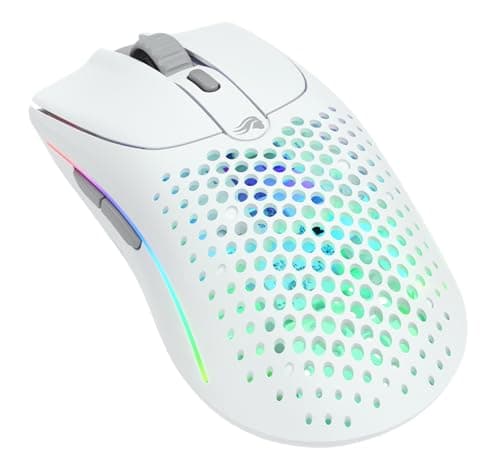
- Glorious Model O 2 Wireless — the value flick pick. A featherweight solid shell with both 2.4GHz and Bluetooth, tuned for claw and fingertip grips, for less than the Viper. The coating can turn slick once your hands warm up, so it suits drier hands and shorter sessions best.
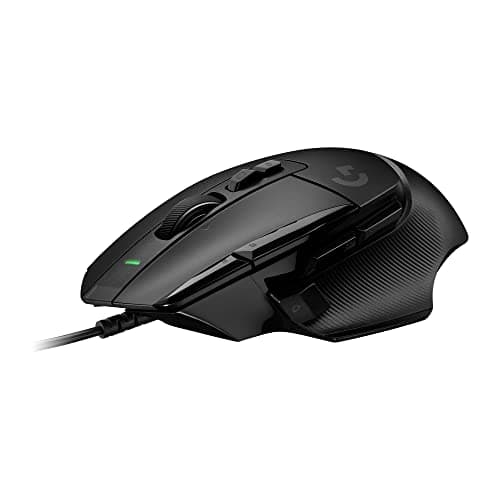
- Logitech G502 X — the button workhorse. Eleven programmable inputs, a tilt wheel and a removable sniper button make it the tool for MMOs, MOBAs and a desktop that also does work. Wired keeps it affordable, and the button count is simply wasted if all you play is shooters.
- Razer Viper V3 HyperSpeed — the AA-powered esports bargain. An 82g symmetrical shape on genuine HyperSpeed wireless, running for months off a single AA. That battery adds a little weight and top-balance next to the rechargeable mice, which is the trade for the low price.
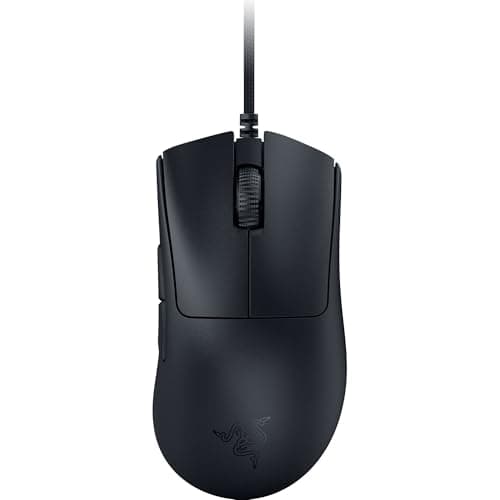
- Razer DeathAdder V3 — the ergonomic value pick. The famous right-handed hump at around 59g, now light enough to flick with, on durable optical switches. Wired only at this price, and no use to left-handers — but for a right-hand palm gripper it is the comfort standout here.
- Logitech G305 — the do-anything cheap wireless. The HERO sensor and LIGHTSPEED radio off a single AA for months. It is small, and at 99g with the battery it is the heaviest flick option here, but for a mixed library on a tight budget it is the safest all-round buy.
The short answer
#ad · Live prices from the Amazon Creators API, as of October 31, 2026. Where we have no verified live price, we show none — we would rather leave a gap than print a number that has rotted.
In detail
Best for competitive FPS
2.4GHz wireless~54g ultralightSymmetrical shapeRazer rates 8K polling
Actual tournament hardware: 54g, a pro-grade sensor and a real 8,000Hz wireless mode. If competitive FPS is why you're here, this is the mouse.
- Sensor quality
- 10
- Build quality
- 9
- Ergonomics
- 8
- Features
- 7
- Value
- 7
Pros
- +One of the lightest genuine esports mice you can buy, and it feels it on fast flicks
- +The wireless is the real low-latency kind that pros actually compete on
- +A clean symmetrical shape with excellent main-button switches
Cons
- −Stripped for weight: no side-button bank, no frills, not much for an MMO or productivity
- −The 8,000Hz polling that headlines the spec sheet needs the separate dongle and eats battery
- −You pay flagship money for a mouse most people can't out-aim at half the price
Don't buy this if…
…you want extra thumb buttons or a palm-filling hump. This is a minimalist flick tool — for buttons and bulk the G502 X is the better fit.
Best lightweight ambidextrous
2.4GHz + BluetoothUltralight solid shellAmbidextrousLong battery life
A featherweight honeycomb-era shape without the holes — light, cheap for what it is, and genuinely fast.
- Sensor quality
- 9
- Build quality
- 8
- Ergonomics
- 8
- Features
- 7
- Value
- 9
Pros
- +Very light without the drilled shell of the originals, so it flicks fast and stays easy to clean
- +Dual 2.4GHz and Bluetooth, plus a battery life that comfortably outlasts a work day
- +A neutral ambidextrous shape that suits claw and fingertip grips
Cons
- −The coating gets slick once your hands warm up on long sessions
- −Thin on extras — two side buttons and little else
- −Not the last word in build heft; it feels appropriately budget-flagship, not premium-solid
Don't buy this if…
…you're a palm-grip player with big hands. It's tuned for claw and fingertip — a larger ergonomic shape like the DeathAdder V3 supports the palm better.
Best for lots of buttons
Wired USB11 programmable buttonsLIGHTFORCE switchesRemovable DPI-shift button
The button-heavy workhorse, lighter than the G502s of old. If you play MMOs or want controls under every finger, start here.
- Sensor quality
- 9
- Build quality
- 8
- Ergonomics
- 8
- Features
- 9
- Value
- 8
Pros
- +A genuine button farm — thumb buttons, a tilt wheel and a removable sniper button cover MMO and productivity needs
- +Lighter than the classic G502 while keeping the shape that made it a bestseller
- +Hybrid optical-mechanical main switches that resist the double-click fault over time
Cons
- −Heavier and busier than a minimalist FPS mouse — the opposite tool to the Viper
- −The wired version is the affordable one; going wireless costs a lot more
- −The pile of buttons is wasted if all you play is shooters
Don't buy this if…
…you play twitchy competitive FPS and want the lightest possible mouse. All those buttons add weight — the Viper V3 Pro or Model O 2 is the flick tool.
The best mouse here, full stop
Razer Focus Pro sensorWireless HyperSpeed82gAA battery
An actual esports mouse that slipped under $50. This is the one to stretch for.
- Sensor quality
- 10
- Build quality
- 9
- Ergonomics
- 8
- Features
- 7
- Value
- 9
Pros
- +This is genuine tournament-grade hardware — the same line pros use, at a budget price
- +82g wireless is lighter than most wired mice in this list
- +Optical switches, so it will not develop the double-click fault that kills cheap mice
Cons
- −The most expensive mouse in this roundup
- −AA-powered like the G305, so same weight-balance caveat
- −No RGB and a plain look — all the money went into the internals
Don't buy this if…
…you don't play shooters. The things that make this special — weight, sensor, switch latency — are things you will never notice in a strategy game. Buy the G502 and get more buttons.
Best ergonomic value
Wired USB~59gErgonomic right-hand shapeOptical switches
The famous DeathAdder ergonomic hump, now genuinely light and wired-cheap. The comfortable pick that doesn't cost flagship money.
- Sensor quality
- 9
- Build quality
- 8
- Ergonomics
- 9
- Features
- 6
- Value
- 9
Pros
- +The DeathAdder shape is one of the most universally comfortable right-handed humps ever made
- +Far lighter than older DeathAdders, so comfort no longer costs you speed
- +Optical main switches that can't develop the double-click fault that kills mechanical ones
Cons
- −Wired only at this price; the wireless Pro version is a big step up in cost
- −A right-hand ergonomic shape, so it's no use to left-handers
- −Only two side buttons — it's a shooter/ergonomic mouse, not an MMO one
Don't buy this if…
…you want a flat, ambidextrous shape or extra macro buttons. This is a right-handed ergonomic hump — the Model O 2 (ambidextrous) or G502 X (buttons) fit those needs.
Best cheap wireless mouse
HERO sensorLIGHTSPEED 2.4GHz99g with batteryLogitech rates 250h
Wireless with a flagship-class sensor, powered by a AA battery. Still unbeaten.
- Sensor quality
- 9
- Build quality
- 8
- Ergonomics
- 7
- Features
- 8
- Value
- 10
Pros
- +The HERO sensor is the same family Logitech puts in mice costing five times as much — this is the single best value in gaming peripherals
- +LIGHTSPEED wireless is genuinely as fast as a cable; this is not a compromise
- +A single AA runs it for months, so there's no charging ritual
Cons
- −The AA battery makes it heavier and slightly unbalanced next to modern lightweight mice
- −No RGB, if that matters to you
- −Small — same hand-size caveat as the G203
Don't buy this if…
…you want a rechargeable mouse you never think about. This wants an AA, and if you'd rather plug in a cable, that's a real preference and this is the wrong mouse.
How to actually pick one
Measure your hand, then pick a shape — in that order
Measure from the base of your palm to the tip of your middle finger, and note whether you rest your whole palm on the mouse or grip it with your fingertips. That single check does more than any spec. Palm grippers and larger hands want the DeathAdder V3's ergonomic hump or the big G502 X. Claw and fingertip players, and smaller hands, want the flat symmetrical Viper V3 Pro, the Model O 2, or the compact G305. A mouse that fights your grip will cost you more accuracy than any upgrade on this page can give back, so get this right before you look at anything else.
Decide which player you are before you look at weight
If you play flick-aim shooters, weight is the spec that matters and lighter is genuinely better — the Viper V3 Pro and DeathAdder V3 are built around that truth. If you play almost anything else, weight is close to noise, and you should be choosing on buttons and comfort instead. Do not buy a 54g competition mouse because a review called it the best; buy it because you play the games it is best at. For everyone else, a heavier mouse with the buttons you actually use is the better purchase, and the G502 X exists precisely for that person.
Understand the three flavors of wireless before you pay for one
There are three here and they are not the same. Rechargeable 2.4GHz (Viper V3 Pro, Model O 2) is the modern default: build the battery in, top it up over USB-C, forget about it. AA-powered wireless (Viper V3 HyperSpeed, G305) is lighter on your wallet and runs for months, but the battery adds a little weight and shifts the balance. Wired (G502 X, DeathAdder V3) removes the question entirely and keeps the price down. None is wrong — but know which one you are buying, because the AA mice feel different in the hand from the rechargeable ones, and that surprises people.
Optical switches are a durability upgrade nobody advertises properly
The single most common way a mouse dies is the double-click fault: one press registers as two, and it is incurable on a conventional mechanical switch. Optical switches — the kind in the Viper V3 Pro, Viper V3 HyperSpeed and DeathAdder V3, and the hybrid units in the G502 X — actuate on a light beam with no metal contacts to wear, so they physically cannot develop it. This is a real reason to prefer those mice over time, and it is barely mentioned on any box because it is a reliability feature, not a performance number.
Do not pay for the polling-rate headline
The Viper V3 Pro can advertise 8,000Hz polling, and it is real, but reaching it needs the separate dongle and it drains the battery noticeably for a benefit almost nobody can perceive. Treat 8K polling as a nice-to-have you will probably leave switched off, not a reason to choose one mouse over another. The same goes for DPI ceilings in the tens of thousands: a number printed to sell a product, not to help you play.
Put any saving into the surface, not a fancier mouse
If a wired mouse like the DeathAdder V3 or an AA-powered one like the G305 lets you spend less than the rechargeable flagships, the best home for that saving is not a nicer mouse — it is the surface under it. A large cloth pad, a fresh set of PTFE feet, or a bungee to lift a wired cable off the desk each do more for day-to-day consistency than the gap between any two mice on this page, and together they cost a fraction of a single upgrade. Our mousepad guide covers the surface end of that; the principle is that once the mouse is right, the desk under it is where the next real improvement lives.
Buy the shape once and stop chasing weight charts
Once you have a shape that fits and a switch that will not die, the difference between the mice here is smaller than the internet suggests. A few grams either side of your ideal weight is something you adapt to within a session; the endless comparison videos measuring 54g against 59g are chasing a margin most players cannot feel in a real match. Pick the mouse that matches your grip and your genre, give it a couple of weeks, and resist the urge to re-buy sideways. The consistency of one familiar mouse beats the novelty of a marginally lighter new one every time.
What not to pay for
RGB. DPI figures above a few thousand. Polling rates your hand cannot feel. Side-button banks on a mouse you will only ever use for shooters. Wireless charging pads and other ecosystem extras. Every one of these exists to differentiate a product on a shelf, and none of them is the reason a mouse is good. Spend your money on the right shape, the right weight for your genre, and the switch that will not die on you — then stop. The one exception is a genre that genuinely uses the buttons: if you play MMOs, a side cluster is not a gimmick, and our best MMO gaming mice page is the right list.
How we picked
We researched published specifications, third-party lab measurements, manufacturer documentation and aggregated owner reviews, then scored each product against a published rubric. The scores are judgments from documented research — they are not measurements we took, because we do not have a lab and we are not going to pretend we do. Where a number came from someone else's lab, we name them and link them in Sources.
Questions
What is the best gaming mouse under $100?+
The Razer Viper V3 Pro for competitive players — genuine tournament hardware at around 54g with real low-latency wireless and optical switches, now sitting under $100. If you want the same lightweight feel for less, the Glorious Model O 2 Wireless is the value pick; if you need buttons rather than flick speed, the Logitech G502 X is the better tool.
Is an ultralight mouse actually worth it?+
Only if you play flick-aim shooters, where the difference between roughly 54g and 100g is real and you feel it on every wide swing. For MMOs, MOBAs, strategy games and general use, weight is close to irrelevant and a heavier mouse with more buttons — like the G502 X — is often the better purchase.
Should I buy wired or wireless at this price?+
Modern 2.4GHz wireless (LIGHTSPEED, HyperSpeed) is effectively as fast as a cable, so wireless is no longer a competitive compromise. Buy wired — like the G502 X or DeathAdder V3 here — mainly to get a specific shape inside the budget, since the wireless versions of those mice cost considerably more. The cable itself is a small price.
Ambidextrous or ergonomic shape?+
Ergonomic humps like the DeathAdder V3 support a relaxed palm grip and suit larger, right-handed hands. Flat symmetrical shapes like the Viper V3 Pro and Model O 2 suit claw and fingertip grips and either hand. Neither is better — match it to how you actually hold a mouse, because the wrong shape costs you comfort and accuracy no spec can recover.
Does 8,000Hz polling make a difference?+
For almost everyone, no. It is real on mice like the Viper V3 Pro, but it needs the separate dongle, drains the battery faster, and delivers a benefit few players can perceive. Leave it off and lose nothing. Do not let the polling-rate headline decide which mouse you buy.
Receipts
We do not run a testing lab, and we do not pretend to. Where a measured number came from someone else's lab, we name them and link them. Where we could not verify something, we say so on the page rather than quietly leaving it out. Read our full method.