Skip to content
GEAREDGAMING

HUB 03 · Best Value

The Best TKL Gaming Keyboards

Tenkeyless keeps the full typing layout and throws away only the number pad -- and that missing block buys you mouse space and a straighter wrist. Here is the field, ranked by switch feel, build and how you connect.

By Stephen V.Updated How we research
#ad

We earn a commission when you buy through our Amazon links, at no extra cost to you. It never affects our rankings, and we say so when the cheaper product is the better buy. How this works.

If you want one TKL board and no homework, buy the Keychron K8 Pro. It is a true tenkeyless with hot-swap sockets, full QMK/VIA remapping and both wired and Bluetooth connection — a keyboard that adapts to you instead of being replaced, and the most complete all-rounder on this page. TKL, short for “tenkeyless,” is the layout most competitive players quietly settle on: a full typing keyboard — letters, function row, arrows and navigation cluster all present — with only the number pad removed from the right-hand side. That missing block is the entire point, and the five boards below are all built around it, differing mainly in switch feel, build quality and how they connect.

What TKL gives up, and what it buys you

The case for TKL is a case about your right hand. On a full-size board the number pad pushes your mouse a hand's width further out, which quietly forces your shoulder open and your wrist to reach. Delete that block and the mouse slides inward, closer to the centre line of your body — a more neutral, less twisted posture that pays off across a long session. The second win is space: with the numpad gone there is far more desk for big, low-sensitivity mouse sweeps, the kind competitive shooter players rely on. You keep everything you actually type with, and lose only the keys most gamers never touch mid-match.

The honest counter-argument is that a number pad is genuinely useful for spreadsheets, accounting and some MMO keybinds, so if your keyboard doubles as a work tool you may miss it. That is a real trade, not a detail — but for pure gaming, and for most mixed use, the extra mouse room and the straighter posture win. We lay out the full ladder of layouts, from full-size down to 60%, in our keyboard sizes explained guide.

TKL versus 75%: an honest distinction

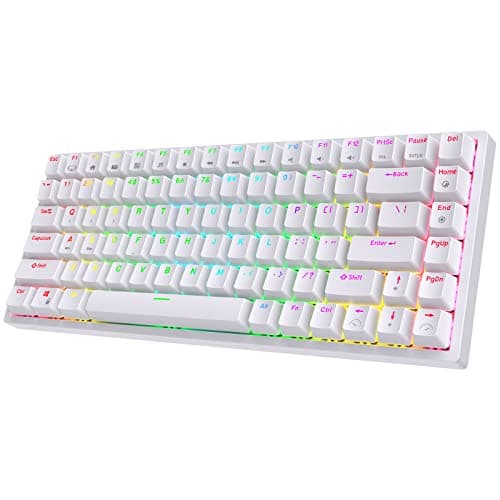
Not every board on this page is a textbook TKL, and it would be dishonest to pretend otherwise. The RK84 is a 75% layout, which is a close cousin rather than a true tenkeyless. Where a TKL leaves gaps between the arrow keys, the function row and the navigation cluster, a 75% board squeezes those same keys into one tighter, gap-free block to shave off a little more width. You keep the arrows and the F-row, but they sit shoulder-to-shoulder, and the keys nearest the edge can take a few days to find by feel. It is a fair swap if maximum compactness matters to you; it is simply not identical to a TKL, and the RK84 is here because it delivers hot-swap and triple-mode wireless at a price a true TKL rarely matches, not because it is a TKL in disguise.

Everything else here is a genuine tenkeyless. The Keychron K8 Pro, the Logitech G515 LIGHTSPEED, the Redragon K552 and the 8BitDo Retro Mechanicalall keep the standard TKL spacing, so the arrows and function row land where your fingers already expect them. If a slightly smaller board still appeals, weigh the RK84 against them with your own hands in mind — the 75% adjustment is small, but it is real.

Switch feel is the decision hiding under the layout

Once you have chosen the size, the thing you will actually feel every day is the switch. Broadly, switches come in three families: linear switches press smoothly with no bump, and are the common pick for fast gaming inputs; tactile switches give a definite bump at the point they actuate, which many typists prefer; and clicky switches add an audible click on top of that bump. Our keyboard switch types explained guide walks through where each one shines. The important structural difference on this page is whether you are stuck with the switch you buy. The K8 Pro and the RK84 and the 8BitDo are hot-swappable, meaning you can pull a switch out and drop a different one in with no soldering — so the feel is a setting you can change later, not a permanent decision. The Logitech G515 and the Redragon K552 have their switches soldered in, so the feel you buy is the feel you keep.

If you want to know how a board's switches behave in measured terms — actuation force, latency, consistency — the honest reference is a lab, not a spec sheet. Independent reviewers like RTINGS publish that data, and the open-source QMK firmware behind boards like the K8 Pro is documented in the open. We do not run a lab, so we lean on their measurements rather than inventing our own.

Wireless, wired and low-profile

Connection is the last axis, and it splits the field neatly. The Logitech G515 LIGHTSPEED is the low-profile wireless pick: its LIGHTSPEED 2.4GHz link is the same low-latency wireless Logitech puts in its pro mice, and its slim, quiet keys are far kinder on the wrist than a tall gaming board — the catch is that the switches are soldered and it costs meaningfully more than a triple-mode board from Royal Kludge. The Keychron K8 Pro and the 8BitDo Retro Mechanicalboth offer Bluetooth alongside a wired link, and the K8 Pro's honest limit is that it has no dedicated 2.4GHz dongle, so hardcore competitive players will still want the cable. The RK84 is the triple-mode value option (Bluetooth, 2.4GHz and USB-C), while the Redragon K552is wired-only — which is not a flaw so much as the reason it is the cheapest board here. For the wider picture, see our wired vs wireless gaming keyboard guide and the best wireless gaming keyboards page.

Build quality: the plate, the stabilisers and the keycaps

Two boards can share a switch and still feel worlds apart, because the parts around the switch do half the work. The most audible is the platethe switches mount to: the Redragon K552's steel plate is the reason a budget board can feel solid rather than hollow, where a flexing plastic plate creaks and bounces under a firm press. The stabilisersunder the longer keys — spacebar, enter, backspace — are the usual weak point on value boards, and a rattly stabiliser is the single most common complaint about the Royal Kludge and RK-style keyboards; it is fixable, but it is a job. And the keycaps decide how the board wears: cheap ABS caps go greasy and shiny within months, while PBT caps hold their texture for years. None of this shows up in a headline spec, which is exactly why it separates a board you enjoy from one you merely tolerate.

The hot-swap boards have an escape hatch the soldered ones do not: because the switches lift out, the plate, stabilisers and caps are all easy to reach and improve later. On a sealed board like the G515 or the K552, what you buy is what you keep — which is fine when the stock parts are good, as they are on the Logitech, and a firmer ceiling on the cheaper soldered options. The low-profile G515 is worth a special word here: its slim keys feel genuinely different from full-height switches, quieter and flatter, and that is either the reason to buy it or the reason to avoid it — try the feel before you commit if you possibly can.

Anti-ghosting and rollover: table stakes, not a selling point

You will see gaming keyboards advertise anti-ghosting and n-key rollover, and it is worth knowing what they mean without letting them sway the decision. In short, they guarantee that every key you press at once actually registers — so a movement key, a crouch and a reload firing together never drop an input. Every mechanical board on this page handles this properly; at this tier it is table stakes rather than a feature that separates them. Our anti-ghosting and n-key rollover guide explains where the old limitation came from and why it no longer bites on a decent mechanical board. If you are still weighing mechanical against a cheaper membrane board, our membrane vs mechanical keyboard guide and the best gaming keyboards under $50 page are the next stops.

Who should still buy full-size instead

Honesty cuts both ways, so it is worth naming who should notbuy a TKL. If you crunch numbers, run accounting software, or lean on a numpad for MMO or streaming macros, losing that block is a daily irritation no amount of mouse room makes up for. For those players a full-size board, or a 96% layout that keeps the numpad while still trimming a little width, is the smarter buy — we cover the latter on the best hot-swappable keyboards page, where the 96% Royal Kludge RK96 lives. TKL is the default for gaming, not a universal upgrade, and buying one you end up fighting at work is a false economy.

How the ranking shakes out

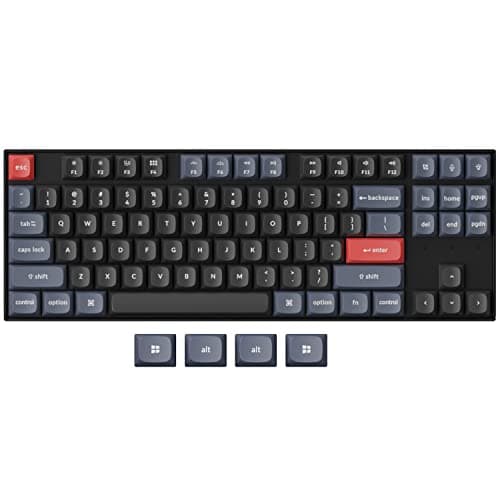
The Keychron K8 Pro wins because it is the board that grows with you: hot-swap sockets, full QMK/VIA remapping deeper than any gaming-brand software, an aluminium-frame option, and Bluetooth or wired connection. Its honest limits are the missing 2.4GHz dongle and a firmware learning curve if you just want plug-and-play. The Logitech G515 LIGHTSPEEDis the slim-desk pick — genuinely fast wireless and a restrained, low-profile look that suits a work-and-play setup — as long as you accept soldered switches and a higher price. The RK84 is the compact value alternative, delivering hot-swap and triple-mode wireless for less than a true TKL usually costs, with the caveats that it is a 75% layout and its stock switches and stabilisers are only average until you tune them.

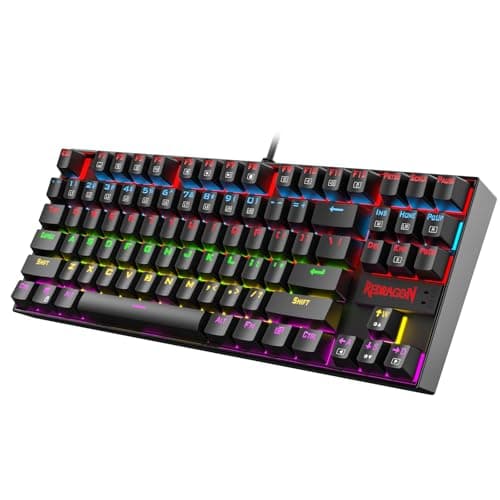
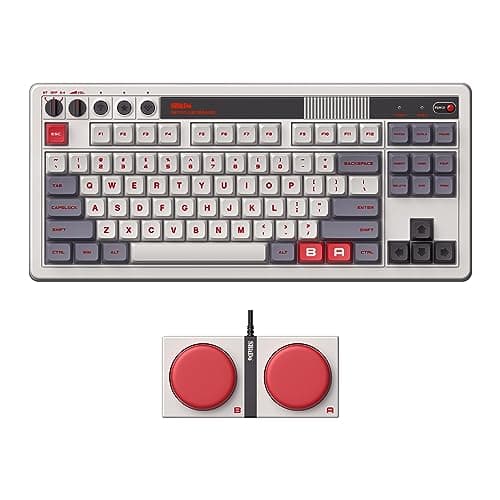
The Redragon K552is the cheapest way onto this page: a true 87-key tenkeyless on a steel plate that does not flex, for less than a nice dinner — you give up hot-swap (the switches are soldered), settle for a single-colour backlight, and accept that the stock keycaps will go shiny with use. And the 8BitDo Retro Mechanicalis the pick for personality: a hot-swap TKL with genuine retro character and programmable Super Buttons, whose only real drawback is that its loud styling is the whole point — wrong board if you want something understated. For the broader field across every size, our best mechanical keyboards page ranks them all.

Which TKL is yours

Decide in this order and the pick falls out. If you want a board you can tune and re-tune for years, the K8 Pro is the answer, and the RK84 is the smaller, cheaper hot-swap alternative if you can live with a 75% block. If you want a slim, quiet wireless board that looks the part on a professional desk, the G515 is it. If you are buying your first mechanical and the price is the deciding factor, the K552 is the honest budget TKL. And if you want the board to have some character, the 8BitDo Retro Mechanical delivers it. If you are still weighing whether you even need mechanical switches, our do you need a mechanical keyboard for gaming guide settles it, and if hot-swap is the feature pulling you in, the best hot-swappable keyboards page and our how to choose a gaming keyboard guide go deeper.

The short answer

Quick picks

#ProductBest forScorePrice
01
Keychron Keychron K8 Pro (QMK/VIA)
Keychron K8 Pro (QMK/VIA)

The enthusiast pick: hot-swap sockets, full QMK/VIA remapping and an aluminium frame, wireless or wired. The board that grows with you.

Best for tinkerers
8.2
$124.99Amazon
02
Logitech G Logitech G515 LIGHTSPEED TKL
Logitech G515 LIGHTSPEED TKL

The wireless board most people should buy: low-profile, genuinely fast LIGHTSPEED wireless, and it looks like it belongs on a grown-up desk.

Best wireless all-rounder
8.0
$119.99Amazon
03
Royal Kludge RK ROYAL KLUDGE RK84
RK ROYAL KLUDGE RK84

Hot-swap, wireless, mechanical, 75%. Nothing else here comes close on features per dollar.

The best keyboard on this page
8.2
$56.89Amazon
04
Redragon Redragon K552 Kumara
Redragon K552 Kumara

The default budget mechanical, and it earned that. A metal-framed TKL that costs less than a nice dinner.

Most people's first mechanical
7.4
$36.99Amazon
05
8BitDo 8BitDo Retro Mechanical Keyboard
8BitDo Retro Mechanical Keyboard

A hot-swap, triple-mode board with genuine character — the retro NES/Fami styling plus two big programmable Super Buttons set it apart from the sea of black slabs.

Best for personality
7.8
$89.99Amazon

#ad · Live prices from the Amazon Product API, as of Jul 31, 2026. Where we have no verified live price, we show none — we would rather leave a gap than print a number that has rotted.

In detail

The picks, in full

01
Keychron Keychron K8 Pro (QMK/VIA)

Best for tinkerers

Keychron K8 Pro (QMK/VIA)

Bluetooth 5.1 + USB-C wiredHot-swappable · TKLQMK/VIA programmableAluminium frame option
8.2/10

The enthusiast pick: hot-swap sockets, full QMK/VIA remapping and an aluminium frame, wireless or wired. The board that grows with you.

Switch quality
8
Build quality
9
Ergonomics
8
Features
9
Value
7

Pros

  • Hot-swap sockets let you change switches with no soldering, so the board is a platform, not a fixed appliance
  • Full QMK/VIA support means you remap every key and layer at the firmware level — deeper than any gaming-brand software
  • A gasket-adjacent, well-built TKL that works with Mac and Windows out of the box

Cons

  • Bluetooth-and-wired only — there is no dedicated low-latency 2.4GHz dongle, so hardcore competitive players will want the cable
  • QMK/VIA has a learning curve if you just want plug-and-play
  • Heavier and taller than a low-profile board like the G515

Don't buy this if…

you specifically want a low-latency 2.4GHz wireless link for competitive play. The K8 Pro is Bluetooth-or-wired — the G515 LIGHTSPEED or an RK triple-mode board give you the 2.4GHz dongle.

$124.99View on Amazon

Price as of Jul 31, 2026. Prices change — Amazon's is the one that counts.

#ad · we may earn a commission from this link to Keychron K8 Pro (QMK/VIA)

02
Logitech G Logitech G515 LIGHTSPEED TKL

Best wireless all-rounder

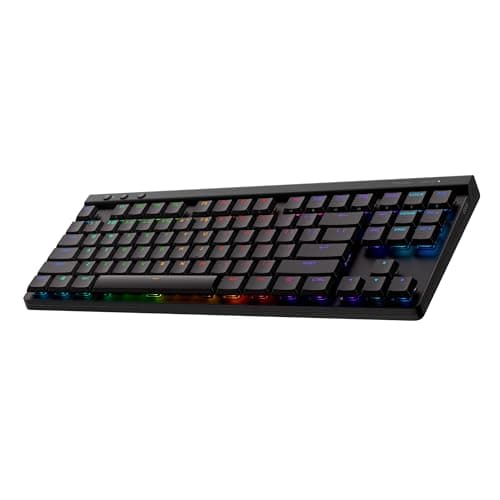
Logitech G515 LIGHTSPEED TKL

LIGHTSPEED 2.4GHz + BluetoothLow-profile · TKLTactile switchesLIGHTSYNC RGB
8.0/10

The wireless board most people should buy: low-profile, genuinely fast LIGHTSPEED wireless, and it looks like it belongs on a grown-up desk.

Switch quality
8
Build quality
8
Ergonomics
9
Features
8
Value
7

Pros

  • LIGHTSPEED is the same low-latency 2.4GHz wireless Logitech's pro mice use — you cannot feel it versus wired
  • The low-profile design is slim, quiet and far kinder on the wrists than a tall gaming board
  • A restrained, non-gamery look with per-key RGB that suits a work-and-play desk

Cons

  • The switches are soldered — there is no hot-swap here, so you live with the tactile choice you buy
  • Costs meaningfully more than a triple-mode board from Royal Kludge that does the wireless part for less
  • Low-profile keys feel different from full-height switches — try the feel before you commit if you can

Don't buy this if…

you want to swap switches later or you are on a tight budget. This is a sealed, premium low-profile board — for tinkering or value, the RK84 or Keychron K8 Pro are the hot-swap picks.

$119.99View on Amazon

$159.9925% off

Price as of Jul 31, 2026. Prices change — Amazon's is the one that counts.

#ad · we may earn a commission from this link to Logitech G515 LIGHTSPEED TKL

03
Royal Kludge RK ROYAL KLUDGE RK84

The best keyboard on this page

RK ROYAL KLUDGE RK84

Mechanical, hot-swappable75% layoutBT 5.0 / 2.4G / USB-CRGB
8.2/10

Hot-swap, wireless, mechanical, 75%. Nothing else here comes close on features per dollar.

Switch quality
7
Build quality
7
Ergonomics
8
Features
10
Value
9

Pros

  • Hot-swap sockets mean you can change the switches without soldering — this keyboard grows with you instead of being replaced
  • Triple-mode wireless at a price where most boards are wired-only
  • 75% keeps the arrows and F-row while freeing up serious mouse space

Cons

  • The stock switches and stabilisers are mediocre — the board is a great platform with average parts in it
  • It rattles a bit until you do something about the stabilisers
  • Royal Kludge's software is rough

Don't buy this if…

you want it to be perfect out of the box. This is a board that rewards tinkering; if you never intend to open it, the G413's fixed switches are simply better than these are.

$56.89View on Amazon

$59.895% off

Price as of Jul 31, 2026. Prices change — Amazon's is the one that counts.

#ad · we may earn a commission from this link to RK ROYAL KLUDGE RK84

04
Redragon Redragon K552 Kumara

Most people's first mechanical

Redragon K552 Kumara

Mechanical (Outemu)TKL · 87-keySingle-colour LEDSteel top plate
7.4/10

The default budget mechanical, and it earned that. A metal-framed TKL that costs less than a nice dinner.

Switch quality
7
Build quality
8
Ergonomics
8
Features
5
Value
9

Pros

  • A steel top plate at this price — it does not flex or creak the way the plastic boards around it do
  • TKL keeps the arrow keys and function row, so it works for games and for actual work
  • The most owned, most documented budget mechanical there is — a fix or a mod is one search away

Cons

  • The switches are soldered in. When they wear out or you outgrow them, the board is finished — there is no hot-swap here
  • Single-colour backlight on this version, not RGB
  • Stock ABS keycaps will go shiny with use

Don't buy this if…

you already know you want to tinker. The hot-swap Redragon K617 Fizz lets you change switches with no soldering iron.

$36.99View on Amazon

Price as of Jul 31, 2026. Prices change — Amazon's is the one that counts.

#ad · we may earn a commission from this link to Redragon K552 Kumara

05
8BitDo 8BitDo Retro Mechanical Keyboard

Best for personality

8BitDo Retro Mechanical Keyboard

Bluetooth + 2.4GHz + USB-CHot-swappable · TKLTwo Super ButtonsProgrammable via app
7.8/10

A hot-swap, triple-mode board with genuine character — the retro NES/Fami styling plus two big programmable Super Buttons set it apart from the sea of black slabs.

Switch quality
7
Build quality
8
Ergonomics
7
Features
9
Value
8

Pros

  • Triple-mode connectivity — Bluetooth, low-latency 2.4GHz dongle and USB-C — covers gaming and everyday use
  • Hot-swap sockets and the included dual Super Buttons make it genuinely fun to tinker with
  • The retro moulded caps and colourway are a real design statement, not a sticker job

Cons

  • The styling is the point — if you want a clean, modern look it is the wrong board
  • Stock switches and stabilisers are a starting point, like most boards at this price
  • The novelty Super Buttons take desk space some people would rather not give up

Don't buy this if…

you want an understated, professional-looking keyboard. Its whole appeal is the retro character — for a restrained desk the G515 or Keychron K8 Pro fit better.

$89.99View on Amazon

$99.9910% off

Price as of Jul 31, 2026. Prices change — Amazon's is the one that counts.

#ad · we may earn a commission from this link to 8BitDo Retro Mechanical Keyboard

How we picked

We do not run a testing lab

We researched published specifications, third-party lab measurements, manufacturer documentation and aggregated owner reviews, then scored each product against a published rubric. The scores are judgements from documented research — they are notmeasurements we took, because we do not have a lab and we are not going to pretend we do. Where a number came from someone else's lab, we name them and link them in Sources.

Questions

Frequently asked

What does TKL mean on a keyboard?
TKL stands for “tenkeyless” — a full typing layout with only the number pad removed from the right-hand side. You keep the letters, the function row, the arrow keys and the navigation cluster, and lose just the numpad. The payoff is more desk room for the mouse and a more centred, less twisted wrist posture, which is why so many competitive players use the layout.
Is a 75% keyboard the same as a TKL?
Not quite. A 75% board keeps the same keys as a TKL — arrows and function row included — but squeezes them into one tighter, gap-free block to save more width, where a true TKL leaves spacing between those clusters. The RK84 here is a 75% board, which makes it more compact but takes a few days to learn by feel. The Keychron K8 Pro, Logitech G515, Redragon K552 and 8BitDo are true tenkeyless layouts.
Do I lose anything important by dropping the number pad?
Only the numpad itself, which most gamers rarely touch mid-match. The trade matters if your keyboard doubles as a work tool — spreadsheets, accounting and some MMO keybinds genuinely benefit from a number pad. For pure gaming and most mixed use, the extra mouse room and straighter posture are worth more than the block you give up. If you need the numpad, a 96% board keeps it while still trimming some width.
Should a TKL gaming keyboard be wireless?
Only if it suits your desk. Wireless boards like the Logitech G515 (low-latency LIGHTSPEED) and the triple-mode RK84 are excellent, but a wired board such as the Redragon K552 costs less and never needs charging. The Keychron K8 Pro offers Bluetooth and wired but no dedicated 2.4GHz dongle, so committed competitive players may still prefer a cable. Buy the connection that matches how you actually play.

Keep reading

Receipts

Sources

We do not run a testing lab, and we do not pretend to. Where a measured number came from someone else's lab, we name them and link them. Where we could not verify something, we say so on the page rather than quietly leaving it out. Read our full method.