If you want the short answer, buy the Turtle Beach Recon 70. It is a light, wired headset with a flip-up mic and a single 3.5mm plug that goes straight into the bottom of your Xbox controller, so it works on an Xbox Series X, a Series S or an Xbox One with zero setup. Every one of the four picks on this page connects the exact same way — one 3.5mm cable into the controller — because on Xbox that is the path that simply, reliably works. None of them is wireless, and none of them is USB, and that is a deliberate, honest choice, not a limitation we are hiding. This is a budget-focused roundup of wired headsets for Xbox. Before the picks, it is worth being completely clear about how audio actually reaches an Xbox, because the console handles headsets differently from a PC or a PlayStation, and a lot of people buy the wrong thing because nobody told them. Read the compatibility section first — it will save you a return.
Why every pick here plugs into the controller's 3.5mm jack
On an Xbox Series X, a Series S or an Xbox One, the universal, no-fuss way to get game sound and party chat into a headset is a wired headset with a standard 3.5mm plug, pushed into the 3.5mm jack on the bottom edge of the controller. It needs no dongle, no adapter, no drivers and no menu diving: plug it in, and the console routes audio to it. That is why all four headsets below are wired 3.5mm analog sets. It is not that we could not find wireless or USB options — it is that on Xbox, at this budget, the 3.5mm route is the one that always works, and we would rather point you at something that works than something that looks fancier on the box.
Here is the part that trips people up, stated plainly. Two connection types that work fine elsewhere do not work on an Xbox console:
- USB headsets do not work for audio on Xbox consoles.A USB gaming headset that plays sound perfectly on a PC will not output game audio when you plug it into an Xbox. Xbox does not support USB audio the way a PC (or a PS5) does, so a “USB gaming headset” is the wrong purchase for an Xbox unless it also has a 3.5mm cable you can use instead.
- Generic 2.4GHz-dongle wireless headsets do not work on Xbox.The cheap wireless headsets that come with a little USB dongle you plug into a PC or a PS5 will not pair with an Xbox. Xbox wireless audio uses Microsoft's own radio, so a wireless headset only works on Xbox if it is specifically licensed as “Xbox Wireless” or “Designed for Xbox.” That licensed wireless category is real, but it is a separate and noticeably pricier class of headset, and it is not what this budget roundup is about.
So none of the four picks here claims to be wireless, and none claims USB support. Every single one connects to your Xbox by one 3.5mm plug into the controller. If you specifically want licensed wireless for Xbox, that is a different page and a different budget; if you want to understand the trade before you decide, our wired vs wireless guide lays it out, and the step-by-step how to connect a headset to PS5 and Xbox guide walks through the exact ports on each console.
What about surround sound on an analog headset?
A fair question, since some of these sets list features like DTS on the box. The honest answer for Xbox is that an analog 3.5mm headset cannot do virtual surround by itself — there is no chip or software in the headset doing the processing over that connection. On Xbox, spatial sound is a console feature: the system can apply Windows Sonic for Headphones (free) or a licensed option such as Dolby Atmos for Headphones to whatever wired headset you have plugged in, because the processing happens on the console and then travels down the analog cable as ordinary stereo your ears turn into a soundstage. In other words, the spatial effect on Xbox comes from the box, not from these headsets, and it works with all four of them equally. If the difference between real surround hardware and this kind of virtual processing matters to you, our virtual surround vs stereo guide explains exactly what each one does and does not buy you.
How we ranked them: comfort, mic, weight and build
Because every headset here uses the same 3.5mm connection, connectivity is not what separates them. Four things are, and they are the criteria we ranked on:
- Comfort. You wear a headset for hours, so clamp force, earpad material and how the weight is carried matter more than almost anything else at this price.
- Microphone. Party chat is the point on Xbox. We favored mics that are clear enough for teammates to understand you, and noted where a mic detaches or flips up to mute.
- Weight. Lighter headsets fatigue you less over a long session, and these budget plastic sets can be genuinely light, which is a real advantage rather than a compromise.
- Build. Budget headsets are mostly plastic, so we were honest about which ones creak, which feel flimsy, and where you are paying for a little more solidity.
We do not run an audio lab, so where a measured number matters — frequency response, microphone recordings, isolation — we point you to independent, instrumented reviews like RTINGS rather than quote figures we did not take ourselves. Everything below is a judgment about fit, practicality and value on Xbox. And be realistic about the category: at this price you are buying a comfortable, clear-enough headset with a usable chat mic, not active noise canceling, studio-grade sound or the deep isolation of a far pricier set. Every pick here makes that trade knowingly, and that is exactly why they stay affordable — so the right question is not which is objectively best, but which fits your head and your budget on the day you buy.
The picks
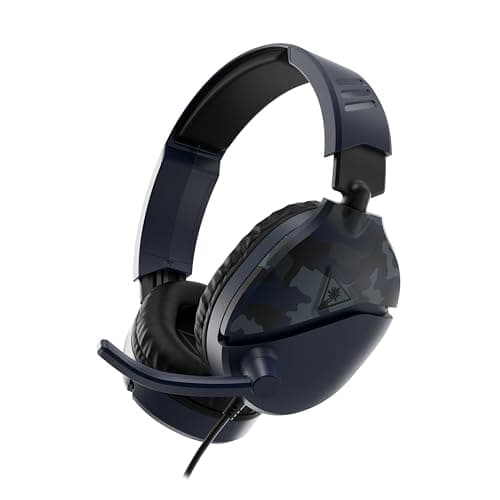
The Turtle Beach Recon 70takes the top spot as the best budget all-rounder. Its single 3.5mm plug covers Xbox, PlayStation, Switch, PC and mobile with no setup at all, and its flip-up mic mutes the moment you raise it — a simple, reliable design that new players get instantly. It is about as cheap as a genuinely usable gaming headset gets, and it is light on the head. The honest cons: the build is all lightweight plastic and creaks if you flex it, the bass-forward tuning is fun but slightly muddies fine positional detail, and some platform versions drop the inline volume control. If you want a set that just works on the family Xbox and does not cost much, this is the default.
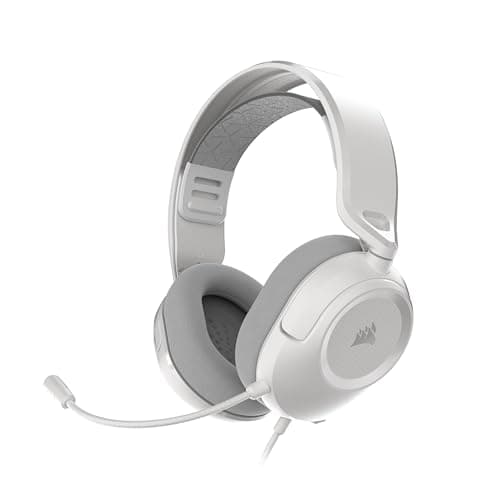
The Corsair HS35 v3is the best plug-into-anything pick, and it earns that with a detachable mic and comfortable memory-foam pads at a low price. One 3.5mm jack works on a PC, a controller, a Switch and a phone with no dongles and no drivers, and the mic pops off so the set passes as normal headphones outside. Be clear-eyed about the trade-offs, though: being analog, it has no software surround or EQ of its own, there is no USB option for anyone who wants virtual surround on a PC, and the sound is clear but unremarkable. On Xbox specifically, none of that matters — the analog path is exactly what the console wants — but if you also game on a PC and crave built-in surround processing, know that this set does not provide it.
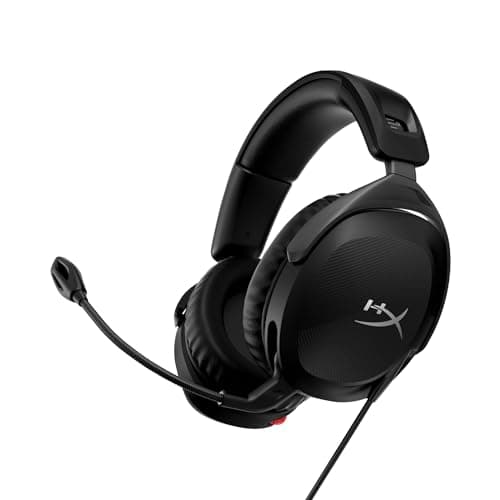
The HyperX Cloud Stinger 2is the floor: the absolute cheapest thing here that is still worth owning. It is astonishing value for a headset with real memory foam and a working mic, and its swivel-to-mute mic is a better mute mechanism than a lot of far pricier sets manage — rotate it up and you are muted. It is light, and the 3.5mm plug works everywhere, Xbox included. The catch is that the sound is flat and the bass is loose, it is all plastic, and the mic does not detach. It also lists DTS Headphone:X on the box, which is a software feature you would use on a PC — over the analog connection to an Xbox, spatial sound comes from the console's own setting, as covered above, not from the headset. Buy it if the budget is truly tight; if you can stretch a little, one of the sets above will last you longer.
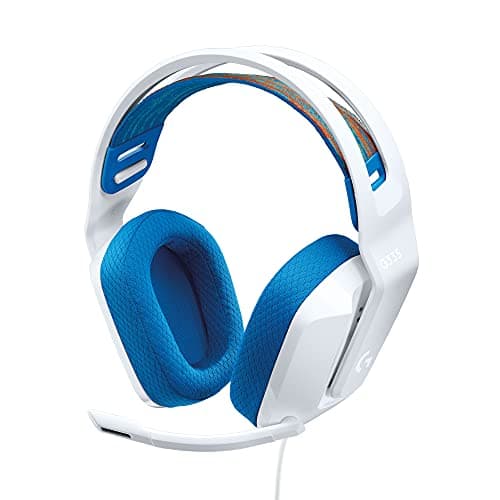
The Logitech G335is the comfort specialist, and comfort is its entire pitch. A fabric suspension band spreads the weight across your head so you barely feel it after hours, it is very light at around 240 grams, and the flip-to-mute mic plus a clean, understated look make it an easy set to live with. Over 3.5mm it stays universal across platforms. The honest cons: the clamp is gentle, so a larger head may want a firmer grip, it is analog only with no software surround or EQ, and the sound is balanced but not especially detailed. If you wear glasses and need a tight seal, the light clamp may not give it — but if all-day comfort is your priority, nothing else here matches it.
How to choose between them
Think of it as four questions. If you want the safe, cheap default that works on everything the household owns, take the Recon 70. If you want a mic that detaches so the set doubles as ordinary headphones out of the house, the HS35 v3is the tidy plug-into-anything pick — an analog set whose mic pops off and which works on a PC, a Switch or a phone just as happily as on your Xbox pad. If the budget is at rock bottom, the Cloud Stinger 2 is the least you can spend without buying a toy. And if you will wear the headset for marathon sessions and value comfort above all, the G335is the one your neck will thank you for. Whatever you pick, the connection is the same — one 3.5mm plug into the controller, no batteries to charge, no dongle to lose and no pairing to fail — so you are really just choosing a fit and a feel.
Every price on this page is pulled live and date-stamped rather than typed once and left to drift, so the budget framing stays honest. If you want to browse the wider audio hub, start at the gaming audio hub. For more options that are not Xbox-specific, our best cheap gaming headsets and best wired gaming headsets pages cover the same class of set for PC and other consoles, the best headsets for PS5 page is the sister guide for the other console, and if competitive footstep clarity is your goal, the best headsets for FPS roundup ranks for that instead. If licensed wireless is what you are really after and budget is flexible, the best wireless gaming headsets page is where to look next.