If you want one recommendation, buy the Razer Viper V3 Pro. At around 54 grams it is one of the lightest genuine esports mice you can buy, its 2.4GHz link is the real low-latency kind pros compete on, and it slips under the price that tournament hardware used to command. For fast, aim-first play, it is the mouse. Weight is the property you feel on literally every movement. A lighter mouse has less inertia, so it takes less force to start it moving and less to stop it dead on target — the difference shows up most on quick flicks and micro-adjustments, and it shows up again three hours into a session as less fatigue in your hand and wrist. The competitive scene spent years chasing the sub-60g class for exactly that reason. The four mice below are all genuinely light; what separates them is shape, and whether you want a cable or a fast wireless link.
Why low mass matters more than the number on the box
Think about what your hand actually does in a shooter. To track a moving target you make dozens of tiny corrections a second; to flick onto a target that appears at your side you accelerate the mouse hard and then stop it precisely. Both are fighting inertia, and inertia scales with mass. Shave 30 grams off a mouse and every one of those start-and-stop movements takes less effort and settles faster, which is why players describe a good ultralight as feeling “effortless” rather than simply light. The second benefit is quieter but just as real: over a long session, a lighter mouse asks less of the small muscles in your hand, so you stay comfortable and consistent for longer. We lay out the full trade-off — and where a little more weight is actually the right call — in our lightweight vs heavy gaming mouse guide.
There is a limit to the chase, though. Below a certain mass the returns flatten and a mouse can start to feel insubstantial, so “lightest possible” is not automatically “best.” What you want is a mouse that is light and has a shape that fits your hand and grip, because a shape you fight will cost you more accuracy than a few grams ever saves. That is why this page is deliberately short: these four are the picks that are genuinely light without a catch, rather than a long list padded with heavier, button-covered mice that do not belong in the category.
Weight is only half the story: the link matters too
A light mouse is wasted if the connection adds lag, and this is where the marketing word “wireless” hides an important distinction. The low-latency performance these mice are known for comes from a dedicated 2.4GHz radio link— Razer's HyperSpeed, Logitech's LIGHTSPEED — running through a small dongle, not from Bluetooth. A proper 2.4GHz link is, for practical purposes, as fast as a cable; Bluetooth is convenient for a laptop but adds enough latency that no one competes on it. So when you see “wireless” on the box, the question is which kind: for gaming you want the 2.4GHz dongle in use, and you keep Bluetooth (where a mouse offers both) for battery-sipping desk work. Independent reviewers such as RTINGS publish the click-latency and sensor numbers that back this up, and Blur Busters covers how input latency and motion actually add up — measurements we reference rather than take, because we do not run a lab. If polling rate is the part that confuses you, our mouse polling rate explainer untangles what those 1,000Hz and 8,000Hz figures do and do not buy you.
The sensor is a solved problem — the shape is not
It is worth saying plainly: at this level, the sensor is not something to agonize over. Every mouse on this page uses a flagship-class optical sensor that tracks flawlessly for any human hand — the days of spin-outs and acceleration on good gaming mice are long gone. What you are actually choosing between is shape, weight and the feel of the main-button switches, and of those three, shape is the one that will make or break the mouse for you. A sensor you cannot out-run is table stakes; a shape your hand fights every session is a daily tax. That is why we keep steering you back to fit rather than spec sheets: pick the body your grip wants, confirm it is genuinely light, and trust that the sensor inside any of these four is beyond reproach. All four also carry excellent main-button switches, so the click feel is not a differentiator here either — the shape is.
How the ranking shakes out
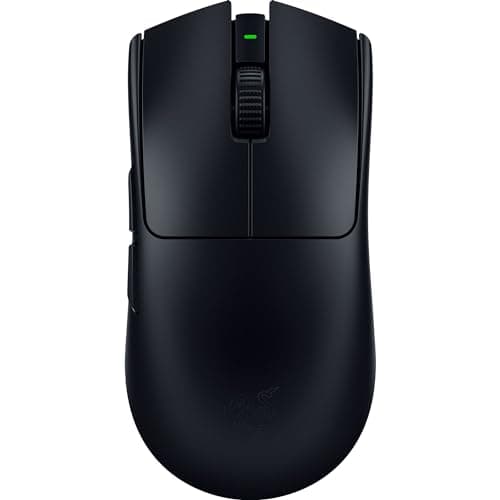
The Razer Viper V3 Prois the pick for competitive FPS, full stop. At roughly 54 grams it is among the lightest real esports mice on the market, it feels it on fast flicks, and its 2.4GHz link is the genuine tournament-grade kind. The trade-offs are deliberate: it is stripped for weight, so there is no bank of thumb buttons and little for productivity, and the headline 8,000Hz polling needs the separate dongle and eats into battery life. You are also paying flagship money for a mouse most players cannot out-aim at half the price — but if competitive aim is why you are here, it is the one. It leads our best mice for FPS page for the same reasons.
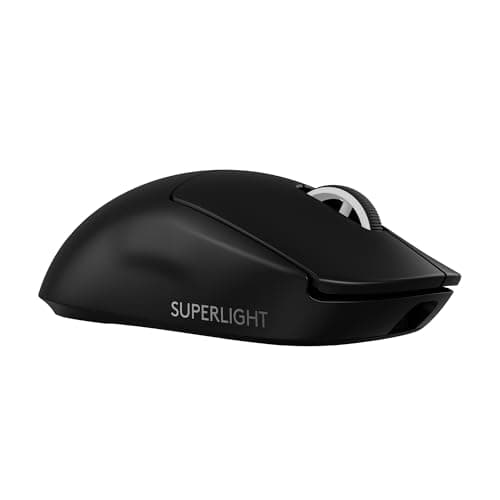
The Logitech G PRO X Superlight 2is the safe, known-quantity flagship. It is one of the most-used shapes in competitive play at around 60 grams, its LIGHTSPEED wireless is as fast as a cable with excellent battery life, and the clean ambidextrous shape suits most grips. It is expensive and deliberately minimal — two side buttons, no frills — but that is the point: a huge number of players already trust this exact shape and weight, so it is the low-risk premium buy. If the Viper's shape does not suit your hand, this is the first alternative to try; both sit near the top of our best wireless gaming mice page.
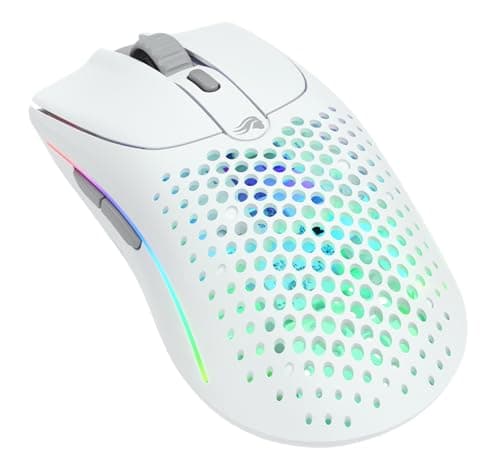
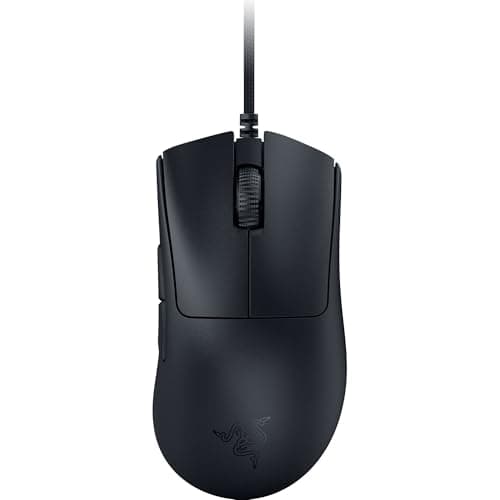
The Glorious Model O 2 Wirelessis the value featherweight. It carries the light, neutral honeycomb-era shape without the drilled holes of the originals, so it flicks fast and stays easy to clean, and it offers a 2.4GHz link plus Bluetooth and a battery that outlasts a work day — a lot of ultralight for the money. Its coating can get a touch slick once your hands warm up, and it is thin on extras, but as a light, fast, ambidextrous mouse that costs less than the two flagships, it is the sweet-spot pick for claw and fingertip grips. The Razer DeathAdder V3 is the outlier and the answer for a specific hand: it is the famous DeathAdder ergonomic right-hand hump, now genuinely light at about 59 grams, and it is wired— which, for latency, is a feature, not a limitation, since a cable is the lowest-latency link of all. It is the comfortable, palm-friendly pick that does not cost flagship money, as long as you do not need a left-handed shape or a bank of macro buttons.
When a lighter mouse is the wrong call
Light is not universally better, and it is worth being honest about who should look elsewhere. If you play MMOs or games that lean on a bank of thumb buttons, every mouse here is deliberately minimal — two side buttons and little else — and you would be better served by a button-heavy shape, even at the cost of some weight. If you are a big-handed palm-grip player, the ambidextrous shapes here (the Viper, the Superlight 2 and the Model O 2) can feel small and hollow under a full palm, and the ergonomic DeathAdder V3 or a larger mouse is the more comfortable answer. And if the lowest possible price is the priority, a genuine ultralight is not where the bargains live — three of these four are premium buys, and only the Model O 2 undercuts the flagships by much. There is nothing wrong with a slightly heavier mouse that fits your hand and your games; the point of this page is that when low mass is the goal, these four deliver it without a hidden catch.
A last practical note on living with an ultralight. Stripping mass tends to mean stripping other things too: the coatings can turn slick once your palms warm up on a long session, the feature sets are lean, and the build can feel budget-flagship rather than tank-solid — the Model O 2 in particular trades a little heft for its price. Battery is the other thing to plan around on the wireless picks: the real low-latency 2.4GHz link and, where offered, very high polling rates draw more power than Bluetooth, so keep a cable handy for the odd top-up mid-session. None of that changes how the mice perform where it counts, but it is the texture of owning one, and it is worth knowing before you decide a few grams are worth chasing.
Match the shape to your hand, then the link to your setup
Grip style is the quickest way to narrow the four. Palm grip— your whole hand resting on the mouse — wants a filled, supportive shape, which points you at the ergonomic DeathAdder V3 or, if you want wireless, one of the fuller ambidextrous bodies rather than the smallest. Claw grip — arched fingers, palm just touching the back — and fingertip grip— only the fingertips on the mouse — both reward a light, neutral shape you can move freely, which is exactly what the Viper V3 Pro, the Superlight 2 and the Model O 2 are built for. There is no wrong grip, only a shape that matches yours; if you are not sure which you use, glance down mid-game and note where your palm and fingers actually sit. Hand size feeds into it too: bigger hands tend to prefer the larger, more filled shapes, while smaller hands can be swamped by them. Get the grip-and-size match right and any of these four will feel like an extension of your arm rather than an object you are steering.
Every mouse here is light enough that weight will not be the thing you notice — shape will. Two of them (the Viper and the Superlight 2) are neutral ambidextrous shapes; the Model O 2 is a light, neutral shape that suits claw and fingertip grips; the DeathAdder V3 is a right-handed ergonomic hump built to fill a palm. Pick the body your hand wants first, because a comfortable shape you can hold the same way every time is worth more than any spec. Then match the connection to how you play: a 2.4GHz dongle for wireless freedom without the latency penalty, or a cable if you would rather never think about charging. Our how to choose a gaming mouse guide walks through grip types and sizing, and if the budget is firm, the best gaming mice under $50page carries the same logic down a tier — though these four are worth the stretch if a genuinely light mouse is the goal. Every price here is pulled live, so the value order reflects today's cost, not a stale one.
The top two mice here are the pair most people end up choosing between, and they are close enough to deserve their own page: our Viper V3 Pro vs G PRO X Superlight 2 comparison works through weight, shape and polling rate side by side.