Skip to content
GEAREDGAMING

HUB 02 · Gaming Audio

EQ Settings for Footsteps: What Actually Helps

Every forum has a magic EQ curve. Here is the mechanism underneath them, what it can and cannot do for you, and the much duller change that helps more.

By Stephen V.Updated How we research
#ad

We earn a commission when you buy through our Amazon links, at no extra cost to you. It never affects our rankings, and we say so when the cheaper product is the better buy. How this works.

The short answer: cut, do not boost. Pull the low end down by a few decibels, leave the midrange alone, and resist every curve that tells you to add 6 dB somewhere. EQ cannot create detail your headset never produced — it can only stop loud bass from drowning the detail that is already there, and that is a real but modest win. If the headset is bass-heavy, this will help noticeably. If it is already neutral, EQ will do very little and the honest advice is to stop fiddling.

Footstep audio is the single most searched problem in gaming sound, and the internet's answer to it is a thousand screenshots of equalizer curves with no explanation attached. Some of them do help. Most of them help for a reason their author did not state, and a few actively make things worse. This page is the mechanism, so you can judge any curve you find on your own rather than trusting ours.

Where footsteps actually live

A footstep in a game is a short, broadband transient — a click or a thud with energy spread across a wide range rather than a tone at one pitch. The part of it your brain uses to work out whereit came from is mostly in the upper midrange and treble, roughly the 1–8 kHz region, because that is the band where your outer ear imposes the direction- dependent filtering that sound localization depends on. Below about 500 Hz you can barely place a sound at all; the cues simply are not there. Our footstep audio explained guide goes through that properly, and it is worth reading first if any of this is new.

That single fact is what makes EQ useful at all. Loud low frequencies do not help you locate anything, and they do actively mask the quieter high-frequency information sitting next to them — your ear's sensitivity to a quiet sound drops when a loud one is nearby in frequency. So the useful EQ move is not “boost footsteps”, because there is no footstep band to boost. It is “turn down the thing that is covering them”.

What to actually change

Work in cuts, in small amounts, one change at a time.

  • A gentle low shelf.Reduce everything below roughly 150–200 Hz by 3–6 dB. This is the change that does most of the work on a bass-forward gaming headset. Explosions get less impressive; quiet detail gets easier to hear. That is the whole trade, and it is the right trade if you are playing to win.
  • Leave 1–4 kHz where it is. This is where footsteps, reloads and voice all live. Boosting it does not add information, it just makes everything in that band louder, including the gunfire. It also makes long sessions fatiguing fast.
  • Be very careful above 8 kHz.A treble boost here reads as “more detail” for about ten minutes and then becomes a hiss you cannot unhear. If your headset is genuinely dull up top, 2–3 dB is plenty.
  • Turn off every “enhancement” first. Bass boost, loudness equalization, room correction and virtual surround in the Windows sound panel all change the signal before your EQ sees it. Microsoft's audio device documentation covers where those switches live. Start from flat or you are tuning on top of someone else's curve.

Two things EQ cannot do, and claims to the contrary are the quickest way to spot a bad guide. It cannot recover detail a closed-back headset never resolved in the first place, and it cannot widen a soundstage — stage width comes from the physical design of the earcup and from the crosstalk and reflection cues reaching your ear, not from the balance of frequencies. If a curve promises either, close the tab. Our virtual surround vs stereo guide deals with the related claim about surround processing.

The duller changes that help more than EQ

If you want the biggest improvement per minute spent, do these before you open an equalizer at all.

Set the in-game audio preset correctly.Most competitive shooters ship a “headphones” or “night mode” audio profile, and these do more for footstep audibility than any EQ curve because they apply dynamic-range compression inside the game engine — quiet sounds get louder relative to loud ones, which is exactly what you want and is something an equalizer cannot do. Check the audio menu before you blame the hardware.

Turn the master volume down a little. Counter-intuitive, but at high volumes a loud gunshot temporarily desensitizes you to quiet sound that follows it. Playing a notch quieter genuinely improves what you hear in the seconds after a firefight, and it is free.

Fix the connection before the curve. A headset running through the wrong output device, a worn 3.5mm jack or a half-seated plug produces problems EQ will never solve. Our headset troubleshooting guide and one-ear fault guide cover the usual suspects. And if you are chasing a hiss or crackle rather than a missing footstep, read how to fix headset crackling instead — that is a different problem with a different fix.

Where to apply the EQ

In rough order of how much trouble they are: your headset's own software if it has any (SteelSeries Sonar, Logitech G HUB, Razer Synapse and the rest all expose a parametric or graphic EQ, and the settings follow the device); Windows' built-in equalizer on the playback device, which is crude but free; or a system-wide tool like Equalizer APO, which is the most capable option and the one most likely to need an afternoon. Console players have the fewest options — a PlayStation or Xbox gives you a handful of presets, which is a real argument for a headset whose EQ lives in the headset rather than the computer.

Save one profile, play with it for a week, and change one band at a time. The failure mode here is not picking the wrong curve, it is making eleven changes in one sitting and losing track of which one helped.

When the headset is the problem

There is a point where EQ stops being the answer. If you are running a sealed, bass-tuned headset and you have already cut 6 dB off the bottom end, you are fighting the hardware, and the hardware wins. A closed-back design with a narrow stage has a structural ceiling on how well you can place a sound, and no curve moves it. Our open-back vs closed-back comparison explains why, and best open-back headphones for gaming is the page to read if the conclusion is that you need different hardware.

The three picks below are the practical answers at three different points: the two headsets make a saved EQ profile easy and keep it with the device, and the third is the hardware answer — an open-back that needs the least EQ of anything we recommend precisely because it is not bass-forward to begin with.
The short answer

Quick picks

#ProductBest forScorePrice
01
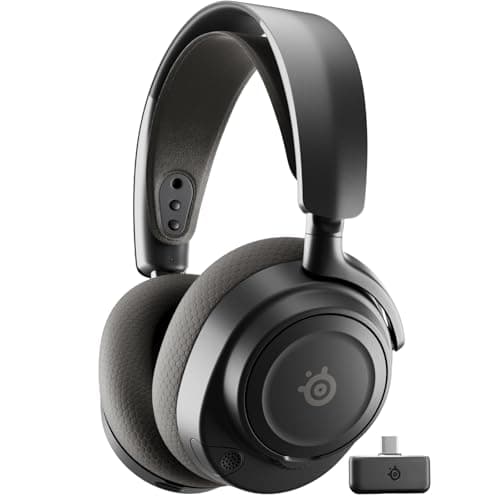
SteelSeries SteelSeries Arctis Nova 7 (Gen 2)
SteelSeries Arctis Nova 7 (Gen 2)

The wireless headset most people should actually buy.

The best wireless all-rounder
8.0
$184.62 on Amazon →
02
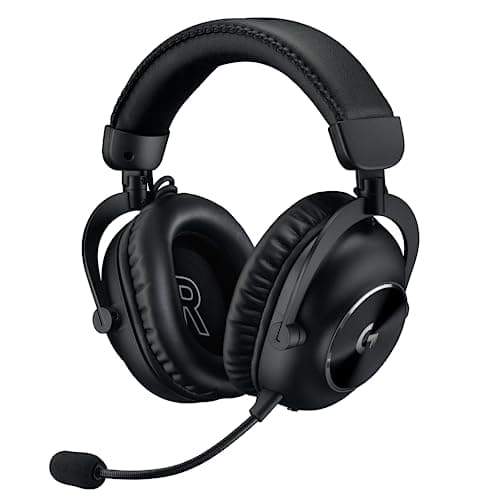
Logitech G Logitech G PRO X 2 LIGHTSPEED
Logitech G PRO X 2 LIGHTSPEED

Graphene drivers, esports pedigree, and a price that assumes you care about both.

Wireless with a serious mic
7.6
$229.99 on Amazon →
03
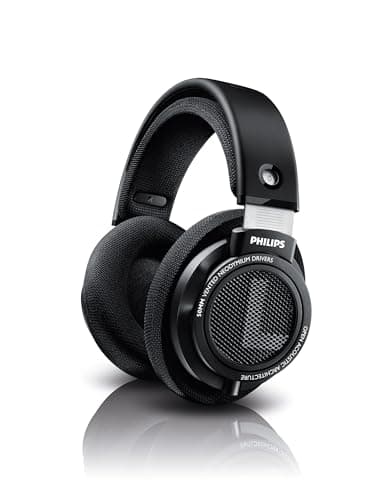
Philips Philips SHP9500
Philips SHP9500

The budget open-back that has been the enthusiast answer for a decade.

Positional audio on a budget
6.8
$59.99 on Amazon →

#ad · Live prices from the Amazon Creators API, as of October 5, 2026. Where we have no verified live price, we show none — we would rather leave a gap than print a number that has rotted.

In detail

The picks, in full

01
SteelSeries SteelSeries Arctis Nova 7 (Gen 2)

The best wireless all-rounder

SteelSeries Arctis Nova 7 (Gen 2)

2.4GHz + BluetoothSimultaneous dual audioRetractable micUSB-C dongle
8.0/10

The wireless headset most people should actually buy.

Positional accuracy
7
Footstep clarity
7
Mic quality
8
Comfort
9
Value
9

Pros

  • Does the important 90% of the Nova Pro at a fraction of the price
  • Simultaneous 2.4GHz + Bluetooth is genuinely useful and rare at this price
  • The USB-C dongle plugs straight into a Steam Deck or an Ally

Cons

  • No hot-swap battery, so a dead headset means a cable
  • Closed back — the usual staging ceiling

Don't buy this if…

…you want the widest possible soundstage. This is a very good closed-back headset, and a closed-back headset is still the wrong tool for that job.

$184.62View on Amazon

$199.998% off

Price as of October 5, 2026. Prices change — Amazon's is the one that counts.

#ad · we may earn a commission from this link to SteelSeries Arctis Nova 7 (Gen 2)

02
Logitech G Logitech G PRO X 2 LIGHTSPEED

Wireless with a serious mic

Logitech G PRO X 2 LIGHTSPEED

Wireless LIGHTSPEED + BTGraphene driversDetachable boomLogitech rates 50h battery
7.6/10

Graphene drivers, esports pedigree, and a price that assumes you care about both.

Positional accuracy
8
Footstep clarity
7
Mic quality
9
Comfort
8
Value
6

Pros

  • Battery life is long enough that you stop thinking about it
  • The detachable boom mic is among the best on any wireless headset
  • Memory foam and leatherette/velour options both in the box

Cons

  • Expensive, and the graphene drivers are a smaller upgrade than the marketing implies
  • Closed back — same structural staging ceiling as the rest

Don't buy this if…

…your budget is the constraint. The Arctis Nova 7 does the same job for less and you will not hear the difference in a firefight.

$229.99View on Amazon

$279.9918% off

Price as of October 5, 2026. Prices change — Amazon's is the one that counts.

#ad · we may earn a commission from this link to Logitech G PRO X 2 LIGHTSPEED

03
Philips Philips SHP9500

Positional audio on a budget

Philips SHP9500

Open back32 OhmOver-earNo microphone
6.8/10

The budget open-back that has been the enthusiast answer for a decade.

Positional accuracy
8
Footstep clarity
8
Mic quality
0
Comfort
8
Value
10

Pros

  • Open back at a fraction of the DT 990's price — the structural advantage without the tax
  • 32 Ohm, so it actually runs off a phone, a Deck or a motherboard
  • Detachable cable and a huge, cheap aftermarket of pads and boom mics

Cons

  • No mic — budget a clip-on or a modmic on top
  • Build is plasticky, and it creaks
  • Leaks sound as badly as any open back

Don't buy this if…

…you need a microphone and a single purchase. Add a boom mic and the total creeps toward a proper wireless headset.

$59.99View on Amazon

Price as of October 5, 2026. Prices change — Amazon's is the one that counts.

#ad · we may earn a commission from this link to Philips SHP9500

How we picked

We do not run a testing lab

We researched published specifications, third-party lab measurements, manufacturer documentation and aggregated owner reviews, then scored each product against a published rubric. The scores are judgments from documented research — they are not measurements we took, because we do not have a lab and we are not going to pretend we do. Where a number came from someone else's lab, we name them and link them in Sources.

Questions

Frequently asked

What are the best EQ settings for hearing footsteps?
Cut, do not boost. Reduce everything below about 150–200 Hz by 3–6 dB, leave the 1–4 kHz region alone, and add no more than 2–3 dB above 8 kHz if your headset is genuinely dull. Turn off bass boost, loudness equalization and any virtual surround first so you are not stacking your curve on top of someone else's.
Does EQ actually help you hear footsteps?
Yes, but through one specific mechanism: it reduces masking. Loud bass makes nearby quieter sounds harder to hear, so turning the bass down makes the footstep easier to pick out. What EQ cannot do is add detail a headset never resolved, or widen the soundstage — those come from the physical design of the headphone, not the frequency balance.
Should I boost the footstep frequency?
There is no single footstep frequency to boost. A footstep is a broadband transient, and the part you localize with is spread across roughly 1–8 kHz — the same range as gunfire, reloads and voice. Boosting it raises everything in that band equally, which gains you nothing and makes long sessions fatiguing.
Is the in-game audio setting better than an EQ?
Usually, yes. A game's “headphones” or night-mode audio preset applies dynamic-range compression inside the engine, which raises quiet sounds relative to loud ones. An equalizer cannot do that at all — it only changes the balance between frequencies. Set the in-game preset first, then EQ if you still want to.
Where should I apply EQ: headset software, Windows, or a third-party tool?
Headset software first if yours has it, because the profile follows the device and usually works on console too. Windows' built-in device equalizer is crude but free. A system-wide tool such as Equalizer APO is the most capable and the most work to set up. Console players have the fewest options, which is a genuine reason to prefer a headset that stores EQ itself.

Keep reading

Receipts

Sources

We do not run a testing lab, and we do not pretend to. Where a measured number came from someone else's lab, we name them and link them. Where we could not verify something, we say so on the page rather than quietly leaving it out. Read our full method.