Skip to content
GEAREDGAMING

HUB 03 · Best Value

The Best Webcams Under $100

Under $100 the camera stops being the limiting factor. What decides how you look on stream is the light in front of you — so this page spends as much time on that as on the hardware.

By Stephen V.Updated How we research
#ad

We earn a commission when you buy through our Amazon links, at no extra cost to you. It never affects our rankings, and we say so when the cheaper product is the better buy. How this works.

Top pick · Best Webcam Under $100

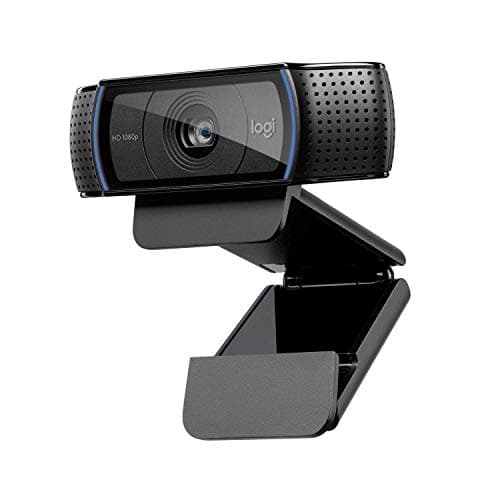
Logitech Logitech C920 HD Pro

Logitech C920 HD Pro

7.6/10

The webcam that has been the default answer for a decade. 1080p, plug-and-play, and cheap enough to be a no-brainer.

Price as of November 7, 2026. Prices change — Amazon's is the one that counts. #ad · we may earn a commission from this link to Logitech C920 HD Pro

Verdict

The short version

Buy the Logitech C920 HD Pro — 1080p, autofocus, USB plug-and-play, and the default answer for a decade for good reason. It works the instant you plug it in, on any machine, with no software layer that has to be running for the camera to behave. In decent light it looks perfectly good on a 1080p stream or a work call, and nothing else in this bracket is as reliably boring.

The budget pick is the NexiGo N660P — the cheapest camera here, and the one that spends its money on the spec this page cares about: 1080p at 60fps, with a sliding privacy cover on the lens. The Razer Kiyo V2 Xis the third pick and the sharpest of the three, with Razer rating it at 1440p60 — worth it if you crop into your frame or sit further from the camera. All three were under $100 as of the date stamped on the table below.

Compare

Specs and prices at a glance

#ProductKey specsBest forPrice
01Logitech C920 HD Pro

Logitech

  • 1080p / 30fps
  • USB plug-and-play
  • Autofocus
  • Dual mics
Best for most people$63.00 on Amazon →
02Razer Kiyo V2 X

Razer

  • 1440p / 60fps (per Razer)
  • USB
  • Wide sensor
  • Streamer-focused
Best for sharpness on a budget$70.97 on Amazon →
03NexiGo N660P

NexiGo

  • 1080p / 60fps
  • Autofocus
  • Sliding privacy cover
  • Dual mics
Best budget streaming cam$59.99 on Amazon →

#ad · Specs as published by the manufacturer or the Amazon listing. Live prices from the Amazon Creators API, as of November 7, 2026. Where we have no verified live price we show none, rather than print a number that has rotted.

Here is the thing every webcam roundup buries: in this price bracket, the camera is rarely what is wrong with your image. A webcam sensor is physically tiny, so it needs light. Starved of light, it raises gain, and gain is noise — the grainy, mushy look people blame on resolution. Give the same cheap camera a bright, soft light pointed at your face and it will beat an expensive camera in a dim room, every time. Budget accordingly.

Every price here is pulled live from Amazon and stamped with the date we retrieved it. We do not run a testing lab and never claim to — our methodology page states exactly what our scores are and are not.

Frame rate beats resolution on a face

Given a fixed budget, 1080p at 60fps looks better on stream than 1440p at 30fps. The reason is motion: faces move constantly, and at 30fps every head turn smears. At 60fps the same movement stays crisp. Resolution only helps if the viewer is seeing all of it, and for a face in a corner box they are not — your webcam is being displayed at a few hundred pixels across in most layouts.

That is why the NexiGo is a genuinely competitive pick despite being the cheapest: 1080p60 is the correct spec for this job. The Kiyo V2 X earns its place differently — if you crop into a 1440p frame to get a tighter shot, you are cropping into real pixels rather than upscaled ones.

What your platform actually sends

Twitch and YouTube both re-encode your stream, and the bitrate you are allowed caps the detail that survives. A 1080p60 broadcast at a typical bitrate is already compressing hard; the extra pixels from a 4K camera are discarded long before a viewer sees them. For video calls it is worse still — most conferencing apps send 720p and drop lower when bandwidth tightens.

So the realistic ceiling for a webcam in 2026 is a clean, well-lit, well-focused 1080p image. Everything above that is for recording local footage you intend to edit, which is a different purchase. If you are building out the rest of a stream, our streaming setup under $200 page puts the whole kit together on a budget.

Spend the next $40 on light, not camera

One soft light placed slightly above eye level and off to one side — the key light — is the single biggest upgrade available to anyone on camera. It fixes the noise, it fixes the colour, and it fixes the flat, grey look of ceiling lighting. A window counts, if you sit facing it and stream during the day.

Two things to avoid: a light directly behind you (your camera exposes for the window and you become a silhouette) and a single harsh light dead-on (flat, shadowless, unflattering). Our streaming lighting roundup covers the panels and ring lights worth buying, and how to light your stream covers placement in detail.

The small things that matter more than the sensor

Autofocus behaviour. A camera that hunts for focus every time you lean is distracting on stream. If yours does it, lock the focus in the camera software or in OBS.

Mounting. Every one of these clips to a monitor, which puts the lens above your eyeline and gives the slightly-looking-down angle everyone recognises. A cheap desk arm or tripod lets you set the camera at eye level, which looks dramatically more natural.

Privacy. A physical cover is worth having. The NexiGo includes a sliding one; on the others, a strip of tape works and costs nothing.

Microphone.Use none of the built-in mics. Every camera here lists onboard microphones and they all sound like a camera microphone. A cheap dedicated mic is the second biggest audience-facing upgrade after lighting — our microphone roundup covers the options.

The short answer

Quick picks

#ProductBest forScorePrice
01
Logitech Logitech C920 HD Pro
Logitech C920 HD Pro

The webcam that has been the default answer for a decade. 1080p, plug-and-play, and cheap enough to be a no-brainer.

Best for most people
7.6
$63.00 on Amazon →
02
Razer Razer Kiyo V2 X
Razer Kiyo V2 X

A higher-resolution streaming cam that pushes past 1080p. The pick if you want a sharper image without going 4K.

Best for sharpness on a budget
7.6
$70.97 on Amazon →
03
NexiGo NexiGo N660P
NexiGo N660P

The budget pick, and the one that spends its money on the spec this page cares about: 1080p at 60fps, with a cover on the lens.

Best budget streaming cam
7.6
$59.99 on Amazon →

#ad · Live prices from the Amazon Creators API, as of November 7, 2026. Where we have no verified live price, we show none — we would rather leave a gap than print a number that has rotted.

In detail

The picks, in full

01
Logitech Logitech C920 HD Pro

Best for most people

Logitech C920 HD Pro

1080p / 30fpsUSB plug-and-playAutofocusDual mics
7.6/10

The webcam that has been the default answer for a decade. 1080p, plug-and-play, and cheap enough to be a no-brainer.

Image quality
7
Build quality
7
Features
6
Ease of use
9
Value
9

Pros

  • A proven 1080p image that looks fine in decent light and needs zero setup
  • The most widely supported webcam anywhere — every app just works with it
  • Cheap, reliable and endlessly available

Cons

  • 1080p at 30fps only — no 60fps for smooth motion
  • It leans hard on good lighting; in a dim room the image gets noisy
  • No built-in privacy shutter

Don't buy this if…

…you want smooth 60fps or you stream in a dim room. The C920 caps at 30fps and needs light — the Facecam MK.2 does 1080p60 and handles low light better.

$63.00View on Amazon

$67.397% off

Price as of November 7, 2026. Prices change — Amazon's is the one that counts.

#ad · we may earn a commission from this link to Logitech C920 HD Pro

02
Razer Razer Kiyo V2 X

Best for sharpness on a budget

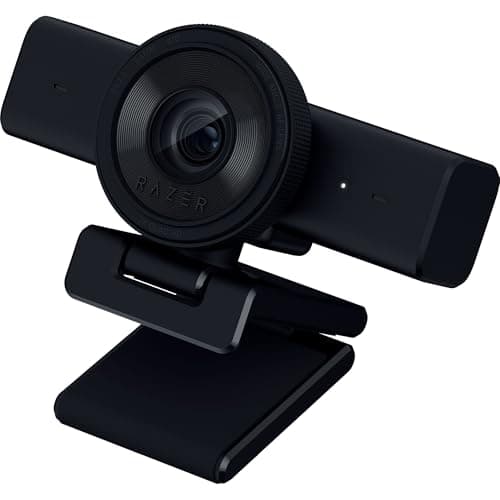
Razer Kiyo V2 X

1440p / 60fps (per Razer)USBWide sensorStreamer-focused
7.6/10

A higher-resolution streaming cam that pushes past 1080p. The pick if you want a sharper image without going 4K.

Image quality
8
Build quality
7
Features
7
Ease of use
8
Value
8

Pros

  • Higher-than-1080p resolution keeps you sharp even after a stream crops in
  • Higher frame-rate capture for smoother motion than a 30fps office cam
  • Razer's Synapse tuning for a streaming look

Cons

  • Higher resolution and frame rate lean on good lighting to pay off
  • No built-in ring light (unlike the original Kiyo)
  • Software is another install to manage

Don't buy this if…

…you stream in a dark room and were hoping for a built-in light. This model drops the ring light — the original Kiyo line had it.

$70.97View on Amazon

$99.9929% off

Price as of November 7, 2026. Prices change — Amazon's is the one that counts.

#ad · we may earn a commission from this link to Razer Kiyo V2 X

03
NexiGo NexiGo N660P

Best budget streaming cam

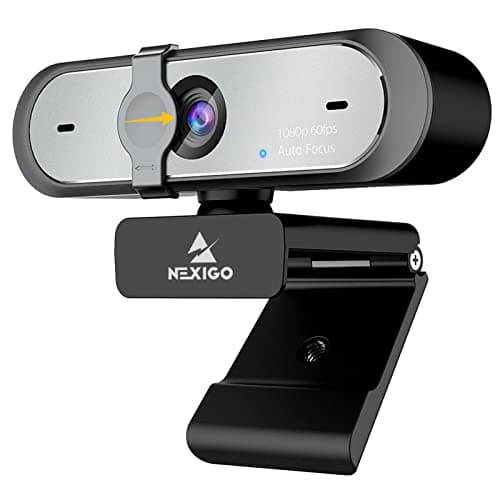
NexiGo N660P

1080p / 60fpsAutofocusSliding privacy coverDual mics
7.6/10

The budget pick, and the one that spends its money on the spec this page cares about: 1080p at 60fps, with a cover on the lens.

Image quality
7
Build quality
6
Features
8
Ease of use
8
Value
9

Pros

  • 1080p at 60fps at the cheap end of this page — the smooth-motion spec that reads as professional, without paying for resolution you would down-sample
  • The privacy cover slides on the camera itself, so there is no stick-on shutter to buy
  • Autofocus plus a companion app for manual image settings, which is more control than a plug-and-play office cam gives you

Cons

  • NexiGo lists a 1/2.9-inch sensor — small, so it leans on the light in front of it more than the frame-rate number suggests
  • 1080p is the ceiling: no spare pixels to crop into the way the 1440p and 4K cameras here have
  • The tuning software is plain next to Elgato's Camera Hub or Razer's Synapse, and it is another install to manage

Don't buy this if…

…you want a flagship image and polished software to go with it. This is a cheap camera that gets the important specs right — the Facecam MK.2 is the honest step up.

$59.99View on Amazon

Price as of November 7, 2026. Prices change — Amazon's is the one that counts.

#ad · we may earn a commission from this link to NexiGo N660P

Pick in one line each.

Want it to just work: the C920. Plug-and-play, no software required, autofocus that behaves.

Spending as little as possible, still streaming: the NexiGo N660P. 1080p60 and a lens cover for the least money here.

Want the sharpest image or plan to crop: the Razer Kiyo V2 X, rated above 1080p by Razer.

Then stop buying cameras. Put the next $40 into a key light and the $40 after that into a microphone. Those two changes will do more for your stream than any camera upgrade available under $300.
How we picked

We do not run a testing lab

We researched published specifications, third-party lab measurements, manufacturer documentation and aggregated owner reviews, then scored each product against a published rubric. The scores are judgments from documented research — they are not measurements we took, because we do not have a lab and we are not going to pretend we do. Where a number came from someone else's lab, we name them and link them in Sources.

Questions

Frequently asked

Is a $100 webcam good enough for streaming?
Yes. Twitch and YouTube both re-encode your feed at a capped bitrate, so a clean, well-lit 1080p image is effectively the ceiling of what a viewer receives. A cheap camera in good light beats an expensive camera in bad light, which is why every pick here is paired with advice to buy a light next.
1080p60 or 1440p30 — which matters more?
1080p at 60fps, for a talking head. Faces move constantly and 30fps smears every head turn, while the extra resolution is thrown away by your layout and your platform’s encoder. Higher resolution only pays off if you crop into the frame or record locally for editing.
Do I need a 4K webcam?
Almost certainly not. Streaming platforms do not transmit it, conferencing apps do not transmit it, and the small sensors in webcams need more light the more pixels they have. 4K is worth it for local recording where you intend to crop and edit in post.
Are these webcams actually under $100?
Every price on this page is pulled live from Amazon and date-stamped rather than typed once and left to go stale. All three picks were under $100 as of the date shown; prices move, so check the live figure on each before you buy.

Keep reading

Receipts

Sources

We do not run a testing lab, and we do not pretend to. Where a measured number came from someone else's lab, we name them and link them. Where we could not verify something, we say so on the page rather than quietly leaving it out. Read our full method.