Skip to content
GEAREDGAMING

HUB 03 · Best Value

The Best Gaming Mice for FPS

The sensor is a solved problem; every mouse here tracks better than you can aim. So we ranked on the things that actually still differ in a shooter: weight, and a shape that fits your hand and grip.

By Stephen V.Updated How we research
#ad

We earn a commission when you buy through our Amazon links, at no extra cost to you. It never affects our rankings, and we say so when the cheaper product is the better buy. How this works.

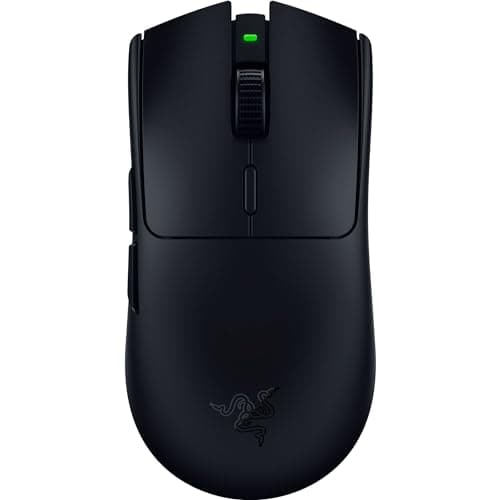
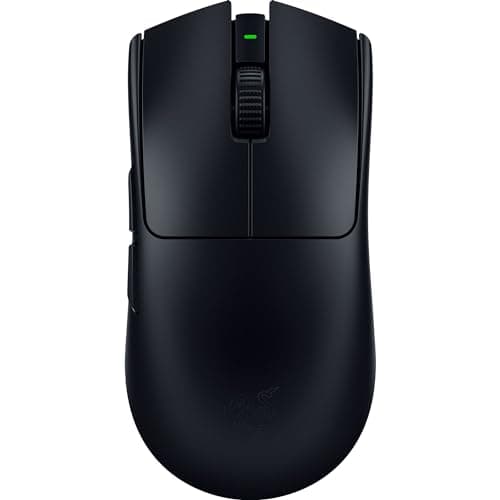
Buy the Razer Viper V3 Pro. It is genuine tournament hardware — roughly 54g, flawless low-latency wireless, and a clean symmetrical shape a huge number of professionals already compete on. For an FPS mouse, that combination of light weight and trusted shape is the whole game. If the shape does not suit you, the Logitech G PRO X Superlight 2 is the other shape half the pro scene uses, and the Glorious Model O 2 Wireless gets you most of the way for markedly less.

Stop shopping for a sensor. It is a solved problem.

The single most useless number in this category is DPI, and it is the number every box shouts loudest. Every mouse on this page tracks perfectly at any speed a human arm can produce. The gap between an 18,000 DPI sensor and a 26,000 DPI sensor is real in a laboratory and invisible in a game — nobody aims at 26,000 DPI, and nobody could if they tried. Once the sensor is good enough, and at this level they are all far past that, the spec sheet has nothing left to tell you that matters. The differences that decide a flick are the ones DPI cannot describe.

This is liberating rather than limiting. It means you can ignore the headline number entirely and spend your attention on the two things that genuinely separate a great FPS mouse from a merely adequate one: how much it weighs, and whether its shape fits your hand and your grip. Get those two right and you have the best mouse for you. Get them wrong and the fanciest sensor in the world will not rescue your aim.

Weight is the property you will feel on every flick

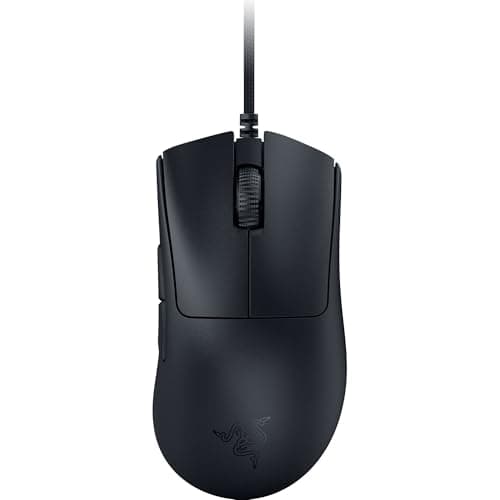
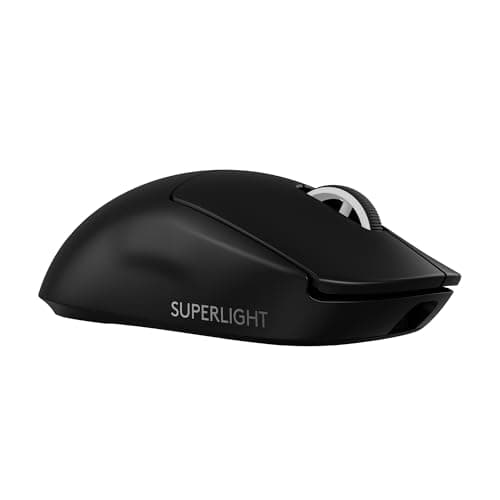
In a flick-aim shooter, weight is the spec you notice most, because you are accelerating and stopping the mouse thousands of times a match. A lighter mouse changes direction with less effort and settles faster when you snap onto a target, which is why the competitive scene has spent years chasing grams. The Viper V3 Pro at around 54g and the Superlight 2 at around 60g are featherweights; the Viper V3 HyperSpeed at 82g and the KATAR PRO XT at 73g are heavier but still light by any normal standard; the DeathAdder V3 at around 59g proves you no longer have to trade comfort for weight the way older ergonomic mice forced you to.

A word of honesty, though: below a certain point, lighter stops helping and starts being a number on a box. The difference between a 54g mouse and a 60g mouse is far smaller than the marketing implies, and neither will out-aim the other in your hand. Light matters; obsessing over the last few grams does not. Buy something light enough that it does not fight your flicks, then stop counting.

Shape is where you actually choose — match it to your grip

Weight narrows the field; shape picks the winner, and shape is personal. There is no best shape, only the shape that fits your hand size and the way you hold a mouse. Get this wrong and a world-class mouse will feel like someone else's.

  • Palm griprests the whole hand on the mouse and wants a filled-out back to support the palm. The DeathAdder V3's ergonomic right-handed hump is one of the most universally comfortable palm shapes ever made — if you palm-grip, start there.
  • Claw grip arches the fingers and rests the back of the palm, and it likes a neutral, symmetrical body. The Viper V3 Pro, the Superlight 2 and the Model O 2 all suit it.
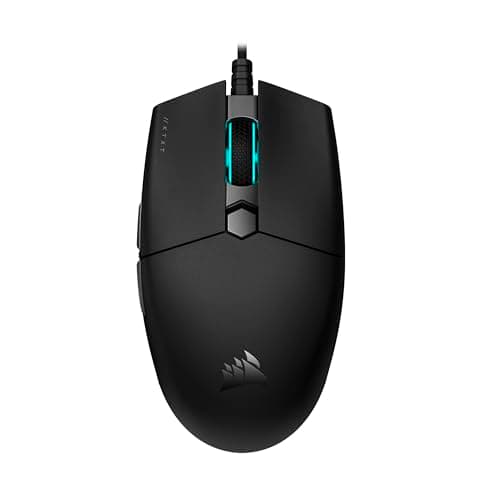
  • Fingertip grip controls the mouse with the fingers alone and wants something small and light. The KATAR PRO XT and the symmetrical featherweights here are the fingertip tools; a big ergonomic hump is the wrong shape for it.

There is a second axis on top of grip: symmetrical versus ergonomic.The Viper, the Superlight 2 and the Model O 2 are symmetrical — neutral shapes that suit the widest range of hands and both claw and fingertip grips. The DeathAdder V3 is a dedicated right-handed ergonomic shape, more comfortable for palm grippers but useless to a left-hander. Neither approach is better; they are answers to different hands.

Wireless is no longer the compromise it used to be

The old rule that competitive players must go wired is out of date. The Viper V3 Pro, the Superlight 2 and the Model O 2 all use modern low-latency 2.4GHz wireless that is, for all practical purposes, as fast as a cable — and losing the cable drag is a genuine improvement in feel, especially for wide, fast aim. What wireless still costs you is a little money and, occasionally, a little weight for the battery. The Viper V3 HyperSpeed shows the trade cleanly: it runs on a single AA cell, which is convenient and keeps it cheap, but that cell is why it is heavier than the rechargeable flagships. The wired KATAR PRO XT and DeathAdder V3, meanwhile, are the value play — a good paracord-style or flexible cable drags far less than the stiff rubber cables of old, and a cheap mouse bungee removes what little remains.

One durability note worth more than its billing: several mice here use optical main switches (the Viper line, the DeathAdder V3), which actuate on a light beam and physically cannot develop the double-click fault that eventually kills a lot of mechanical-switch mice. Nobody advertises this properly, and it is one of the best long-term reasons to pick one.

The ranking is a starting point, not a verdict on your hand

We put the Viper V3 Pro at the top because, for the widest range of hands and grips, it is the best-judged combination of weight, shape and wireless on this page. But a roundup ranking is an average, and your hand is not average. If the Superlight 2's slightly different back suits you better, it is the better mouse for you, full stop, and the same is true right down the list. Read the order here as “try these first,” not as a scoreboard where a lower rank means a worse mouse. The featherweight symmetrical trio — the Viper V3 Pro, the Superlight 2 and the Model O 2 — are close enough that the deciding factor between them is almost always which shell your fingers settle onto, not which one a spec sheet crowns.

This is also why we did not pad the list with a dozen mice. Every option here is one we would put our name to for a shooter, and each covers a distinct need: the ultralight symmetrical flagships for claw and fingertip players, the ergonomic DeathAdder V3 for palm grippers, the AA-powered Viper HyperSpeed as the wireless value pick, and the wired KATAR PRO XT as the lightweight-on-a-budget answer. If none of those shapes fits your hand, that is a real result and worth knowing before you buy — a mouse that does not fit is the one upgrade guaranteed to make your aim worse.

The short answer

Quick picks

#ProductBest forScorePrice
01
Razer Razer Viper V3 Pro
Razer Viper V3 Pro

Actual tournament hardware that slips under $100. If competitive FPS is why you're here, this is the mouse.

Best for competitive FPS
8.2
$99.99Amazon
02
Logitech G Logitech G PRO X Superlight 2
Logitech G PRO X Superlight 2

The pro-scene default. Ultralight, flawless wireless, and a shape a huge number of players already trust.

Best flagship wireless
8.2
$144.99Amazon
03
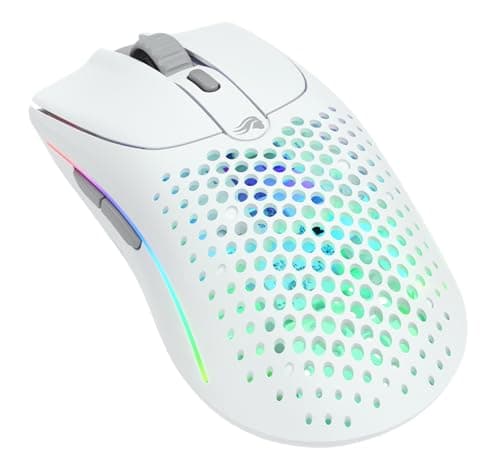
Glorious Glorious Model O 2 Wireless
Glorious Model O 2 Wireless

A featherweight honeycomb-era shape without the holes — light, cheap for what it is, and genuinely fast.

Best lightweight ambidextrous
8.2
$99.99Amazon
04
Razer Razer Viper V3 HyperSpeed
Razer Viper V3 HyperSpeed

An actual esports mouse that slipped under $50. This is the one to stretch for.

The best mouse here, full stop
8.6
$49.99Amazon
05
Razer Razer DeathAdder V3
Razer DeathAdder V3

The famous DeathAdder ergonomic hump, now genuinely light and wired-cheap. The comfortable pick that doesn't cost flagship money.

Best ergonomic value
8.2
$32.99Amazon
06
Corsair Corsair KATAR PRO XT
Corsair KATAR PRO XT

73g, wired, and cheap. A pure FPS tool with nothing else going on.

Lightweight FPS on a budget
7.2
$29.99Amazon

#ad · Live prices from the Amazon Product API, as of Jul 30, 2026. Where we have no verified live price, we show none — we would rather leave a gap than print a number that has rotted.

In detail

The picks, in full

01
Razer Razer Viper V3 Pro

Best for competitive FPS

Razer Viper V3 Pro

2.4GHz wireless~54g ultralightSymmetrical shapeRazer rates 8K polling
8.2/10

Actual tournament hardware that slips under $100. If competitive FPS is why you're here, this is the mouse.

Sensor quality
10
Build quality
9
Ergonomics
8
Features
7
Value
7

Pros

  • One of the lightest genuine esports mice you can buy, and it feels it on fast flicks
  • The wireless is the real low-latency kind that pros actually compete on
  • A clean symmetrical shape with excellent main-button switches

Cons

  • Stripped for weight: no side-button bank, no frills, not much for an MMO or productivity
  • The 8,000Hz polling that headlines the spec sheet needs the separate dongle and eats battery
  • You pay flagship money for a mouse most people can't out-aim at half the price

Don't buy this if…

you want extra thumb buttons or a palm-filling hump. This is a minimalist flick tool — for buttons and bulk the G502 X is the better fit.

$99.99View on Amazon

$159.9938% off

Price as of Jul 30, 2026. Prices change — Amazon's is the one that counts.

#ad · we may earn a commission from this link to Razer Viper V3 Pro

02
Logitech G Logitech G PRO X Superlight 2

Best flagship wireless

Logitech G PRO X Superlight 2

LIGHTSPEED wirelessUltralight (~60g)AmbidextrousLong battery life
8.2/10

The pro-scene default. Ultralight, flawless wireless, and a shape a huge number of players already trust.

Sensor quality
10
Build quality
9
Ergonomics
8
Features
7
Value
7

Pros

  • One of the most-used mice in competitive play — the shape and weight are a known, trusted quantity
  • LIGHTSPEED wireless is genuinely as fast as a cable, with excellent battery life
  • Clean, understated ambidextrous shape that suits most grips

Cons

  • Expensive, and deliberately minimal — no side-button bank or extras
  • The plain design is almost anti-flashy, which not everyone wants for the money
  • Two side buttons only; it's a shooter mouse, not an MMO tool

Don't buy this if…

you want extra buttons or the lowest price. It's a premium minimalist FPS mouse — the G502 Lightspeed has the buttons, the Viper V3 HyperSpeed the value.

$144.99View on Amazon

$159.999% off

Price as of Jul 30, 2026. Prices change — Amazon's is the one that counts.

#ad · we may earn a commission from this link to Logitech G PRO X Superlight 2

03
Glorious Glorious Model O 2 Wireless

Best lightweight ambidextrous

Glorious Model O 2 Wireless

2.4GHz + BluetoothUltralight solid shellAmbidextrousLong battery life
8.2/10

A featherweight honeycomb-era shape without the holes — light, cheap for what it is, and genuinely fast.

Sensor quality
9
Build quality
8
Ergonomics
8
Features
7
Value
9

Pros

  • Very light without the drilled shell of the originals, so it flicks fast and stays easy to clean
  • Dual 2.4GHz and Bluetooth, plus a battery life that comfortably outlasts a work day
  • A neutral ambidextrous shape that suits claw and fingertip grips

Cons

  • The coating gets slick once your hands warm up on long sessions
  • Thin on extras — two side buttons and little else
  • Not the last word in build heft; it feels appropriately budget-flagship, not premium-solid

Don't buy this if…

you're a palm-grip player with big hands. It's tuned for claw and fingertip — a larger ergonomic shape like the DeathAdder V3 supports the palm better.

$99.99View on Amazon

Price as of Jul 30, 2026. Prices change — Amazon's is the one that counts.

#ad · we may earn a commission from this link to Glorious Model O 2 Wireless

04
Razer Razer Viper V3 HyperSpeed

The best mouse here, full stop

Razer Viper V3 HyperSpeed

Razer Focus Pro sensorWireless HyperSpeed82gAA battery
8.6/10

An actual esports mouse that slipped under $50. This is the one to stretch for.

Sensor quality
10
Build quality
9
Ergonomics
8
Features
7
Value
9

Pros

  • This is genuine tournament-grade hardware — the same line pros use, at a budget price
  • 82g wireless is lighter than most wired mice in this list
  • Optical switches, so it will not develop the double-click fault that kills cheap mice

Cons

  • The most expensive mouse in this roundup
  • AA-powered like the G305, so same weight-balance caveat
  • No RGB and a plain look — all the money went into the internals

Don't buy this if…

you don't play shooters. The things that make this special — weight, sensor, switch latency — are things you will never notice in a strategy game. Buy the G502 and get more buttons.

$49.99View on Amazon

$69.9929% off

Price as of Jul 30, 2026. Prices change — Amazon's is the one that counts.

#ad · we may earn a commission from this link to Razer Viper V3 HyperSpeed

05
Razer Razer DeathAdder V3

Best ergonomic value

Razer DeathAdder V3

Wired USB~59gErgonomic right-hand shapeOptical switches
8.2/10

The famous DeathAdder ergonomic hump, now genuinely light and wired-cheap. The comfortable pick that doesn't cost flagship money.

Sensor quality
9
Build quality
8
Ergonomics
9
Features
6
Value
9

Pros

  • The DeathAdder shape is one of the most universally comfortable right-handed humps ever made
  • Far lighter than older DeathAdders, so comfort no longer costs you speed
  • Optical main switches that can't develop the double-click fault that kills mechanical ones

Cons

  • Wired only at this price; the wireless Pro version is a big step up in cost
  • A right-hand ergonomic shape, so it's no use to left-handers
  • Only two side buttons — it's a shooter/ergonomic mouse, not an MMO one

Don't buy this if…

you want a flat, ambidextrous shape or extra macro buttons. This is a right-handed ergonomic hump — the Model O 2 (ambidextrous) or G502 X (buttons) fit those needs.

$32.99View on Amazon

$69.9953% off

Price as of Jul 30, 2026. Prices change — Amazon's is the one that counts.

#ad · we may earn a commission from this link to Razer DeathAdder V3

06
Corsair Corsair KATAR PRO XT

Lightweight FPS on a budget

Corsair KATAR PRO XT

Corsair rates 18,000 DPIWired73g6 buttons
7.2/10

73g, wired, and cheap. A pure FPS tool with nothing else going on.

Sensor quality
8
Build quality
7
Ergonomics
7
Features
6
Value
8

Pros

  • One of the lightest mice at this price — a real advantage for wide, fast aim
  • Paracord-style cable that drags far less than the G203's
  • Small, symmetrical, claw-grip friendly

Cons

  • Too small for large hands, and there's no way around that
  • iCUE is heavy software for a mouse this simple

Don't buy this if…

you palm-grip. It's a small, low mouse — palm grippers will find nothing to hold onto.

$29.99View on Amazon

$34.9914% off

Price as of Jul 30, 2026. Prices change — Amazon's is the one that counts.

#ad · we may earn a commission from this link to Corsair KATAR PRO XT

How to actually pick an FPS mouse

Measure your hand first. Seriously.

Take the length from the base of your palm to the tip of your middle finger, and the width across your palm. That single measurement decides more than any spec on the page. Larger hands want a fuller shape like the DeathAdder V3; smaller hands want something compact like the KATAR PRO XT or one of the symmetrical featherweights. A mouse that is too big for your hand forces a bad grip, and a bad grip caps your aim no matter how good the sensor is. Do this before you look at anything else.

Decide your grip, then let it choose the shape

Palm grippers want a hump to support the hand — the DeathAdder V3. Claw grippers want a neutral symmetrical body — the Viper V3 Pro, the Superlight 2 or the Model O 2. Fingertip grippers want small and light — the KATAR or the featherweights. If you do not know your grip, watch your hand on your current mouse for a few minutes: whether your palm touches the back of the shell is most of the answer.

Buy light enough, not the lightest possible

Weight genuinely matters in a shooter — a lighter mouse changes direction and stops with less effort. But the returns fall off a cliff at the bottom of the range. Any mouse on this page is light enough to flick cleanly; the gap between the lightest and the second-lightest is a rounding error in the hand. Pick a mouse that is light enough that it never fights you, and put the energy you would have spent chasing grams into your mousepad and your aim training instead.

Treat wireless as a feel upgrade, not a latency risk

Modern 2.4GHz wireless on the mice here is effectively as fast as a cable, and the loss of cable drag is a real, positive change in how the mouse moves. If your budget stretches, the wireless Viper V3 Pro, Superlight 2 and Model O 2 are the nicer tools to use. If it does not, do not feel cheated by the wired KATAR or DeathAdder — a good flexible cable, or a cheap bungee, gets you most of the way to the same free-feeling movement. We laid out the full trade in our wired vs wireless mouse guide.

Prefer optical switches for the long haul

The double-click fault — where one press registers as two — is the failure that eventually retires most gaming mice. Optical main switches, like those in the Viper line and the DeathAdder V3, cannot develop it, because there are no metal contacts to wear. It is a quiet durability advantage that adds nothing to the price and a lot to the lifespan. If two mice are otherwise a coin-flip for you, let the optical switches break the tie.

Ignore the extras you will never use in a shooter

An FPS mouse wants to be light and it wants to fit your hand. It does not want a bank of a dozen thumb buttons, a tunable weight system, or a sensor rated for a DPI you will never touch. Those are features for other genres, and every one of them adds weight or cost you do not want here. If you also play MMOs or want controls under every finger, that is a different mouse and a different page; for pure FPS, minimal is the point.

Spend the small money on the glide, not the sensor

Once you have a mouse that fits, the cheapest meaningful upgrades left are the surface it slides on and the feet it slides with. A large cloth mousepad does more for your consistency than the difference between any two mice on this page, and a set of aftermarket PTFE skates transforms how a good mouse feels for the price of a coffee. If your hand sweats and the shell gets slick — a real complaint on some of the lighter shells here — a few strips of grip tape fix it completely. None of these are glamorous, and all of them beat spending more on the mouse itself.

What not to pay for

DPI above a few thousand. Polling rates that need a separate dongle and drain the battery to hit a number you cannot perceive. RGB. Weights you will never install. Every one of those exists to differentiate a product on a shelf, not to help you win a duel — the things that do help are weight in the hand, a shape that fits, and switches that outlast the warranty.
How we picked

We do not run a testing lab

We researched published specifications, third-party lab measurements, manufacturer documentation and aggregated owner reviews, then scored each product against a published rubric. The scores are judgements from documented research — they are notmeasurements we took, because we do not have a lab and we are not going to pretend we do. Where a number came from someone else's lab, we name them and link them in Sources.

Questions

Frequently asked

What is the best gaming mouse for FPS?
The Razer Viper V3 Pro for most competitive players — around 54g, genuine tournament-grade low-latency wireless, and a clean symmetrical shape a large share of professionals already use. If that shape does not fit your hand, the Logitech G PRO X Superlight 2 is the other shape the pro scene trusts, and the Glorious Model O 2 Wireless delivers most of the experience for less.
Does DPI matter for FPS aiming?
Barely. Every mouse here tracks flawlessly far beyond any DPI a person actually plays at, and almost nobody aims above a few thousand DPI. It is the most heavily marketed and least important spec in the category. Weight and a shape that fits your hand and grip decide your aim; the sensor is a solved problem.
How light should an FPS mouse be?
Light enough that it does not fight your flicks, which every mouse on this page already is. The ultralight options are around 54 to 60g and the heaviest here is 82g — all perfectly usable for a shooter. Chasing the very last few grams brings sharply diminishing returns; buy something comfortably light and stop counting.
Is a wireless mouse worth it for competitive FPS?
Yes. Modern 2.4GHz wireless like Razer HyperSpeed and Logitech LIGHTSPEED is effectively as fast as a cable, and losing the cable drag genuinely improves how the mouse moves. Pros compete on it. If your budget is tight, a good wired mouse with a flexible cable or a bungee is still an excellent tool — the wireless is a feel upgrade, not a requirement.
Which mouse shape is best for FPS?
The one that fits your hand and grip. Palm grippers want an ergonomic hump like the DeathAdder V3; claw and fingertip grippers want a neutral symmetrical shape like the Viper V3 Pro, Superlight 2 or Model O 2. There is no universally best shape — measure your hand and match the shape to how you hold a mouse.

Keep reading

Receipts

Sources

We do not run a testing lab, and we do not pretend to. Where a measured number came from someone else's lab, we name them and link them. Where we could not verify something, we say so on the page rather than quietly leaving it out. Read our full method.