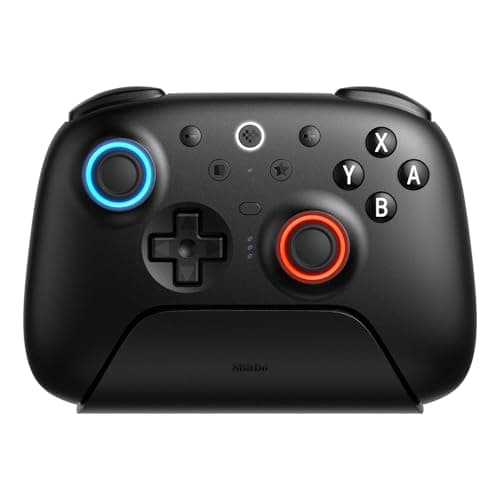
If you want one recommendation and no homework, buy the 8BitDo Ultimate 2 Bluetooth. It has Hall-effect sticks and triggers that resist drift, a charging dock, and deep remapping — it is listed for both Nintendo Switch and Switch 2 over Bluetooth, and it doubles as a 2.4GHz PC pad. It is the best all-round Switch controller for most people. The obvious baseline is the first-party Nintendo Switch Pro Controller, and if you already own one it is a perfectly good pad — comfortable, guaranteed-compatible, with the full-fat gyro and rumble Nintendo builds around. But it uses conventional potentiometer sticks that can eventually drift, it has no back buttons, and it is not the cheapest option. The four controllers below each beat it at something specific: drift resistance, a better d-pad, a comfortable handheld grip, or a lower price. Which one is right depends entirely on how you play.
Start with how you play: docked, handheld, or a bit of both
The Switch is really two machines, and the right controller depends on which one you use. Played docked, on the TV, you want a full wireless Pro-style pad you hold in both hands. Played handheld, with the console in your hands, a wireless pad is awkward — you want something that either clips onto the console or that you are happy to use with the Switch propped on a stand. And plenty of people do both, which usually means a wireless pad for the TV plus living with the Joy-Cons undocked, or a dedicated grip for handheld sessions. Sorting yourself into one of those three buckets eliminates most of this page for you before you even look at features. If you are also weighing the Switch against a PC handheld, our Steam Deck vs Switch comparison is worth a read.
The second thing worth knowing before you buy is stick drift, because it is the fault that eventually ruins most pads — the Joy-Cons became notorious for it. A conventional stick uses a physical wiper scraping a resistive track, which wears out; a Hall-effect stick reads a magnet with a sensor and never makes contact, so it lasts far longer. Two of the four picks here use Hall-effect sticks, and if that durability is your priority, our Hall-effect vs potentiometer sticks guide explains the mechanism, while the how to fix controller stick drift guide covers what to do if a pad you own has already started to wander.
How the ranking shakes out
The 8BitDo Ultimate 2 Bluetoothis the best all-round Switch pad and the pick for most people. It has Hall-effect on both the sticks and the triggers — the durability feature that matters most on a console whose stock sticks became a byword for drift — and it is listed for both Nintendo Switch and Switch 2 over Bluetooth. It ships with a charging dock so it lives topped up on the shelf, and 8BitDo's Ultimate Software handles remapping, back paddles and stick and trigger tuning. The genuine bonus is that it doubles as a 2.4GHz PC controller, so it is one pad for two machines — a big part of why it also features on our best controllers for PCpage. The trade-offs are that the software takes a little learning versus a plug-and-play Pro Controller, the shell feel is a small step below Nintendo's own, and gyro-aim is not guaranteed in every title the way a first-party pad promises, so check the games you care about.
The 8BitDo Pro 2is the pick for anyone whose Switch library leans on 2D. It has Hall-effect sticks and two back buttons, but its standout is one of the best d-pads on any modern controller — the reason it is the standing favorite for 2D platformers, fighting games and retro/emulation play. It connects over Bluetooth or wired, and like the Ultimate 2 it also works as a PC pad via a physical X-input mode switch. The compact, retro-styled shell is less comfortable than a full-size pad on a long 3D session and there is no 2.4GHz dongle in the box, so it is a specialist rather than an all-rounder — but for the games it is built for, nothing else here comes close. It is the d-pad pick on our best Hall-effect controllers page too.
The Hori Split Pad Pro solves a completely different problem: playing the Switch undocked. It clips onto the console's side rails in place of the Joy-Cons, replacing those tiny controls with full-size ergonomic grips, a proper d-pad, assignable back buttons and a turbo function — and because it draws power from the console, there is no battery to charge. Be clear about the limitation, though, because it is a big one: it is handheld-mode only. It has no wireless mode and does not work docked, and it drops HD rumble, gyro and NFC/amiibo to make room for the size and comfort. It also makes the console wider, which some travel cases will not fit. If you play the Switch mostly in your hands and want it to feel like a real controller, it is excellent; if you play on the TV, it is the wrong tool entirely.
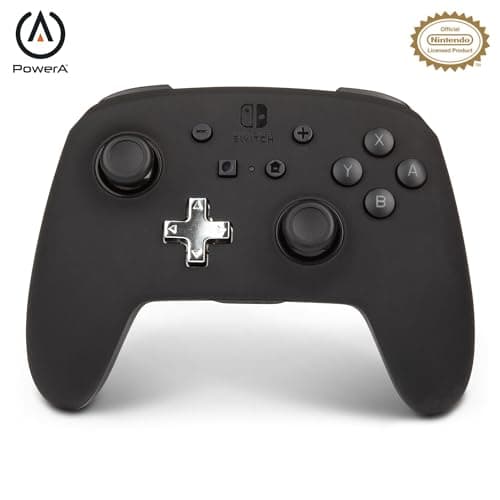
The PowerA Enhanced Wirelessis the budget wireless pick. It is officially licensed and connects over Bluetooth, listed for both Switch and Switch 2, and it adds two mappable advanced buttons on the back — a feature the first-party Pro Controller does not include — for clearly less than a Pro Controller costs. The honest catch is the sticks: it uses conventional potentiometers, so it carries the usual long-term drift risk, and its rumble, battery life and build feel are functional rather than premium. It is the right call when the priority is a cheap, wireless, back-button pad for the TV and you accept that the sticks are the ordinary drift-prone kind — if drift-proof matters more than price, the Ultimate 2 is the longer-lasting choice.
Wired, wireless, or clipped-on — and what you give up
Connection is the other axis that sorts this page. The Ultimate 2 Bluetooth and the PowerA are true wireless pads for docked, TV play. The Pro 2 is wireless over Bluetooth as well, but leans toward the handheld-and-desk crowd given its compact shape. The Hori is neither wireless nor docked-capable — it is a physical extension of the console for handheld play only. There is no single “best” connection; there is only the one that matches where you play. Our wired vs wireless controller guide covers the latency and convenience trade-offs if you are undecided, and Nintendo publishes its own controller compatibility notes for the Switch and Switch 2 worth checking before you buy.
How these compare to the first-party Pro Controller
Since the Pro Controller is the pad most Switch owners already have, it is worth being specific about where each pick actually improves on it. The Pro Controller's strengths are real: it is guaranteed compatible with everything, comfortable in the hand, and it delivers Nintendo's full gyro-aim and HD rumble the way the platform intends. Its weaknesses are equally real. It uses conventional potentiometer sticks, so over years of play it can develop the same drift the Joy-Cons became infamous for; it has no back buttons; and it is not cheap. The Ultimate 2 Bluetooth answers the drift concern head-on with Hall-effect sticks and adds back paddles and remapping the Pro Controller lacks. The Pro 2 beats it decisively on the d-pad. The PowerA undercuts it on price while adding mappable back buttons. And the Hori solves a problem the Pro Controller does not even attempt — comfortable handheld play. None of them is a strict replacement; each is a targeted upgrade for a specific need.
The one thing the third-party pads ask you to check is gyro and rumble, because Nintendo builds some games around motion aiming and its own HD rumble. The Ultimate 2 Bluetooth is a full-featured Pro-style pad, but gyro support is not guaranteed in every title the way a first-party controller promises, so if a specific game's motion controls matter to you, confirm the pad handles them. The Hori Split Pad Pro drops gyro and rumble entirely as part of its handheld-grip design — a deliberate trade for size and comfort, but a real one if you play something that leans on them. When motion and rumble are non-negotiable, the first-party Pro Controller stays the safe default, and these pads are the choice when their specific advantage matters more.
Switch 2 compatibility and buying for local multiplayer
Two of these pads — the 8BitDo Ultimate 2 Bluetooth and the PowerA Enhanced Wireless — are explicitly listed for both the original Nintendo Switch and the Switch 2 over their wireless connections, which is worth knowing if you have upgraded or plan to. Compatibility across console generations and system updates is the sort of thing that can shift, so the honest advice is to confirm current support against Nintendo's own compatibility information before you buy, especially for any game or feature you care about specifically. That is a large part of why the first-party Pro Controller stays the zero-risk default: its compatibility is never in question. The third-party pads earn their place by doing something the Pro Controller does not.
One more reason people shop for Switch controllers beyond the one in the box: local multiplayer. The Switch is a couch machine, and a second or third pad for party and co-op games is one of the most common reasons to buy. For that job the budget wireless PowerA is an easy call — officially licensed, wireless and clearly cheaper than a second Pro Controller — while the Ultimate 2 Bluetooth is the pick if you want the extra pad to be the good one you reach for first. Buying for a full couch does not mean buying identical flagships all round; it means matching each pad to who uses it and what they play. If the pads are getting ahead of the library, a roundup of the best games to play with friends is a sensible place to work out what goes on the screen once everyone is holding one.
How to choose between them
Sort yourself by how you play and the answer falls out. If you play mostly docked and want the most durable all-rounder, the Ultimate 2 Bluetooth is the pick, and it throws in PC use for free. If your library is heavy on 2D, fighting or retro games, the Pro 2 and its d-pad are worth owning even alongside another pad. If you play mostly handheld and want the console to feel like a real controller, the Hori Split Pad Prois the comfortable fix — just remember it does nothing docked. And if you want a cheap wireless pad with back buttons and can live with conventional sticks, the PowerAis the value pick. The first-party Pro Controller remains the zero-thought default if you would rather not choose at all, and several of these — the two 8BitDo pads especially — double as PC controllers, which our how to choose a gaming controller guide gets into. Every price here is pulled live and date-stamped, so the value order reflects what these pads actually cost today. Valve's Steam Input documentation is the reference if you plan to use one of these on a PC as well.
Buying for someone else rather than yourself? Our gaming gifts for Switch ownerspage covers the accessories around the console — cases, grips, storage and the rest — alongside the controllers ranked here.