Skip to content
GEAREDGAMING

HUB 03 · Best Value

The Best Gaming Keyboards for FPS

In a shooter you use about a dozen keys, and the rest of the board is just taking up the space your mouse wants. That is the whole argument for going small.

By Stephen V.Updated How we research
#ad

We earn a commission when you buy through our Amazon links, at no extra cost to you. It never affects our rankings, and we say so when the cheaper product is the better buy. How this works.

Top pick · Best Keyboard for FPS

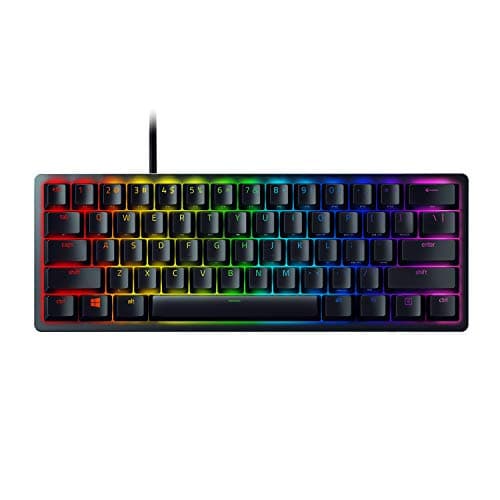
Razer Razer Huntsman Mini

Razer Huntsman Mini

7.6/10

Optical switches and a 60% footprint. The most 'competitive FPS' board here.

Price as of October 21, 2026. Prices change — Amazon's is the one that counts. #ad · we may earn a commission from this link to Razer Huntsman Mini

Verdict

The short version

The best gaming keyboard for FPS is the Razer Huntsman Mini — linear optical switches in a 60% layout. Optical actuation has no mechanical debounce delay and cannot develop chatter over time, and the 60% footprint frees a large amount of desk for the low-sensitivity mouse sweeps competitive aim depends on. It is the pick for someone who plays shooters primarily and does not need the keyboard to double as a work board.

Which is also the catch worth stating up front.A 60% board has no arrow keys, no function row and no navigation cluster — everything lives on a held-Fn layer, and it is a genuine adjustment if you also use this desk for spreadsheets or code. If that sounds unacceptable, the Logitech G515 LIGHTSPEED TKL keeps the function row and arrows in a low-profile wireless board, and the Logitech G413 SE is the plain full-size wired option. On the smallest budget, the Redragon K617 Fizzis a 60% hot-swap board for about the price of a mousepad — its stock switches are average, and you can replace them.

Compare

Specs and prices at a glance

#ProductKey specsBest forPrice
01Razer Huntsman Mini

Razer

  • Linear optical switches
  • 60% layout
  • Aluminum top
  • PBT keycaps
FPS players who want maximum mouse room$69.00 on Amazon →
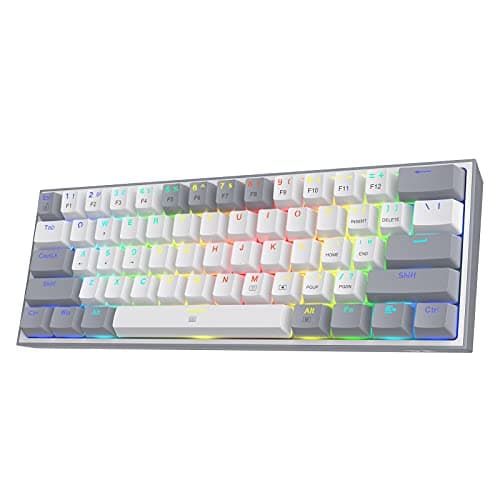
02Redragon K617 Fizz

Redragon

  • Mechanical, hot-swappable
  • 60% · 61-key
  • Per-key RGB
  • Detachable USB-C
Tinkerers and tiny desks$29.99 on Amazon →
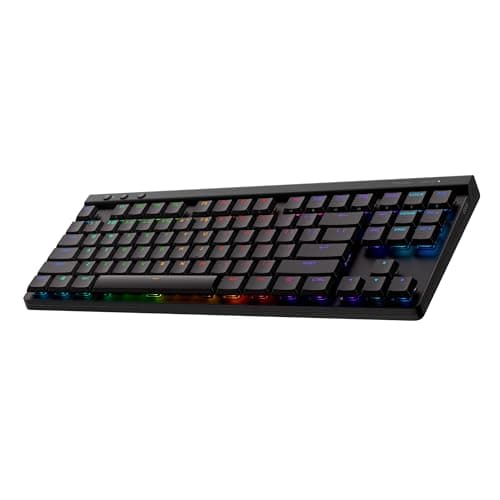
03Logitech G515 LIGHTSPEED TKL

Logitech G

  • LIGHTSPEED 2.4GHz + Bluetooth
  • Low-profile · TKL
  • Tactile switches
  • LIGHTSYNC RGB
Best wireless all-rounder$109.99 on Amazon →
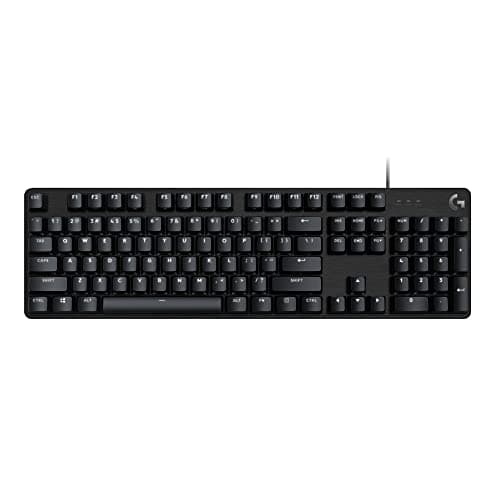
04Logitech G413 SE

Logitech G

  • Tactile mechanical
  • Full-size
  • Aluminum top plate
  • White backlight
A mechanical that just works$78.99 on Amazon →

#ad · Specs as published by the manufacturer or the Amazon listing. Live prices from the Amazon Creators API, as of October 21, 2026. Where we have no verified live price we show none, rather than print a number that has rotted.

Three things make a keyboard good for shooters: switches that actuate early and predictably, a footprint small enough to leave your mouse room, and N-key rollover so every simultaneous press registers. Almost everything else on the box — RGB, media wheels, wrist rests, polling rate claims — is irrelevant to whether you win a fight. This page ranks four boards against those three things, and explains why the third one is already solved on everything worth buying.

It is worth being honest about the size of the effect first. A keyboard is the input device with the least headroom for improvement in an FPS: you press a movement key and the character moves. Compared with a mouse, where sensor behaviour, weight and shape measurably change where your crosshair ends up, a keyboard upgrade is a comfort and consistency purchase. Buy the mouse first — our best gaming mice for FPSpage is the one that matters more — and then buy the keyboard that suits how you sit.

Switch type: linear, and why

Mechanical switches come in three broad families, and Cherry publishes the actuation force and travel figures that define them.

  • Linear switches press straight down with no bump and no click. Nothing interrupts the travel, so the press is smooth and fast to repeat. This is the competitive default, and it is the default for a reason rather than a fashion.
  • Tactile switches have a bump at the actuation point. You can feel the key register, which is excellent for typing and slightly slower for rapid counter-strafing, because the bump is physical resistance you have to push through each time.
  • Clickyswitches add an audible click to the bump. Satisfying, loud, and the worst choice of the three if you also use a microphone — your stream or your teammates hear every key.

Opticalswitches are a separate axis rather than a fourth family: the stem breaks a light beam instead of closing a metal contact. Because there is no physical contact to bounce, there is no debounce delay to filter out and the switch cannot develop the double-click “chatter” that eventually kills a mechanical board — the fault our keyboard chatterguide is about. Most optical switches are also linear, which is why an optical linear board is the tidiest answer to this page's question. Razer documents the mechanism on its own site, and our optical vs mechanical switches guide covers the trade-offs, including the smaller aftermarket.

Footprint: the actual reason to buy a small board

Competitive players run low mouse sensitivity, which means aiming across the screen is a physical arm movement of several inches, repeated thousands of times a session. A full-size keyboard with a number pad occupies roughly 17 inches of desk; a TKL board is around 14; a 60% board is around 11.5. Those six inches are not an abstraction — they are the difference between a comfortable sweep and clipping your keyboard mid-flick.

The second effect is angle. With a smaller board you can centre your mouse hand closer to your body midline, which keeps your shoulder in a neutral position instead of abducted out to the side. Over a four-hour session that is a comfort difference you feel.

The cost is the keys you lose. On a 60% layout the function row, arrows, Home/End/Page keys and often Delete all move to a held-Fn layer — the layer concept QMK documents is the same idea every compact board implements. In games you will not notice. In a spreadsheet, a browser or an IDE you will notice on day one and resent it by the end of the week. TKL is the honest compromise: you keep everything except the number pad, which in a shooter you were not using. Our keyboard sizes explained guide has the full layout ladder, and best 60% keyboards and best TKL keyboards each go deeper on one of the two formats.

N-key rollover: already solved, still worth checking

If you are holding W and A, pressing Shift and then tapping Space, the keyboard has to report four simultaneous presses. A cheap membrane board can drop one of them — the fault called ghosting. Every keyboard on this page has N-key rollover, meaning any number of simultaneous presses all register, so this is not a differentiator between the four. It is still the one spec to verify if you are buying something not on this page, and our anti-ghosting and N-key rollover guide explains how the marketing terms map to the real behaviour.

What to ignore: polling rate and “1ms” claims

Keyboards are now advertised with 1,000Hz and 8,000Hz polling rates. The difference between them is under a millisecond, which is a small fraction of both human reaction time and the frame time of the monitor the result has to be drawn on. Independent measurement bears this out — RTINGS measures keyboard latency across the market, and the spread among decent boards is not a competitive factor. Spend the attention on switch feel and layout, which you notice every minute, rather than on a number you cannot perceive. If input lag is genuinely your concern, our how to reduce input lag guide goes after the parts of the chain that actually contribute milliseconds.

Wired or wireless for FPS

Modern low-latency 2.4GHz wireless — Logitech's LIGHTSPEED is the best-documented example — is genuinely fast enough that you cannot feel the difference against a cable. Bluetooth is not; it is for a tablet, not a match. The real arguments for wireless are cable clutter and desk tidiness, and the real argument against is one more thing to charge. Either is defensible. Our wired vs wireless keyboard guide has the longer version.

Which of the four

Shooters are most of what you play and the desk is for gaming: the Huntsman Mini. You want the 60% footprint on the smallest possible budget and do not mind tuning it: the K617 Fizz, whose hot-swap sockets mean the average stock switches are a starting point rather than the end state — Redragon publishes the layout and switch details. You need the function row and arrows and want no cable: the G515 TKL. You want a rigid, plain, wired full-size board that will not surprise you: the G413 SE. If you want the whole field rather than the FPS-shaped subset, best gaming keyboards under $100 and best mechanical keyboards are the broader pages, and how to choose a gaming keyboard is the one to read if none of these four is quite it.
The short answer

Quick picks

#ProductBest forScorePrice
01
Razer Razer Huntsman Mini
Razer Huntsman Mini

Optical switches and a 60% footprint. The most 'competitive FPS' board here.

FPS players who want maximum mouse room
7.6
$69.00 on Amazon →
02
Redragon Redragon K617 Fizz
Redragon K617 Fizz

Hot-swap sockets on a budget board. That was not supposed to be possible.

Tinkerers and tiny desks
7.2
$29.99 on Amazon →
03
Logitech G Logitech G515 LIGHTSPEED TKL
Logitech G515 LIGHTSPEED TKL

The wireless board most people should buy: low-profile, genuinely fast LIGHTSPEED wireless, and it looks like it belongs on a grown-up desk.

Best wireless all-rounder
8.0
$109.99 on Amazon →
04
Logitech G Logitech G413 SE
Logitech G413 SE

A plain, solid, full-size mechanical. No RGB, no gimmicks, no regrets.

A mechanical that just works
7.2
$78.99 on Amazon →

#ad · Live prices from the Amazon Creators API, as of October 21, 2026. Where we have no verified live price, we show none — we would rather leave a gap than print a number that has rotted.

In detail

The picks, in full

01
Razer Razer Huntsman Mini

FPS players who want maximum mouse room

Razer Huntsman Mini

Linear optical switches60% layoutAluminum topPBT keycaps
7.6/10

Optical switches and a 60% footprint. The most 'competitive FPS' board here.

Switch quality
9
Build quality
9
Ergonomics
6
Features
7
Value
7

Pros

  • Optical switches actuate on a light beam — no debounce delay, and they cannot develop chatter
  • 60% frees an enormous amount of desk for low-sensitivity aim
  • PBT keycaps that will not go shiny

Cons

  • No arrow keys, no F-row, no nav cluster — everything is a Fn layer, and it is a real adjustment
  • Right at the top of this page's budget

Don't buy this if…

…you use the keyboard for work as well as games. Losing the arrows and F-keys is genuinely painful in a spreadsheet, and you will resent it by Wednesday.

$69.00View on Amazon

$129.9947% off

Price as of October 21, 2026. Prices change — Amazon's is the one that counts.

#ad · we may earn a commission from this link to Razer Huntsman Mini

02
Redragon Redragon K617 Fizz

Tinkerers and tiny desks

Redragon K617 Fizz

Mechanical, hot-swappable60% · 61-keyPer-key RGBDetachable USB-C
7.2/10

Hot-swap sockets on a budget board. That was not supposed to be possible.

Switch quality
7
Build quality
6
Ergonomics
6
Features
8
Value
9

Pros

  • Hot-swap sockets mean you can pull a switch out and drop a new one in with no soldering — an upgrade path almost nothing else this cheap offers
  • The 60% footprint frees a large amount of desk for low-sensitivity mouse sweeps
  • Detachable USB-C cable, so it stores and travels cleanly

Cons

  • 60% means no arrow keys, no function row and no navigation cluster — it all lives on a hidden Fn layer, and that is a real adjustment
  • The stock switches and stabilizers are average — the whole point is that you can replace them
  • Small, light and plastic; it is a platform, not a premium object

Don't buy this if…

…you use the same keyboard for spreadsheets or coding. Losing the arrows and F-row hurts for work — buy the TKL K552 instead.

$29.99View on Amazon

$44.9933% off

Price as of October 21, 2026. Prices change — Amazon's is the one that counts.

#ad · we may earn a commission from this link to Redragon K617 Fizz

03
Logitech G Logitech G515 LIGHTSPEED TKL

Best wireless all-rounder

Logitech G515 LIGHTSPEED TKL

LIGHTSPEED 2.4GHz + BluetoothLow-profile · TKLTactile switchesLIGHTSYNC RGB
8.0/10

The wireless board most people should buy: low-profile, genuinely fast LIGHTSPEED wireless, and it looks like it belongs on a grown-up desk.

Switch quality
8
Build quality
8
Ergonomics
9
Features
8
Value
7

Pros

  • LIGHTSPEED is the same low-latency 2.4GHz wireless Logitech's pro mice use — you cannot feel it versus wired
  • The low-profile design is slim, quiet and far kinder on the wrists than a tall gaming board
  • A restrained, non-gamery look with per-key RGB that suits a work-and-play desk

Cons

  • The switches are soldered — there is no hot-swap here, so you live with the tactile choice you buy
  • Costs meaningfully more than a triple-mode board from Royal Kludge that does the wireless part for less
  • Low-profile keys feel different from full-height switches — try the feel before you commit if you can

Don't buy this if…

…you want to swap switches later or you are on a tight budget. This is a sealed, premium low-profile board — for tinkering or value, the RK84 or Keychron K8 Pro are the hot-swap picks.

$109.99View on Amazon

$159.9931% off

Price as of October 21, 2026. Prices change — Amazon's is the one that counts.

#ad · we may earn a commission from this link to Logitech G515 LIGHTSPEED TKL

04
Logitech G Logitech G413 SE

A mechanical that just works

Logitech G413 SE

Tactile mechanicalFull-sizeAluminum top plateWhite backlight
7.2/10

A plain, solid, full-size mechanical. No RGB, no gimmicks, no regrets.

Switch quality
8
Build quality
9
Ergonomics
6
Features
5
Value
8

Pros

  • Aluminum top plate — it is genuinely rigid where the budget boards flex
  • Good tactile switches straight out of the box, no tuning needed
  • White backlight only, which is a feature if you're tired of RGB

Cons

  • No hot-swap. When the switches wear out, the keyboard is finished
  • Wired only
  • Full-size, so it eats desk space you might want for mouse sweeps

Don't buy this if…

…you want to modify it later. It is a sealed appliance — excellent, and permanently what it is.

$78.99View on Amazon

$89.9912% off

Price as of October 21, 2026. Prices change — Amazon's is the one that counts.

#ad · we may earn a commission from this link to Logitech G413 SE

How we picked

We do not run a testing lab

We researched published specifications, third-party lab measurements, manufacturer documentation and aggregated owner reviews, then scored each product against a published rubric. The scores are judgments from documented research — they are not measurements we took, because we do not have a lab and we are not going to pretend we do. Where a number came from someone else's lab, we name them and link them in Sources.

Questions

Frequently asked

What switches are best for FPS games?
Linear switches, or optical switches (which are usually linear). They press straight down with no tactile bump to push through, so repeated presses are smooth and consistent. Tactile switches are better for typing; clicky switches are the worst choice if you use a microphone, because everyone hears them.
Is a 60% keyboard better for FPS?
It is better for mouse room, which is the thing that actually helps. A 60% board is around five inches narrower than a full-size one, and at low mouse sensitivity that space is the difference between a clean sweep and clipping the keyboard. The cost is losing the arrows, function row and navigation keys to a held-Fn layer, which hurts for work and not for games.
Does keyboard polling rate matter for gaming?
Barely. The difference between a 1,000Hz and an 8,000Hz polling rate is under a millisecond, which is a small fraction of human reaction time and of a single monitor frame. Independent latency measurements show the spread among decent boards is not a competitive factor. Switch feel and layout matter far more.
Do I need N-key rollover for FPS?
You need it, and you already have it on anything worth buying. N-key rollover means any number of simultaneous key presses all register, so holding W and A while pressing Shift and Space cannot drop an input. Every keyboard on this page has it; it is the spec to verify on a cheap membrane board.
Is wireless okay for competitive shooters?
Low-latency 2.4GHz wireless is fine — you cannot feel it against a cable. Bluetooth is not, and no board should be used over Bluetooth for a match. The honest trade with wireless is cable tidiness against one more device to charge.

Keep reading

Receipts

Sources

We do not run a testing lab, and we do not pretend to. Where a measured number came from someone else's lab, we name them and link them. Where we could not verify something, we say so on the page rather than quietly leaving it out. Read our full method.