Before you buy anything on this page: most people should not do this upgrade. Swapping the Steam Deck's internal SSD means opening the device, and that can affect your warranty. For the majority of owners, a microSD card is the correct, no-risk way to add storage — no screwdriver, no warranty question, no chance of a bricked handheld.
This is an advanced upgrade, and we are not going to pretend otherwise. To fit any drive here you disassemble the Deck, remove the shield, swap the SSD and reimage SteamOS from a recovery USB. It is well documented — iFixit and Valve both publish guides — but it is not a five-minute job, and a mistake can cost you the device. If reading that sentence made you nervous, that is useful information: buy a microSD card instead and enjoy your handheld. Our Steam Deck storage guide explains exactly what a card can and cannot do, so you can make that call before you pick up a screwdriver.
Still here? Good — because for the right person this is a genuinely excellent upgrade. An internal SSD is dramatically faster than any microSD card, so games installed on it load and stream assets the way the Deck was designed to. If you play large, storage-heavy titles and the card slot is not keeping up, this is the real fix, and the guide above says so in as many words. The rest of this page is about buying the drive correctly, because there is exactly one way to get it wrong and it is expensive.
The single most important spec is the physical size: M.2 2230. The Steam Deck takes a short 2230 drive, not the longer 2242 or the full-length 2280 you find in a desktop or most laptops. A 2280 drive simply will not fit — it is not a compatibility warning, it is a ruler. Every drive on this page is 2230, and that is the first thing to check on any listing you look at elsewhere.
The second thing worth knowing is that you should not overpay for headline speed. These are PCIe Gen4 drives, but the Deck's M.2 slot caps throughput well below what a Gen4 drive can do on a desktop. In practice that means the fastest 2230 drive and a merely-good one perform close to identically inside a Steam Deck, because the slot, not the SSD, is the limit. So the decision is not about who has the biggest sequential number — it is capacity, price and which brand you want behind you if something fails.
What the upgrade actually gets you
It is worth being concrete about the payoff, because it is the reason anyone accepts the risk. An internal NVMe SSD is not a little quicker than a microSD card — it is in a different class entirely. Games installed on it launch faster, load between areas faster, and stream open-world assets without the hitching a card can introduce on the most demanding titles. If you have ever watched a big game stutter as it pulls textures off the card slot, moving it to an internal SSD is the fix, and no card upgrade matches it. That is the honest case for doing this: the ceiling is genuinely higher, and for the right library the device feels transformed.
The counter-case, which we keep making because it is true, is that most people never push the card hard enough to justify opening the device. The card slot is slower than internal storage, always — but for a library you play a game or two from at a time, it is perfectly serviceable, and the SSD's advantage is invisible. So the upgrade earns its keep for a specific owner: someone with a large installed library, who plays the heaviest titles, and who wants the Deck to feel as fast as it possibly can. If that is not you, the screwdriver stays in the drawer and the card does the job.
One more honest note before the picks. This is a one-time job you keep for the life of the device, which changes how to think about the cost. Unlike a card you might buy a second of, an internal drive is a single decision — so the sensible move is usually to buy a size up from what you need today rather than reopening the Deck in a year. That is the main reason the 1TB, not the 500GB, is our overall pick: the price step is small and it buys you out of a second surgery.
How to buy a Steam Deck SSD without a mistake
First, be honest about whether you should
This is the buying-guide equivalent of the warning above, and it belongs here too because it is the most important decision on the page. If you only need a little more room, or you are not comfortable opening the handheld, the right purchase is a microSD card, not an SSD. A card is the no-risk route, and for a large majority of owners it is genuinely all they need. The SSD is for people who want maximum speed, a big installed library, and are comfortable with a screwdriver and a SteamOS reinstall.
The drive must be M.2 2230 — this is non-negotiable
Say it again because it is the one mistake that wastes money: the Deck fits a 2230 drive. 2242 and 2280 drives are longer and will not physically go in. When you shop, the number after “M.2” is the length in millimeters, and it has to read 2230. Every pick on this page is the right size; the danger is buying a cheaper-looking 2280 drive from a search result and discovering the ruler problem after you have the Deck open.
Do not overpay for Gen4 speed you cannot use
The Deck's slot caps drive throughput below what a Gen4 SSD can deliver elsewhere, so the headline sequential figure — the thing manufacturers compete on — is largely irrelevant here. Two 2230 drives with very different spec-sheet speeds will feel the same in the Deck because the slot is the bottleneck, not either drive. This is the same logic that governs microSD cardsin the Deck's UHS-I slot: once you clear the bus, extra advertised speed has nowhere to go. Buy on capacity and trust, not on the number.
Capacity versus price is the real decision
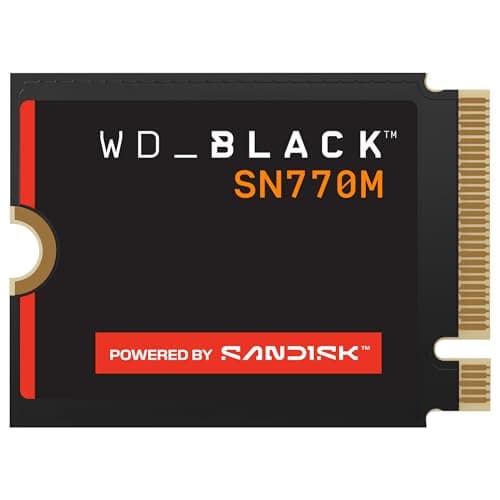
With speed effectively equalized, the choice comes down to how much room you want and what you will pay per gigabyte. 500GB used to be the cheapest way in, but that tier has priced itself out: the cheapest 512GB 2230 drive still on sale costs more than a 1TB one, so there is no longer a reason to buy small. 1TB is the value sweet spot for most people — a small step up in price for double the room — which is why the WD SN770M 1TB is our overall pick. 2TB is for the person who wants to install everything and never think about storage again, and it approaches the cost of a cheaper handheld itself, so it is overkill for a modest library.
Buy the drive bare — no heatsink
The Deck's SSD sits in a tight, shielded pocket, and the drives that fit it are single-sided 2230 modules with the chips on one face. Every pick here is that kind of drive. You do not need a separate heatsink — there is no room for one, and the Deck's shield is designed around a bare 2230 module. If a listing shows a 2230 drive wearing a chunky heatsink, that heatsink is exactly the thing that will stop the shield closing. Buy the drive on its own.
Skip the 2280-with-adapter idea
Every so often someone suggests fitting a full-size 2280 drive with an adapter to save money. Do not. There is no physical room in the Deck for a 2280 module however you mount it, and adapters that promise to shim a longer drive into a shorter slot do not solve the space problem — they create a new one. The 2230 requirement is a hard physical constraint, not a preference, and the drives on this page exist precisely so you do not have to improvise around it.
Endurance is a non-issue for a games drive
People coming from the desktop world sometimes worry about write endurance on a small, DRAM-less drive. For storing and launching games it does not matter. Installing a game is a write-once, read-many pattern — you write it to the drive once and then read it back every time you play. The endurance ratings on these drives comfortably outlast the way a handheld actually uses them.
DRAM-less is fine for a games drive
Every 2230 drive here is DRAM-less, which sounds like a downgrade and is not one for this use. DRAM-less drives trail desktop SSDs in sustained heavy writes — the kind of workload you would hit editing video, not installing games. For storing and launching a Steam library it is a non-issue, and it is part of why these small drives are affordable in the first place.
Back up first, and keep saves in the cloud
Because the upgrade wipes the drive, reinstall SteamOS from Valve's recovery image and let Steam Cloud restore your saves. Follow the iFixit or Valve guide step by step rather than improvising, and do not start until you have a recovery USB ready. This is the least glamorous advice on the page and the one most likely to save your afternoon.
The picks in one line each
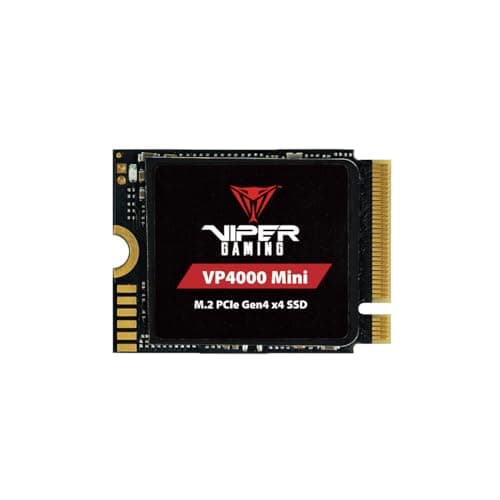
The WD SN770M 1TB is the one to buy for most people — the community-favorite drive, the value sweet spot on capacity, and WD's support behind it. The Patriot VP4000 Mini 1TB is the value alternative: it undercuts the WD and hits the same practical ceiling inside a Deck, so if it is cheaper on the day, take it. There is no 500GB pick here any more — the small-capacity 2230 tier has priced itself out, and a 1TB drive now costs less than the cheapest 512GB one we could find. And the WD SN770M 2TB is for the person who wants to install everything and stop thinking about storage, at a price that approaches a cheaper handheld itself — overkill for a modest library, exactly right for a huge one.
What we could not verify
We have not benchmarked these drives against each other inside a Steam Deck — we do not have a lab, and the whole point of this page is that the Deck's slot caps them close together anyway, so a benchmark would mostly measure the Deck, not the drive. Everything above rests on the published 2230 form-factor requirement, Valve's and iFixit's documented upgrade procedure, and the manufacturers' own specifications, all linked below. If you want measured per-drive load times inside a Deck, that is a number we cannot honestly provide, and we would rather say so than invent one.