Skip to content
GEAREDGAMING

HUB 03 · Best Value

What GPU Do You Need for 1440p 144Hz?

The wrong way to answer this is a list of graphics cards. The right way is to measure what your card already does, because the answer changes completely between an esports title and a new single-player release.

By Stephen V.Updated How we research
#ad

We earn a commission when you buy through our Amazon links, at no extra cost to you. It never affects our rankings, and we say so when the cheaper product is the better buy. How this works.

There is no single graphics card that is “the one for 1440p 144Hz,” because the same card will hold 300fps in a competitive shooter and 70fps in a new single-player release. The useful question is not which card to buy — it is what frame rate your current card produces in the games you actually play, at the resolution you are considering. That is measurable in about ten minutes, and this guide is how.

We are deliberately not publishing a table of GPU models with frame rates next to them. We have not benchmarked those cards, the numbers move with every driver and game patch, and a number we could not stand behind is worse than no number. What we can give you is the arithmetic, the method, and an honest account of which monitor to buy at each answer.

The arithmetic: 1440p is 78% more work than 1080p

A frame is a grid of pixels, and the graphics card has to compute every one of them.

  • 1080p:1920 × 1080 = about 2.07 million pixels per frame.
  • 1440p:2560 × 1440 = about 3.69 million pixels per frame — 78% more than 1080p.
  • 4K:3840 × 2160 = about 8.29 million pixels per frame — four times 1080p.

As a rough planning rule: if your card holds a comfortable frame rate at 1080p, expect somewhere around 60–70% of that number at 1440p. It is not exact — some of a frame's cost is resolution-independent work the CPU and GPU do regardless — but it is close enough to decide whether you are in the right neighbourhood. Going the other way, a card that manages 90fps at 1440p will typically clear 144 comfortably at 1080p.

Why the game matters more than the resolution

This is the part the question usually misses. Frame rate is a property of a specific game at specific settings, not of a card. The spread is enormous:

  • Competitive esports titles— the shooters and MOBAs most high-refresh monitors are bought for — are built to run on modest hardware, because that is where their audience is. Many mid-range cards clear 144fps at 1440p in these titles without difficulty. If this is what you play, the answer to this page's question is usually “the card you already have.”
  • Current AAA single-player games with ray tracing available are the opposite case. Holding 144fps at 1440p in those is a flagship-card expectation, and even then it usually means turning ray tracing down.
  • Everything in between depends on your settings. Shadows, volumetric effects and ray tracing cost disproportionately more than texture resolution, which is why dropping two settings often buys more frames than dropping a whole resolution tier.

So the honest framing: a high-refresh monitor is bought for the games where your card is fast, and those games are usually exactly the ones where high refresh helps most. You do not need 144fps in a slow single-player game, and a variable refresh rate panel makes the lower frame rates in those titles look smooth anyway.

How to measure it in ten minutes

Do this before you buy anything. It replaces every estimate on this page with a fact about your own machine.

  • Turn on a frame-rate overlay. Both NVIDIA and AMD ship a performance overlay in their own driver software, and many games have a built-in counter in the video options.
  • Set your game to the resolution you are considering.You do not need the monitor to test this — render at 1440p on a 1080p screen and the frame rate is representative even though the image is downscaled.
  • Play the demanding part, not the menu.A quiet corridor tells you nothing. Find a busy firefight or a dense city street — your 1% low frame rate in those moments is what you will actually feel.
  • Write down the number for each game you play most. Then buy a monitor whose refresh rate sits a little above the one you care about, not far above all of them.

Upscaling changes the answer, legitimately

DLSS from NVIDIA and FSR from AMD render the frame at a lower internal resolution and reconstruct it to your display resolution. At 1440p on quality settings the result is good enough that a large share of players leave it on permanently, and it can be the difference between 95fps and 144.

Two honest caveats. Upscaling quality varies by game and by implementation version, so it is not a guaranteed multiplier. And frame generation — which inserts interpolated frames rather than rendering them — raises the number on the counter without reducing input latency the way real frames do, which matters in a competitive shooter and does not in a single-player game.

What a high refresh rate does and does not give you

A monitor's refresh rate is a ceiling, not a promise: a 144Hz panel fed 80fps shows 80 distinct images a second. That is not wasted — adaptive sync, standardised by VESA, matches the panel to whatever your card delivers and removes tearing without the input-lag cost of V-Sync, so an underfed high-refresh monitor still looks better than a 60Hz one. But you are not getting the thing you paid for until the frames arrive.

The benefit curve also flattens. 60Hz to 144Hz is transformative. 144Hz to 240Hz is real and much smaller — the motion-persistence research Blur Busters publishes shows why — and 240Hz to 360Hz is a specialist purchase. Our is 240Hz worth it and refresh rate explained guides go further into both.

So which monitor should you buy

Once you have your measured number, the decision is straightforward. Four cases, and the four panels below map onto them in order.

Your card manages well under 100fps at 1440p in the games you play:buy 1080p at a high refresh rate instead. A 24-inch 180Hz panel costs less than a 1440p one, and 1080p at 24 inches is about 92 pixels per inch — sharp enough at that size, which our 1080p monitor page covers. You get the high refresh you were buying for, at frames your card can actually produce.

Your card manages 100–160fps at 1440p:this is the 1440p 144–180Hz sweet spot, and it is where most of the market sits for good reason. A 27-inch 1440p panel at a rated 180Hz is the sensible buy, with adaptive sync covering the dips.

Your card clears 200fps at 1440p in the titles you care about: 240Hz is a real upgrade rather than a number, and the cheapest 1440p 240Hz panel is the efficient way to take it. Best 240Hz monitors is the full field; best monitors for FPS is the page if shooters are the point.

You care more about image than frame rate:spend the pixels on resolution instead of Hz. A 4K panel at a lower refresh rate is the better buy for single-player games, and it downscales gracefully when you need frames — 1440p vs 4K works through that trade, and best 32-inch monitors is where the bigger 4K panels are ranked.

One last practical note: whatever you buy, make sure you are actually getting its refresh rate. Windows frequently defaults a new monitor to 60Hz, and the wrong port or cable caps it silently — our HDMI vs DisplayPort and how to check your refresh rate guides are the two pages that catch this.
The short answer

Quick picks

#ProductBest forScorePrice
01
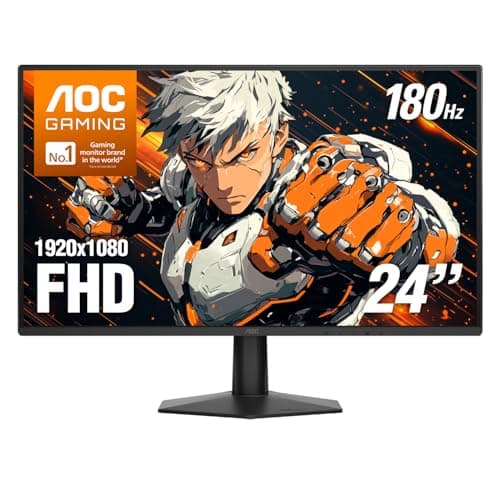
AOC AOC 24G51F2
AOC 24G51F2

The one to buy. 24in, 1080p, Fast IPS, 180Hz — the competitive-gaming standard, cheap.

The best all-round pick
8.0
$105.15 on Amazon →
02
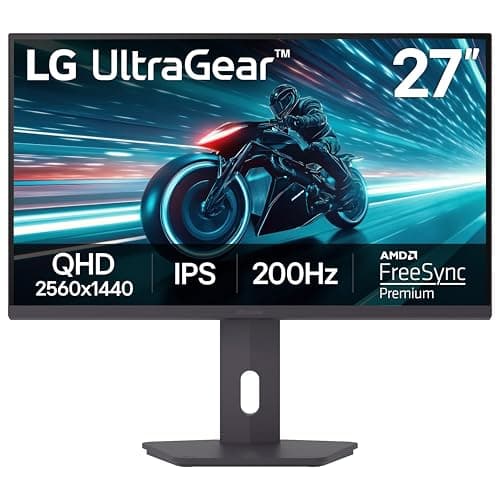
LG LG UltraGear 27GS75Q-B
LG UltraGear 27GS75Q-B

The one to buy. 1440p, IPS, 180Hz and a stand that actually adjusts — the complete package for the money.

The best all-round pick
8.6
$169.99 on Amazon →
03
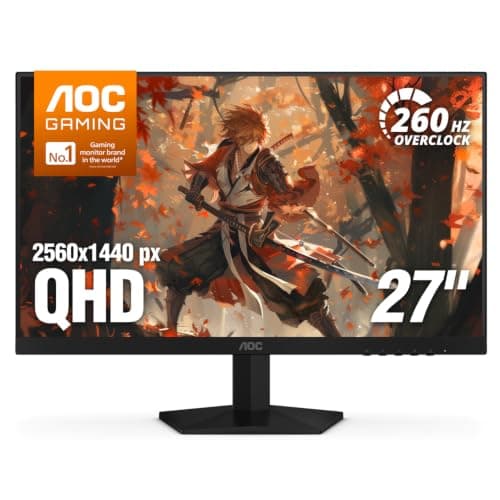
AOC AOC Q27G41ZE
AOC Q27G41ZE

240Hz and 1440p together for under $200 — the most frames per dollar on the page, if your GPU can feed them.

Competitive play / most Hz
7.4
$159.99 on Amazon →
04
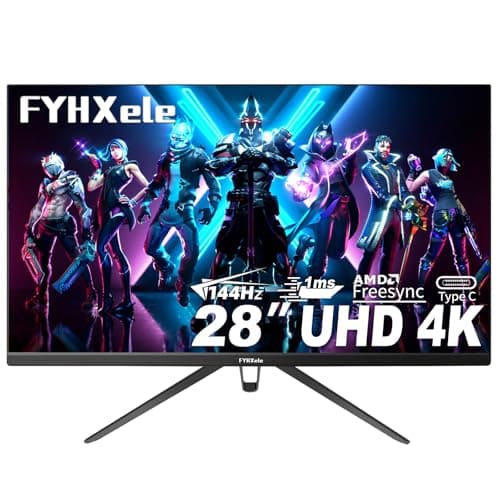
Generic 28" 4K 144Hz IPS
28" 4K 144Hz IPS

A bigger 28-inch 4K canvas with HDR400 certification, still priced well under the flagships.

Best value big 4K
7.0
Check Price on Amazon →

No buyable offer at last check

#ad · Live prices from the Amazon Creators API, as of October 21, 2026. Where we have no verified live price, we show none — we would rather leave a gap than print a number that has rotted.

In detail

The picks, in full

01
AOC AOC 24G51F2

The best all-round pick

AOC 24G51F2

24"1920x1080 Fast IPSAOC rates 180Hz / 0.5ms MPRTAdaptive Sync
8.0/10

The one to buy. 24in, 1080p, Fast IPS, 180Hz — the competitive-gaming standard, cheap.

Panel quality
8
Build quality
8
Ergonomics
6
Features
8
Value
10

Pros

  • Fast IPS at 180Hz for close to VA money — you get the color and the viewing angles without paying the usual premium
  • 24in/1080p is the size and resolution competitive players actually use, and it is not a compromise
  • DisplayPort 1.4 and HDMI 2.0 both carry the full 180Hz, and AOC backs the panel with a three-year zero-bright-dot warranty

Cons

  • 1080p on a 24in panel is not sharp by modern standards — you will see pixels
  • IPS contrast is mediocre; blacks are gray in a dark room
  • The slim stand tilts only — no height adjustment, no swivel, no pivot, so raising it means a VESA arm

Don't buy this if…

…you mostly play story games in the dark. IPS blacks will disappoint you — the KOORUI's VA panel is the better tool for that, and it costs about the same.

$105.15View on Amazon

Price as of October 21, 2026. Prices change — Amazon's is the one that counts.

#ad · we may earn a commission from this link to AOC 24G51F2

02
LG LG UltraGear 27GS75Q-B

The best all-round pick

LG UltraGear 27GS75Q-B

27"2560x1440 IPSLG rates 180Hz (OC 200Hz) / 1msHeight/pivot stand
8.6/10

The one to buy. 1440p, IPS, 180Hz and a stand that actually adjusts — the complete package for the money.

Panel quality
9
Build quality
8
Ergonomics
9
Features
8
Value
9

Pros

  • 1440p IPS at 180Hz is the configuration most people should own, and LG tunes its panels a clear step above the no-name competition
  • A tilt/height/pivot stand — the ergonomic adjustment budget monitors almost always delete to hit a price
  • Certified for both NVIDIA G-SYNC Compatible and AMD FreeSync, so variable refresh works whatever card you run

Cons

  • The HDR10 badge is nominal — no local dimming, so it is SDR with a wider input range, not real HDR
  • The 200Hz is an overclock; you are really buying a very good 180Hz panel

Don't buy this if…

…your graphics card is entry-level. 1440p at 180Hz is a lot of pixels to feed, and an older or budget GPU will leave most of those frames on the table — a 1080p panel from our under-$200 guide is the smarter buy until you upgrade it.

$169.99View on Amazon

Price as of October 21, 2026. Prices change — Amazon's is the one that counts.

#ad · we may earn a commission from this link to LG UltraGear 27GS75Q-B

03
AOC AOC Q27G41ZE

Competitive play / most Hz

AOC Q27G41ZE

27"2560x1440 IPSAOC rates 240Hz (OC 260Hz) / 0.3msAdaptive Sync
7.4/10

240Hz and 1440p together for under $200 — the most frames per dollar on the page, if your GPU can feed them.

Panel quality
8
Build quality
7
Ergonomics
5
Features
8
Value
9

Pros

  • 240Hz on an IPS 1440p panel at this price would have cost flagship money two years ago
  • G-SYNC Compatible with a 0.3ms rated response, aimed squarely at fast shooters
  • AOC's 3-year zero-bright-dot panel warranty is unusually generous for the money

Cons

  • 'HDR Ready' means it accepts an HDR signal, not that it displays real HDR — treat it as an SDR monitor
  • Only HDMI 2.0, so 240Hz is DisplayPort-only and a PS5 / Series X is capped at 60Hz on this screen
  • 240Hz at 1440p is a heavy GPU ask — you need frames in the 200s to use it, and most cards will not hit that in modern titles

Don't buy this if…

…you play story-driven or graphically heavy games. The 240Hz is dead weight unless you are pushing competitive shooters at very high frame rates — you would get a better stand and the same sharpness from a 180Hz panel instead.

$159.99View on Amazon

Price as of October 21, 2026. Prices change — Amazon's is the one that counts.

#ad · we may earn a commission from this link to AOC Q27G41ZE

04
Generic 28" 4K 144Hz IPS

Best value big 4K

28" 4K 144Hz IPS

28" 4K UHD3840x2160 IPSRated up to 144HzHDR400
7.0/10

A bigger 28-inch 4K canvas with HDR400 certification, still priced well under the flagships.

Panel quality
8
Build quality
6
Ergonomics
6
Features
7
Value
8

Pros

  • 28 inches gives 4K a little more visual impact than a 27 without ballooning in size
  • HDR400 certification means brighter highlights than the bargain panels claim
  • IPS color and viewing angles at a mid-budget price

Cons

  • HDR400 is entry-level HDR — real punch needs far more dimming zones
  • 4K high-refresh remains GPU-hungry
  • Stand and build are basic at this price

Don't buy this if…

…you want reference HDR or OLED contrast. Entry HDR400 can't deliver it — the Samsung OLED G8 is the panel for that.

Check price on Amazon →

No buyable offer at the last price check (October 21, 2026). We show nothing rather than a stale number.

#ad · we may earn a commission from this link to 28" 4K 144Hz IPS

How we picked

We do not run a testing lab

We researched published specifications, third-party lab measurements, manufacturer documentation and aggregated owner reviews, then scored each product against a published rubric. The scores are judgments from documented research — they are not measurements we took, because we do not have a lab and we are not going to pretend we do. Where a number came from someone else's lab, we name them and link them in Sources.

Questions

Frequently asked

What GPU do I need for 1440p 144Hz?
It depends entirely on the game. Competitive esports titles clear 144fps at 1440p on a lot of mid-range hardware; current AAA single-player games with ray tracing on will not hold 144 at 1440p even on a flagship. Measure your own frame rate at 1440p in the games you play before buying the monitor, rather than trusting a model list.
How much harder is 1440p than 1080p to run?
1440p is about 3.69 million pixels per frame against 2.07 million at 1080p — 78% more work. As a planning rule, expect roughly 60-70% of your 1080p frame rate at 1440p. Some of a frame's cost is resolution-independent, so the real drop is usually a little less than the raw pixel ratio suggests.
Can I use a 144Hz monitor if my GPU only gets 80fps?
Yes, and it still looks better than 60Hz. A refresh rate is a ceiling rather than a guarantee, and adaptive sync (G-SYNC or FreeSync) matches the panel to whatever your card delivers, removing tearing without V-Sync's input-lag penalty. You just are not getting the 144 you paid for until the frames arrive.
Does DLSS or FSR count toward hitting 144fps?
Real upscaled frames do — the game renders at a lower internal resolution and reconstructs, and at 1440p on quality settings most people leave it on. Frame generation is different: it inserts interpolated frames, which raises the counter without reducing input latency, so it helps in single-player games and is a poor substitute in competitive shooters.
Should I buy 1080p high refresh or 1440p lower refresh?
If you play competitive shooters, 1080p at a high refresh rate — the frames matter more than the sharpness, and 1080p at 24 inches is sharp enough. If you play single-player games, 1440p at 144Hz or even 4K at a lower refresh is the better experience. Match the panel to what you play, not to the bigger number.

Keep reading

Receipts

Sources

We do not run a testing lab, and we do not pretend to. Where a measured number came from someone else's lab, we name them and link them. Where we could not verify something, we say so on the page rather than quietly leaving it out. Read our full method.