Skip to content
GEAREDGAMING

HUB 03 · Best Value

The Best Accessibility Controllers

Controllers for players who need lower grip force, a flatter layout or a smaller reach — plus a straight answer about the two dedicated devices we could not link.

By Stephen V.Updated How we research
#ad

We earn a commission when you buy through our Amazon links, at no extra cost to you. It never affects our rankings, and we say so when the cheaper product is the better buy. How this works.

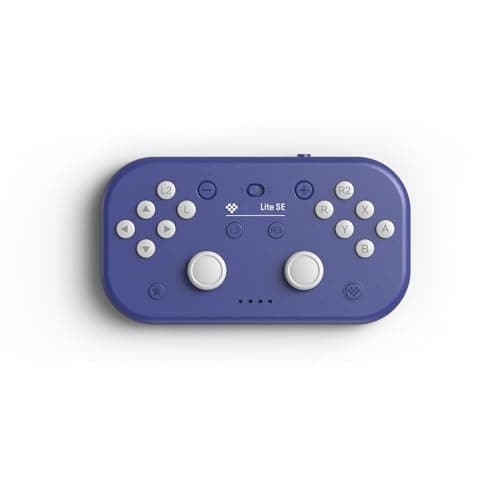
Start with the 8BitDo Lite SE. It is the cheapest controller we could verify that is built and sold specifically for players with limited mobility: no analog sticks, a flat low-profile face that can be operated resting on a table rather than held up, and large widely-spaced buttons that need very little force. That is 8BitDo's own stated purpose for the product, not our interpretation of a spec sheet. Before the list, one thing you deserve to know up front.

The short answer

Quick picks

#ProductBest forScorePrice
01
8BitDo 8BitDo Lite SE
8BitDo Lite SE

The cheapest controller we could verify that is built and sold specifically for players with limited mobility.

Best for limited hand mobility
7.2
$34.99Amazon
02
8BitDo 8BitDo Lite 2
8BitDo Lite 2

The Lite SE's shape with sticks added back. A small, light, low-effort pad for 2D games and handheld play.

Best small, low-effort pad
7.2
$34.99Amazon
03
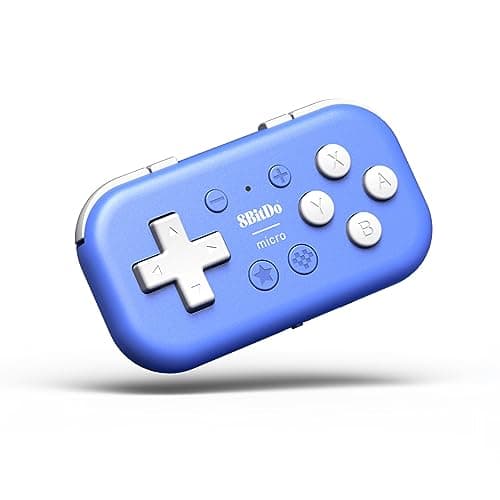
8BitDo 8BitDo Micro
8BitDo Micro

Pocket-sized, keyboard-mode capable, and cheap enough to be a stocking filler that actually gets used.

Best tiny pad
6.8
$24.99Amazon
04
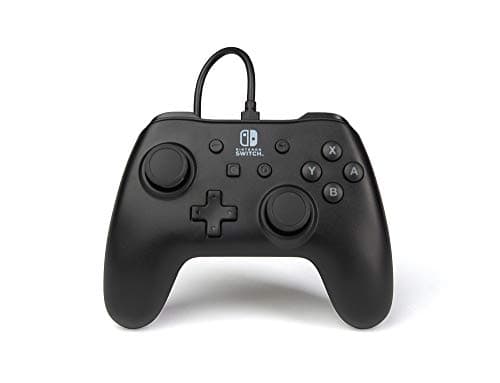
PowerA PowerA Wired Controller (Switch)
PowerA Wired Controller (Switch)

The cheapest officially-licensed pad in this cluster, and the one with nothing to charge or pair.

Cheapest licensed option
6.8
$16.48Amazon
05
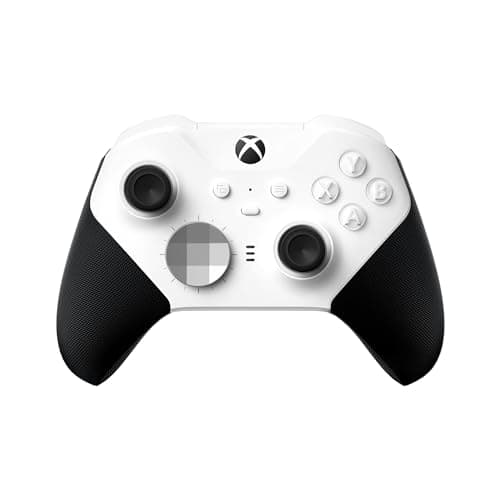
Microsoft Xbox Elite Series 2 Core
Xbox Elite Series 2 Core

The most capable pad on this page and the worst value on it. Worth it only if you will genuinely use the paddles and hair-triggers — most people won't.

Best for paddles & pros
8.0
$111.74Amazon

#ad · Live prices from the Amazon Product API, as of Sep 7, 2026. Where we have no verified live price, we show none — we would rather leave a gap than print a number that has rotted.

In detail

The picks, in full

01
8BitDo 8BitDo Lite SE

Best for limited hand mobility

8BitDo Lite SE

Bluetooth · USB-CNo analog sticksFlat, wide layoutSwitch · Android · iOS · macOS
7.2/10

The cheapest controller we could verify that is built and sold specifically for players with limited mobility.

Build quality
7
Ergonomics
9
Features
5
Compatibility
6
Value
9

Pros

  • 8BitDo's own listing states it is for gamers with limited mobility — that is the maker's stated purpose, not our inference
  • Removing the analog sticks leaves a flat, low-profile face that can be operated resting on a table rather than held up
  • Large, widely-spaced buttons and a light body reduce the grip strength the pad demands

Cons

  • No analog sticks at all, so games that need analog movement are off the table
  • No rumble, no gyro, no headphone jack — it is deliberately minimal
  • Not an Xbox or PlayStation pad; the supported list is Switch, Android, iOS, macOS and Apple TV

Don't buy this if…

you need analog stick movement. This is a d-pad-only controller by design — for 3D games you need something with sticks, and no software setting adds them.

$34.99View on Amazon

Price as of Sep 7, 2026. Prices change — Amazon's is the one that counts.

#ad · we may earn a commission from this link to 8BitDo Lite SE

02
8BitDo 8BitDo Lite 2

Best small, low-effort pad

8BitDo Lite 2

Bluetooth · USB-CTwo mini analog sticksFlat profileSwitch · Android · Raspberry Pi
7.2/10

The Lite SE's shape with sticks added back. A small, light, low-effort pad for 2D games and handheld play.

Build quality
7
Ergonomics
8
Features
6
Compatibility
6
Value
9

Pros

  • Same flat, table-friendly body as the Lite SE but with two small analog sticks, so 3D games are possible
  • Very light and small, which matters if holding a full-size pad is tiring
  • Two rear buttons that can be mapped in 8BitDo's software

Cons

  • The mini sticks have short travel — precise aiming in a shooter is a real compromise
  • No rumble or gyro
  • Switch, Android and Raspberry Pi; it is not an Xbox or PlayStation controller

Don't buy this if…

you play competitive shooters. The short-travel mini sticks trade aim precision for size, and no amount of sensitivity tuning gets that back.

$34.99View on Amazon

Price as of Sep 7, 2026. Prices change — Amazon's is the one that counts.

#ad · we may earn a commission from this link to 8BitDo Lite 2

03
8BitDo 8BitDo Micro

Best tiny pad

8BitDo Micro

Bluetooth · USB-CPocket-sizedKeyboard modeSwitch · Android · Raspberry Pi
6.8/10

Pocket-sized, keyboard-mode capable, and cheap enough to be a stocking filler that actually gets used.

Build quality
7
Ergonomics
6
Features
6
Compatibility
6
Value
9

Pros

  • Small enough to live in a bag or a coat pocket, which is the whole reason to own one
  • Keyboard mode makes every button send a keystroke, so it doubles as a one-hand macro pad
  • One of the cheapest genuinely useful gaming gifts you can buy

Cons

  • No analog sticks — it is a d-pad and face buttons only
  • Adult hands will find long sessions cramped; it is a supplementary pad, not a main one
  • No rumble, no gyro, no headphone jack

Don't buy this if…

it would be someone's only controller. It is a second, take-anywhere pad by design — as a primary controller it will frustrate within an hour.

$24.99View on Amazon

Price as of Sep 7, 2026. Prices change — Amazon's is the one that counts.

#ad · we may earn a commission from this link to 8BitDo Micro

04
PowerA PowerA Wired Controller (Switch)

Cheapest licensed option

PowerA Wired Controller (Switch)

Wired USB10ft detachable cableOfficially licensedNo battery
6.8/10

The cheapest officially-licensed pad in this cluster, and the one with nothing to charge or pair.

Build quality
6
Ergonomics
7
Features
4
Compatibility
7
Value
10

Pros

  • Officially licensed by Nintendo, so there is no compatibility asterisk
  • No battery at all — it cannot be flat when someone wants to play, which matters more than it sounds for a shared family pad
  • A 10ft detachable cable is long enough to reach a sofa, and replaceable when it frays

Cons

  • Wired only, and the cable is genuinely in the way if the console is docked across the room
  • No rumble, no amiibo NFC, no motion controls
  • Basic plastic build with potentiometer sticks that can drift eventually

Don't buy this if…

you want motion controls or amiibo support. It has neither, and games that require motion aiming will not work properly with it.

$16.48View on Amazon

$22.9928% off

Price as of Sep 7, 2026. Prices change — Amazon's is the one that counts.

#ad · we may earn a commission from this link to PowerA Wired Controller (Switch)

05
Microsoft Xbox Elite Series 2 Core

Best for paddles & pros

Xbox Elite Series 2 Core

Bluetooth · USB-C · Xbox WirelessBuilt-in rechargeableAdjustable-tension sticksHair-trigger locks
8.0/10

The most capable pad on this page and the worst value on it. Worth it only if you will genuinely use the paddles and hair-triggers — most people won't.

Build quality
7
Ergonomics
9
Features
10
Compatibility
9
Value
5

Pros

  • Adjustable-tension thumbsticks, shorter hair-trigger locks and a wrap-around rubberized grip that a standard pad can't match
  • Built-in rechargeable battery and on-controller profile switching for swapping button maps mid-game
  • The most premium in-hand feel of anything here — genuinely a tier above in materials

Cons

  • The 'Core' ships WITHOUT the paddle set, extra sticks and carry case — you buy those separately, pushing the real cost higher still
  • The Series 2 line carries a well-documented history of bumper and reliability complaints
  • It costs two to three times a standard Xbox Wireless Controller for gains most players never touch

Don't buy this if…

you won't actually remap and use the back paddles. Without them you are paying flagship money for a heavier standard controller — the plain Xbox Wireless Controller does the same core job for a fraction of the price.

$111.74View on Amazon

$149.9926% off

Price as of Sep 7, 2026. Prices change — Amazon's is the one that counts.

#ad · we may earn a commission from this link to Xbox Elite Series 2 Core

The two devices we could not link, and why

The two purpose-built accessible controllers most people have heard of are the Xbox Adaptive Controller and the PlayStation Access Controller. Neither returned a new-condition listing we were willing to link when we checked, and we are not going to send you to a refurbished reseller for a device someone may depend on. Both are sold and supported directly by their manufacturers, and both have proper documentation: Microsoft Accessibility for the Xbox Adaptive Controller and its ecosystem of external switches and buttons, and PlayStation Accessibility for the Access Controller. If a fully modular device with external switch inputs is what you need, buy direct from them — we earn nothing from saying so, and it is the right advice.

What follows is the list of things you can buy today that help with the more common, less total barriers: grip strength, holding a pad up against gravity, reaching a stick with a thumb, and pressing a button that needs too much force.

What actually makes a controller more accessible

The useful axes are not the ones on a spec sheet, so it is worth naming them.

  • Weight and hold. A pad that can rest flat on a table or a lap tray removes the requirement to support its weight for the whole session. Both the Lite SE and Lite 2 have a flat profile designed for exactly that.
  • Button force and spacing.Larger, further-apart buttons that actuate with less force are easier for imprecise or low-strength input. This is the Lite SE's core design choice.
  • Reach.A smaller body brings every input closer to the thumb. This is why the 8BitDo Micro is on this page despite being tiny — for some hands, small is accessible.
  • Remapping. The ability to move an input you cannot reach to one you can. This is free in software: Steam Input, the Xbox Accessories app and Windows all support remapping without buying anything, and it should be the first thing you try.
  • No charging, no pairing. A wired pad removes two recurring tasks. That is why the PowerA Wired is here.

The one expensive entry, and why it earns its place

The Xbox Elite Series 2 Coreis the outlier on price, and it is here for a specific reason rather than as an upsell: its adjustable stick tension and three-position trigger stops let you reduce the physical force a game demands, and its remapping is on-controller rather than app-dependent. If a full-pull trigger or a stiff stick is the barrier, that adjustability is the feature. If it is not, buy something on the top half of this page — the cheaper pads solve the more common problems, and our best controllers under $30 page has more low-force options.

Two adjacent pages worth reading: our how to remap controller buttons guide covers the free software route in full, and how to choose a gaming controller covers size and grip more generally.
How we picked

We do not run a testing lab

We researched published specifications, third-party lab measurements, manufacturer documentation and aggregated owner reviews, then scored each product against a published rubric. The scores are judgments from documented research — they are notmeasurements we took, because we do not have a lab and we are not going to pretend we do. Where a number came from someone else's lab, we name them and link them in Sources.

Questions

Frequently asked

What is the best accessible controller for limited mobility?
For a fully modular setup with external switches and buttons, the Xbox Adaptive Controller and the PlayStation Access Controller are the purpose-built devices, and both are best bought directly from Microsoft and Sony. For lower grip force, a flatter layout and less reach — which covers a much larger group of players — the 8BitDo Lite SE is the cheapest option explicitly designed for it.
Why are the Xbox Adaptive Controller and Access Controller not linked here?
Because when we checked, neither returned a new-condition listing we were prepared to link, and sending someone to a refurbished reseller for a device they may depend on is not acceptable. Both are sold and supported directly by their manufacturers, and we would rather point you there and earn nothing than link something worse.
Can you remap controller buttons without buying a special controller?
Yes, and it should be the first thing you try. Steam Input remaps any controller on PC for free, the Xbox Accessories app remaps Xbox pads on console and PC, and Windows has its own accessibility input settings. Moving an input you cannot reach to one you can costs nothing and often solves the problem entirely.
Are smaller controllers easier to use?
For some hands, yes — a smaller body brings every button within a shorter thumb reach, which matters more than raw size. For others a larger pad that can rest on a lap tray is easier because it does not have to be gripped. The two needs are opposite, which is why this list includes both a compact pad and a flat table-top one.

Keep reading

Receipts

Sources

We do not run a testing lab, and we do not pretend to. Where a measured number came from someone else's lab, we name them and link them. Where we could not verify something, we say so on the page rather than quietly leaving it out. Read our full method.