Skip to content
GEAREDGAMING

HUB 03 · Best Value

The Best Wireless Gaming Keyboards

A good 2.4GHz keyboard is effectively as fast as wired; Bluetooth is the one connection you can feel. Six wireless boards ranked by what actually separates them — the radio, the layout, and whether the switches come out.

By Stephen V.Updated How we research
#ad

We earn a commission when you buy through our Amazon links, at no extra cost to you. It never affects our rankings, and we say so when the cheaper product is the better buy. How this works.

If you want one wireless keyboard and no homework, buy the Logitech G515 LIGHTSPEED. It is a slim, low-profile TKL running Logitech's LIGHTSPEED 2.4GHz link — the same low-latency wireless its pro mice use, which you cannot feel against a cable — plus Bluetooth for everything else, and it looks like it belongs on a grown-up desk rather than a gamer shrine. Its one real catch is that the switches are soldered in, so there is no hot-swap. If tinkering or a rock-bottom price matters more to you than that polish, the five picks below cover those cases too. Before the ranking, one thing has to be said plainly, because it decides everything else on this page: “wireless” is not one technology. There are two completely different radios hiding inside the word, and for gaming they behave nothing alike.

The wireless-keyboard truth: 2.4GHz is not Bluetooth

The old warning that “wireless keyboards are laggy” is half right and half a decade out of date. A board that ships with its own little USB receiver is using a dedicated 2.4GHz radio protocolbuilt for one job: pushing keystrokes with the lowest latency it can. Modern implementations of that — Logitech's LIGHTSPEED, and the proprietary 2.4GHz dongles that come with the better budget boards — add a delay that is a fraction of a frame and sits below what a human can perceive. In blind play you cannot tell a 2.4GHz board from a wired one.

Bluetooth is the other radio, and it is the one you can feel.It is the convenient, universal option — it pairs with your phone, your laptop and your tablet with no dongle — but its general-purpose stack was designed for compatibility and power efficiency, not for shaving milliseconds, so it carries higher and more variable latency. For writing, browsing and slower games that is a non-issue. For a twitch shooter it is the difference that shows up. Motion-and-latency researchers such as Blur Busters have long documented how much a general-purpose radio link adds over a purpose-built one, and the Bluetooth SIG is candid that the spec optimises for interoperability and low power rather than raw speed. The practical rule for this whole page: for competitive play, prefer a board's 2.4GHz dongle or a cable, and treat Bluetooth as the flexible bonus. We unpack the mechanism in full in our Bluetooth vs 2.4GHz explainer and weigh the wider trade in the wired vs wireless keyboard guide.

How we ranked the field

Because every board here is wireless and mechanical, the connection is only the first of four things that separate them. We weighed each pick on:

  • The radio.Does it have a dedicated low-latency 2.4GHz dongle, or is it Bluetooth-and-wired only? That single fact decides whether a board is a serious competitive tool or a convenient everyday one, so it is the first thing we call out on every pick — honestly, even when a board is otherwise excellent.
  • The layout. Wireless is most loved on a tidy desk, so size matters here: a TKL or smaller frees serious mouse room, a 96% keeps the number pad, and a 60% is tiny but drops the arrows and function row. Our keyboard sizes guide explains what each layout gives up.
  • The upgrade path.Hot-swap sockets let you change the switches with no soldering, so a hot-swap board grows with you instead of being replaced — our hot-swap explainer covers why that matters, and our switch-types guide covers what you would swap to.
  • Build and honest cons. The budget triple-mode boards are astonishing on features per dollar, but their stock switches and stabilisers are a starting point, not a finish line, and their software is rough. We say so on every one, because pretending otherwise helps nobody.

The picks, ranked

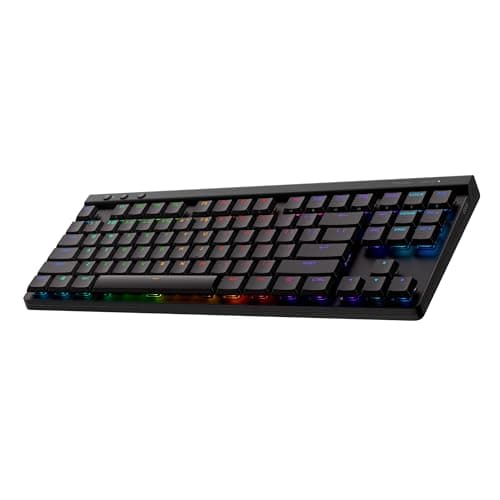
The Logitech G515 LIGHTSPEEDtakes the top spot because it is the most complete wireless package for someone who wants it to just work. LIGHTSPEED 2.4GHz gives you wired-grade latency for games, Bluetooth covers a laptop or tablet, and the low-profile design is slim, quiet and far kinder on the wrists than a tall gaming board — with a restrained, non-gamery look that suits a work-and-play desk. The trade is honest and clear: its switches are soldered, so there is no hot-swap, and it costs meaningfully more than a triple-mode budget board that does the wireless part for less. You are paying for polish, the low-profile form and a proven radio, not for tinkering.

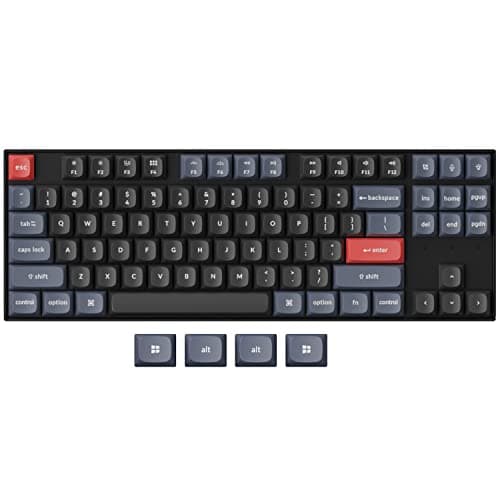
The Keychron K8 Prois the enthusiast's answer and the board that grows with you: hot-swap sockets, full QMK/VIA remapping at the firmware level, and a well-built aluminium-frame TKL that works with Mac and Windows out of the box. But here is the catch we will not bury — the K8 Pro is Bluetooth-and-wired only. It has no dedicated 2.4GHz dongle. For everyday use and typing that is completely fine, and for competitive gaming you simply plug in the cable and get the lowest latency there is. It ranks this high for tinkerers and remappers; if a low-latency 2.4GHz wireless link is specifically what you want, the G515 or one of the RK boards below is the right call, not this one.

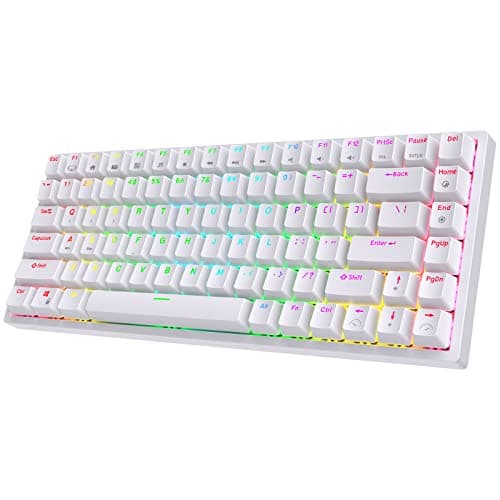
The RK Royal Kludge RK84 is the value pick, and nothing else here comes close on features per dollar: hot-swap, mechanical, a 75% layout that keeps the arrows and F-row while freeing real mouse space, and genuine triple-modeconnectivity — Bluetooth, a low-latency 2.4GHz dongle, and USB-C — at a price where most boards are wired-only. The honest cons are the usual RK ones: the stock switches and stabilisers are mediocre (the board is a great platform with average parts in it), it rattles a little until you tune the stabilisers, and the software is rough. Because it is hot-swappable, none of that is permanent — but budget a little time.

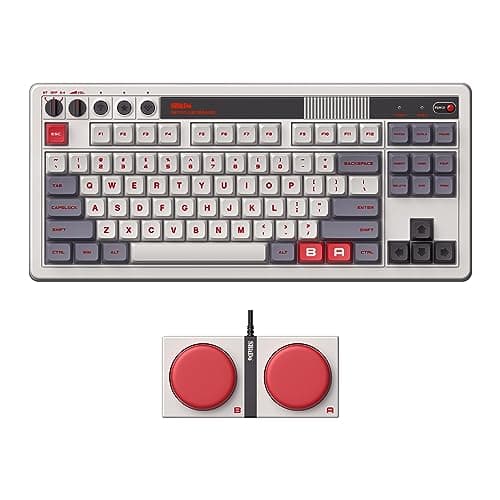
The 8BitDo Retro Mechanical Keyboardis the personality pick, and it earns the spot on substance, not just looks. Under the retro NES/Fami styling is a genuine triple-mode, hot-swappable TKL — Bluetooth, a low-latency 2.4GHz dongle and USB-C — plus two big programmable Super Buttons that are honestly fun to play with. The styling is the whole point, so if you want a clean, modern slab it is the wrong board; the Super Buttons also eat desk space some people would rather keep. But if you want a wireless mechanical with character instead of another black rectangle, this is it.

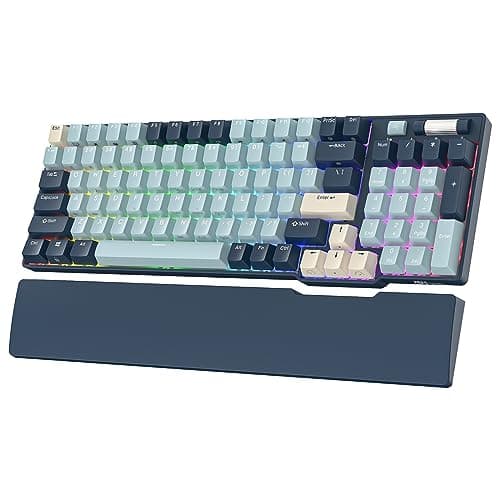
The Royal Kludge RK96is the value pick that refuses to give up the number pad. Its 96% layout squeezes in a full numpad while still freeing more mouse room than a full-size board, and it brings the same triple-mode wireless and hot-swap sockets as the RK84, plus a wrist rest that is a rare extra at this money. The compromises are the crowded layout — some keys sit tight against each other and there is an adjustment period — the usual mediocre stock switches and stabilisers, and the rough RK software. If you do accounting, spreadsheets or MMO keybinds and refuse to lose the numpad, this is your wireless board.

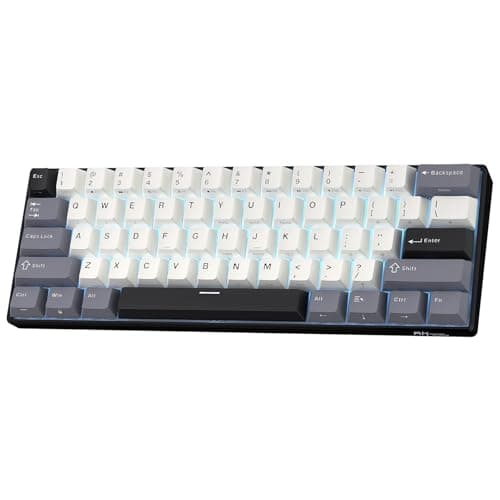
The RK61is the smallest and cheapest way onto this page: wireless, hot-swap and mechanical, all in a tiny 60% frame. It is genuine triple-mode — Bluetooth for a tablet, 2.4GHz for gaming, USB-C when the battery is flat — and the hot-swap sockets mean the cheap stock switches are a starting point rather than a life sentence. The trade is the layout, not the feature list: 60% drops the arrows, F-row and navigation cluster onto a hidden Fn layer, which is a real adjustment, and hardcore competitive players will still prefer a wired link's certainty over its 2.4GHz. For a tiny, cable-free desk on a budget, nothing here is smaller or cheaper.

Living with a wireless keyboard, day to day

Two realities decide how much you enjoy a wireless board once the novelty wears off, and neither shows up on a spec sheet. The first is battery, and it is less of a chore than people fear: a keyboard sips far less power than a wireless mouse or headset, so a mechanical board runs for days on 2.4GHz and often weeks over Bluetooth, and turning the RGB down stretches that a long way further. Every board here can also be played wired over its USB-C cable while it charges, so a flat battery means plugging in for a few minutes, not stopping. The second is the multi-device angle: the triple-mode boards let you keep the 2.4GHz dongle in your gaming PC and pair Bluetooth to a laptop or tablet at the same time, then switch between them with a key combination — genuinely useful when one keyboard has to serve more than one machine.

The one thing wireless does notchange is the feel. A board's switches, its stabilisers, its plate and its keycaps decide how it types, and those are identical whether the signal travels down a cable or through the air. That is why the hot-swap picks here matter: on the RK84, RK96, RK61, K8 Pro and 8BitDo you can improve mediocre stock switches later, while the sealed G515 asks you to be happy with its low-profile tactile feel from day one. Decide how a board should feel first, using our switch-types guide, and treat the connection as the separate question it is.

If you do hit a wireless hiccup — a rare stutter or a dropped keystroke — it is almost always the 2.4GHz band being crowded rather than a fault in the board, and the fix is the same one that helps a wireless mouse: bring the receiver closer. Plugging the dongle into a front USB port, or using a short USB extension to lift it out from behind a metal case and a nest of cables, clears up the large majority of interference complaints. A busy desk full of other 2.4GHz gear and Wi-Fi is the usual culprit, and a few centimetres of clear line to the dongle is usually all it takes.

So which wireless keyboard should you buy?

Reason from your desk and your games, not the marketing. Buy the G515 LIGHTSPEED if you want a slim, quiet, wired-grade wireless board that looks the part and you do not care about swapping switches. Buy the Keychron K8 Pro if remapping and hot-swap tinkering are the point, and you are happy to plug in for competitive sessions because it has no 2.4GHz dongle. Buy the RK84 for the best all-round value with a proper 2.4GHz link and a 75% layout, the 8BitDo if you want that same triple-mode feature set with real character, the RK96 if you cannot part with the numpad, and the RK61if you want the smallest, cheapest wireless mechanical there is. Whichever you pick, the one myth to retire is that wireless is a competitive handicap — on a 2.4GHz dongle it is not, and has not been for years.

If wireless turns out not to be the thing you actually need, that is worth knowing before you pay the radio premium: a wired board often out-specs a wireless one at the same price, which is the whole argument of our wired vs wireless keyboard guide. And if you just want the best mechanical feel regardless of the connection, our best mechanical keyboards and best gaming keyboards under $100 roundups line up the field by feel and by budget instead.
The short answer

Quick picks

#ProductBest forScorePrice
01
Logitech G Logitech G515 LIGHTSPEED TKL
Logitech G515 LIGHTSPEED TKL

The wireless board most people should buy: low-profile, genuinely fast LIGHTSPEED wireless, and it looks like it belongs on a grown-up desk.

Best wireless all-rounder
8.0
$129.99Amazon
02
Keychron Keychron K8 Pro (QMK/VIA)
Keychron K8 Pro (QMK/VIA)

The enthusiast pick: hot-swap sockets, full QMK/VIA remapping and an aluminium frame, wireless or wired. The board that grows with you.

Best for tinkerers
8.2
$124.99Amazon
03
Royal Kludge RK ROYAL KLUDGE RK84
RK ROYAL KLUDGE RK84

Hot-swap, wireless, mechanical, 75%. Nothing else here comes close on features per dollar.

The best keyboard on this page
8.2
$56.89Amazon
04
8BitDo 8BitDo Retro Mechanical Keyboard
8BitDo Retro Mechanical Keyboard

A hot-swap, triple-mode board with genuine character — the retro NES/Fami styling plus two big programmable Super Buttons set it apart from the sea of black slabs.

Best for personality
7.8
$89.99Amazon
05
Royal Kludge RK ROYAL KLUDGE RK96
RK ROYAL KLUDGE RK96

The value champion: a 96% layout that keeps the number pad, triple-mode wireless and hot-swap sockets, all for the price of a plain wired board.

Best value / keeps the numpad
7.6
$65.99Amazon
06
Royal Kludge RK ROYAL KLUDGE RK61 (Wireless)
RK ROYAL KLUDGE RK61 (Wireless)

Wireless, hot-swap and mechanical, all under $50. The trade is the 60% layout, not the feature list.

A wireless mechanical on a budget
7.2
$44.99Amazon

#ad · Live prices from the Amazon Product API, as of Jul 30, 2026. Where we have no verified live price, we show none — we would rather leave a gap than print a number that has rotted.

In detail

The picks, in full

01
Logitech G Logitech G515 LIGHTSPEED TKL

Best wireless all-rounder

Logitech G515 LIGHTSPEED TKL

LIGHTSPEED 2.4GHz + BluetoothLow-profile · TKLTactile switchesLIGHTSYNC RGB
8.0/10

The wireless board most people should buy: low-profile, genuinely fast LIGHTSPEED wireless, and it looks like it belongs on a grown-up desk.

Switch quality
8
Build quality
8
Ergonomics
9
Features
8
Value
7

Pros

  • LIGHTSPEED is the same low-latency 2.4GHz wireless Logitech's pro mice use — you cannot feel it versus wired
  • The low-profile design is slim, quiet and far kinder on the wrists than a tall gaming board
  • A restrained, non-gamery look with per-key RGB that suits a work-and-play desk

Cons

  • The switches are soldered — there is no hot-swap here, so you live with the tactile choice you buy
  • Costs meaningfully more than a triple-mode board from Royal Kludge that does the wireless part for less
  • Low-profile keys feel different from full-height switches — try the feel before you commit if you can

Don't buy this if…

you want to swap switches later or you are on a tight budget. This is a sealed, premium low-profile board — for tinkering or value, the RK84 or Keychron K8 Pro are the hot-swap picks.

$129.99View on Amazon

$159.9919% off

Price as of Jul 30, 2026. Prices change — Amazon's is the one that counts.

#ad · we may earn a commission from this link to Logitech G515 LIGHTSPEED TKL

02
Keychron Keychron K8 Pro (QMK/VIA)

Best for tinkerers

Keychron K8 Pro (QMK/VIA)

Bluetooth 5.1 + USB-C wiredHot-swappable · TKLQMK/VIA programmableAluminium frame option
8.2/10

The enthusiast pick: hot-swap sockets, full QMK/VIA remapping and an aluminium frame, wireless or wired. The board that grows with you.

Switch quality
8
Build quality
9
Ergonomics
8
Features
9
Value
7

Pros

  • Hot-swap sockets let you change switches with no soldering, so the board is a platform, not a fixed appliance
  • Full QMK/VIA support means you remap every key and layer at the firmware level — deeper than any gaming-brand software
  • A gasket-adjacent, well-built TKL that works with Mac and Windows out of the box

Cons

  • Bluetooth-and-wired only — there is no dedicated low-latency 2.4GHz dongle, so hardcore competitive players will want the cable
  • QMK/VIA has a learning curve if you just want plug-and-play
  • Heavier and taller than a low-profile board like the G515

Don't buy this if…

you specifically want a low-latency 2.4GHz wireless link for competitive play. The K8 Pro is Bluetooth-or-wired — the G515 LIGHTSPEED or an RK triple-mode board give you the 2.4GHz dongle.

$124.99View on Amazon

Price as of Jul 30, 2026. Prices change — Amazon's is the one that counts.

#ad · we may earn a commission from this link to Keychron K8 Pro (QMK/VIA)

03
Royal Kludge RK ROYAL KLUDGE RK84

The best keyboard on this page

RK ROYAL KLUDGE RK84

Mechanical, hot-swappable75% layoutBT 5.0 / 2.4G / USB-CRGB
8.2/10

Hot-swap, wireless, mechanical, 75%. Nothing else here comes close on features per dollar.

Switch quality
7
Build quality
7
Ergonomics
8
Features
10
Value
9

Pros

  • Hot-swap sockets mean you can change the switches without soldering — this keyboard grows with you instead of being replaced
  • Triple-mode wireless at a price where most boards are wired-only
  • 75% keeps the arrows and F-row while freeing up serious mouse space

Cons

  • The stock switches and stabilisers are mediocre — the board is a great platform with average parts in it
  • It rattles a bit until you do something about the stabilisers
  • Royal Kludge's software is rough

Don't buy this if…

you want it to be perfect out of the box. This is a board that rewards tinkering; if you never intend to open it, the G413's fixed switches are simply better than these are.

$56.89View on Amazon

$59.895% off

Price as of Jul 30, 2026. Prices change — Amazon's is the one that counts.

#ad · we may earn a commission from this link to RK ROYAL KLUDGE RK84

04
8BitDo 8BitDo Retro Mechanical Keyboard

Best for personality

8BitDo Retro Mechanical Keyboard

Bluetooth + 2.4GHz + USB-CHot-swappable · TKLTwo Super ButtonsProgrammable via app
7.8/10

A hot-swap, triple-mode board with genuine character — the retro NES/Fami styling plus two big programmable Super Buttons set it apart from the sea of black slabs.

Switch quality
7
Build quality
8
Ergonomics
7
Features
9
Value
8

Pros

  • Triple-mode connectivity — Bluetooth, low-latency 2.4GHz dongle and USB-C — covers gaming and everyday use
  • Hot-swap sockets and the included dual Super Buttons make it genuinely fun to tinker with
  • The retro moulded caps and colourway are a real design statement, not a sticker job

Cons

  • The styling is the point — if you want a clean, modern look it is the wrong board
  • Stock switches and stabilisers are a starting point, like most boards at this price
  • The novelty Super Buttons take desk space some people would rather not give up

Don't buy this if…

you want an understated, professional-looking keyboard. Its whole appeal is the retro character — for a restrained desk the G515 or Keychron K8 Pro fit better.

$89.99View on Amazon

$99.9910% off

Price as of Jul 30, 2026. Prices change — Amazon's is the one that counts.

#ad · we may earn a commission from this link to 8BitDo Retro Mechanical Keyboard

05
Royal Kludge RK ROYAL KLUDGE RK96

Best value / keeps the numpad

RK ROYAL KLUDGE RK96

BT 5.0 / 2.4G / USB-C96% · hot-swappableKeeps the number padRGB + wrist rest
7.6/10

The value champion: a 96% layout that keeps the number pad, triple-mode wireless and hot-swap sockets, all for the price of a plain wired board.

Switch quality
7
Build quality
6
Ergonomics
7
Features
9
Value
9

Pros

  • The 96% layout squeezes in a full number pad while still freeing more mouse room than a full-size board
  • Genuine triple-mode wireless and hot-swap sockets at a price where most boards are wired and soldered
  • Ships with a wrist rest, which is a rare extra at this money

Cons

  • The crowded 96% layout puts some keys tight against each other — there is an adjustment period
  • Stock switches and stabilisers are mediocre, the usual RK compromise
  • Royal Kludge's configuration software is rough around the edges

Don't buy this if…

you play low-sensitivity shooters and want maximum desk space for mouse sweeps. A 96% board still has a numpad in the way — a TKL or 60% frees more room.

$65.99View on Amazon

$89.8927% off

Price as of Jul 30, 2026. Prices change — Amazon's is the one that counts.

#ad · we may earn a commission from this link to RK ROYAL KLUDGE RK96

06
Royal Kludge RK ROYAL KLUDGE RK61 (Wireless)

A wireless mechanical on a budget

RK ROYAL KLUDGE RK61 (Wireless)

Mechanical, hot-swappable60% · 61-keyBT 5.0 / 2.4G / USB-CPer-key RGB
7.2/10

Wireless, hot-swap and mechanical, all under $50. The trade is the 60% layout, not the feature list.

Switch quality
7
Build quality
6
Ergonomics
6
Features
9
Value
8

Pros

  • Genuine triple-mode wireless — Bluetooth for a tablet or phone, low-latency 2.4GHz for gaming, USB-C when the battery is flat
  • Hot-swap sockets, so the cheap stock switches are a starting point rather than a life sentence
  • Multi-device Bluetooth pairing is genuinely useful if this board also serves a laptop or phone

Cons

  • The same 60% compromise as the Fizz — no arrows, F-row or navigation cluster
  • 2.4GHz is fine for most play, but hardcore competitive players still prefer a wired connection's certainty
  • RK's software and stock stabilisers are rough; budget a little time for tuning

Don't buy this if…

you want a full set of keys or a rock-solid wired competitive link. This is for people who value going wireless and small over keeping every key.

$44.99View on Amazon

$58.9924% off

Price as of Jul 30, 2026. Prices change — Amazon's is the one that counts.

#ad · we may earn a commission from this link to RK ROYAL KLUDGE RK61 (Wireless)

How we picked

We do not run a testing lab

We researched published specifications, third-party lab measurements, manufacturer documentation and aggregated owner reviews, then scored each product against a published rubric. The scores are judgements from documented research — they are notmeasurements we took, because we do not have a lab and we are not going to pretend we do. Where a number came from someone else's lab, we name them and link them in Sources.

Questions

Frequently asked

Is a wireless gaming keyboard laggy?
It depends entirely on which wireless. A board on a dedicated 2.4GHz dongle (like Logitech's LIGHTSPEED, or the receivers that ship with Royal Kludge and 8BitDo boards) is effectively as fast as wired — the added latency is below what you can perceive. Bluetooth is the exception: it adds a delay a sensitive player can feel in fast games. So “wireless keyboards are laggy” is really only true of Bluetooth, not of a proper 2.4GHz link.
Which wireless keyboard is best for competitive gaming?
One with a dedicated 2.4GHz dongle. The Logitech G515 LIGHTSPEED is the standout all-rounder, and the triple-mode Royal Kludge and 8BitDo boards also include a low-latency 2.4GHz receiver. Avoid relying on Bluetooth for reaction-based play. Note that the Keychron K8 Pro is excellent but is Bluetooth-and-wired only — for competitive use on it you would plug in the cable.
Should I get a hot-swappable wireless keyboard?
If you might ever want to change the feel of your switches, yes — hot-swap sockets let you pull a switch and drop a new one in with no soldering, so the board grows with you. The RK84, RK96, RK61, Keychron K8 Pro and 8BitDo here are all hot-swappable. The Logitech G515 is the exception: its switches are soldered, which is the price of its slim low-profile design.
Do I lose keys by going wireless?
Not because of the wireless — you lose keys by choosing a smaller layout, which is a separate decision. A TKL (like the G515, K8 Pro and 8BitDo) drops only the numpad; the 96% RK96 keeps the numpad; the 60% RK61 drops the arrows and function row onto an Fn layer. Pick the layout for your desk and your work first, then the connection.

Keep reading

Receipts

Sources

We do not run a testing lab, and we do not pretend to. Where a measured number came from someone else's lab, we name them and link them. Where we could not verify something, we say so on the page rather than quietly leaving it out. Read our full method.