Skip to content
GEAREDGAMING

HUB 02 · Gaming Audio

How to Make a Gaming Headset More Comfortable

Most uncomfortable headsets are fixable, and the fixes are cheap. Here they are in the order of how much they help, with the honest point at which you should stop and buy a different one.

By Stephen V.Updated How we research
#ad

We earn a commission when you buy through our Amazon links, at no extra cost to you. It never affects our rankings, and we say so when the cheaper product is the better buy. How this works.

Start by working out where it hurts, because each location has a different cause and a different fix. Pain above the ears is clamping force — stretch the headband over a box for a day or two. A hot, folded-ear feeling is the pads — replace them with deeper, wider ones. A sore spot on the crown is weight distribution — add padding or a suspension strap. All three cost less than ten dollars to attempt, and all three work often enough to be worth trying before you spend real money.

A headset is a clamp that holds two heavy objects against the sides of your skull for several hours. Looked at that way it is remarkable any of them are comfortable, and it is obvious why the uncomfortable ones fail in a small number of predictable ways. Diagnose the way it fails and you can usually fix it.

First: find out what kind of uncomfortable it is

Wear it for an hour, then take it off and notice where the relief is.

  • A dull ache above or around the ears, both sides, symmetric. Clamping force. By far the most common.
  • A single sore point on the top of your head. Weight concentrated on a narrow headband. The headset may not even be heavy.
  • Hot, damp ears; a feeling of the ear being folded or pressed. The pads: too shallow, opening too small, or sealed leatherette trapping heat.
  • A sharp line of pain at the temple, behind your glasses. Clamp plus glasses arms. Different fix, covered below.
  • Jaw ache or a headache across the forehead.Usually clamp again, and worth taking seriously — the Mayo Clinic lists sustained pressure and poor posture among the ordinary triggers of tension-type headache.

Fix 1: reduce the clamping force

The standard method, and it works on most headsets with a flexible band: find a box, a stack of books or anything slightly wider than your head, and leave the headset stretched over it. Start with a day. Check the fit. Repeat with something wider if it is still tight. Go slowly — stretched too far, a headset becomes loose and slides, and you cannot un-stretch it.

Do not use heat on the band unless you know what the frame is made of. A hairdryer on a plastic headband is a well-travelled piece of internet advice and a good way to deform it permanently. Patience and a box is slower and does not break anything.

Fix 2: replace the earpads

This is the single most underrated upgrade in gaming audio. Pads are consumable — foam compresses, and a two-year-old pad is a fraction of its original thickness, which brings the hard inside of the cup closer to your ear and increases effective clamp at the same time. New pads on an old headset often feel like a different product.

When you replace them, you also get to change the material and the shape. Thicker pads reduce clamp (they hold the cups further apart) and give your ear more room. Velour or fabric runs cooler than leatherette at the cost of a little bass and isolation. Larger-diameter pads clear a big ear that the stock ones were sitting on. Most popular headsets have third-party pads available in several materials; check that the mounting is a simple stretch-over-lip design before you buy, because a few headsets use a clip that only takes the manufacturer's own. While the pads are off, clean the cups — our earpad cleaning guide covers doing that without wrecking the foam.

Fix 3: move the weight off the pressure point

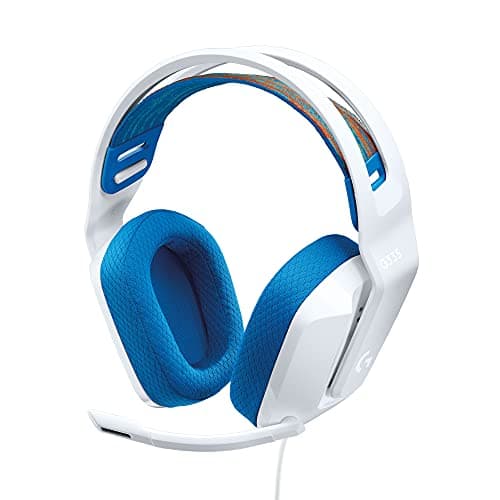
If the pain is a single spot on the crown, the band is concentrating load. Two cheap options: a stick-on or velcro-wrap headband cushion, which widens the contact area; or a third-party suspension strap, which hangs the frame from a flexible sling so there is no single contact line at all. The suspension approach is what the Logitech G335 does from the factory, and it is the reason that headset punches above its price on comfort.

Worth saying plainly: if your headset is genuinely heavy — over roughly 350 g — padding redistributes the load but does not remove it, and there is a limit to how much you can improve. That is the point where fix 5 applies.

Fix 4: deal with the heat

Sealed leatherette pads trap warmth; that is the cost of the seal that gives them their bass and their isolation. Fabric or velour replacements are the direct fix and they are cheap. The indirect fixes are real too: a desk fan, a cooler room, and taking the headset off for two minutes every hour, which also happens to be sensible for your hearing. If isolation is what you are trying to preserve, read noise cancelling vs noise isolating first — you may be able to get the quiet from electronics instead of from a tight seal.

Fix 5: glasses

If you wear glasses, the pad presses the arm of your frames into your temple, and that concentrates the entire clamping force of the headset onto two thin strips of plastic. Thicker, softer pads help the most, because they let the arm sink in rather than pushing back. Reducing clamp with the box method helps second. Thinner or more flexible glasses arms help third, and some people switch to a pair with wire arms specifically for gaming. Our best gaming headsets for glasses page ranks the headsets that need the least of this work.

When to stop fixing and replace it

Three honest signals. If the earcup opening is smaller than your ear, nothing you do helps — deeper pads give you depth but not diameter, and a headset that rests on your ears will always rest on your ears. If the frame is rigid metal with no flex, you cannot meaningfully change its clamp. And if the headset weighs well over 350 g, you are redistributing a problem rather than removing it.

At that point you are shopping, and the thing to shop on is pad depth, opening size and clamp rather than driver size or any of the numbers on the box. Our most comfortable gaming headsets page is the full ranking on those criteria, and how to choose a gaming headset covers everything else you should weigh at the same time. The three below are the short version: the all-round comfortable wired pick, the wireless equivalent, and the lightest cheap one.
The short answer

Quick picks

#ProductBest forScorePrice
01
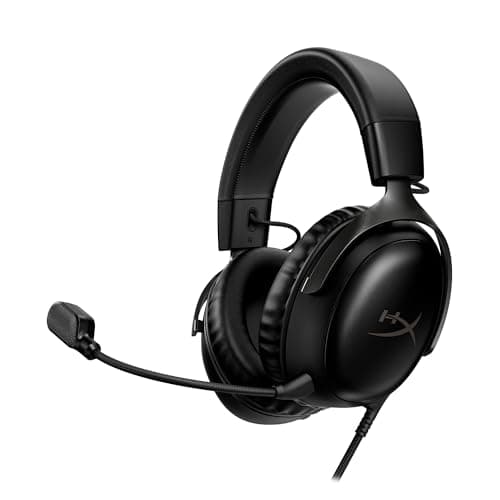
HyperX HyperX Cloud III
HyperX Cloud III

The Cloud formula updated: angled 53mm drivers, thick memory foam, and three ways to plug it in.

Best all-round wired pick
8.2
$69.99 on Amazon →
02
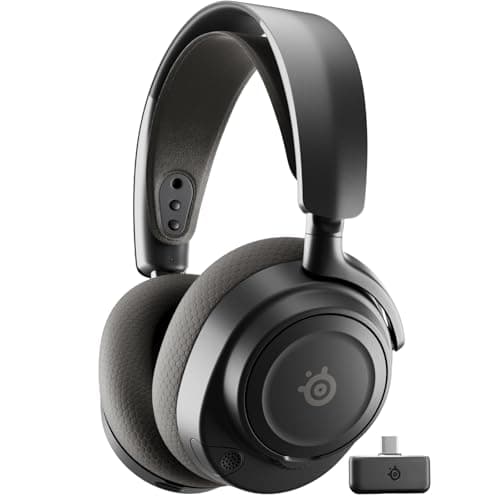
SteelSeries SteelSeries Arctis Nova 7 (Gen 2)
SteelSeries Arctis Nova 7 (Gen 2)

The wireless headset most people should actually buy.

The best wireless all-rounder
8.0
$184.62 on Amazon →
03
Logitech G Logitech G335
Logitech G335

The lightest, comfiest budget headset here, with a suspension band that spreads the weight. Comfort is its whole pitch.

Best budget comfort
7.2
$39.99 on Amazon →

#ad · Live prices from the Amazon Creators API, as of October 5, 2026. Where we have no verified live price, we show none — we would rather leave a gap than print a number that has rotted.

In detail

The picks, in full

01
HyperX HyperX Cloud III

Best all-round wired pick

HyperX Cloud III

USB-C · USB-A · 3.5mmAngled 53mm driversMemory-foam cushions10mm mic
8.2/10

The Cloud formula updated: angled 53mm drivers, thick memory foam, and three ways to plug it in.

Positional accuracy
8
Footstep clarity
8
Mic quality
8
Comfort
9
Value
8

Pros

  • Thick memory-foam cushions and a wide earcup opening — the Cloud line's long-standing comfort advantage
  • Three connection options in one box covers PC, PS5, Xbox and handhelds without adapters
  • Angled drivers aim the sound at the ear rather than straight across it

Cons

  • Wired only — there is no wireless version of this exact model
  • The USB spatial audio is PC-focused; on console you are using plain 3.5mm
  • The angled drivers and thicker pads are a real but incremental upgrade on the older Cloud Alpha — not a reason to replace one you already own

Don't buy this if…

…you want wireless. This is a cable headset in every configuration, and the Arctis Nova 5 is the equivalent-comfort wireless answer.

$69.99View on Amazon

$99.9930% off

Price as of October 5, 2026. Prices change — Amazon's is the one that counts.

#ad · we may earn a commission from this link to HyperX Cloud III

02
SteelSeries SteelSeries Arctis Nova 7 (Gen 2)

The best wireless all-rounder

SteelSeries Arctis Nova 7 (Gen 2)

2.4GHz + BluetoothSimultaneous dual audioRetractable micUSB-C dongle
8.0/10

The wireless headset most people should actually buy.

Positional accuracy
7
Footstep clarity
7
Mic quality
8
Comfort
9
Value
9

Pros

  • Does the important 90% of the Nova Pro at a fraction of the price
  • Simultaneous 2.4GHz + Bluetooth is genuinely useful and rare at this price
  • The USB-C dongle plugs straight into a Steam Deck or an Ally

Cons

  • No hot-swap battery, so a dead headset means a cable
  • Closed back — the usual staging ceiling

Don't buy this if…

…you want the widest possible soundstage. This is a very good closed-back headset, and a closed-back headset is still the wrong tool for that job.

$184.62View on Amazon

$199.998% off

Price as of October 5, 2026. Prices change — Amazon's is the one that counts.

#ad · we may earn a commission from this link to SteelSeries Arctis Nova 7 (Gen 2)

03
Logitech G Logitech G335

Best budget comfort

Logitech G335

Wired 3.5mmSuspension headbandFlip-to-mute mic~240g light
7.2/10

The lightest, comfiest budget headset here, with a suspension band that spreads the weight. Comfort is its whole pitch.

Positional accuracy
7
Footstep clarity
6
Mic quality
6
Comfort
9
Value
8

Pros

  • A fabric suspension band spreads the load so you barely feel it after hours
  • Very light, and 3.5mm keeps it universal across platforms
  • Flip-to-mute mic and a clean, understated look

Cons

  • The clamp is gentle, so a big head may want a firmer fit
  • Analog only — no USB surround or software EQ
  • Sound is balanced but not especially detailed

Don't buy this if…

…you wear glasses and need a firmer seal, or you want software surround. The light clamp trades grip for comfort, and 3.5mm can't do virtual surround alone.

$39.99View on Amazon

$69.9943% off

Price as of October 5, 2026. Prices change — Amazon's is the one that counts.

#ad · we may earn a commission from this link to Logitech G335

How we picked

We do not run a testing lab

We researched published specifications, third-party lab measurements, manufacturer documentation and aggregated owner reviews, then scored each product against a published rubric. The scores are judgments from documented research — they are not measurements we took, because we do not have a lab and we are not going to pretend we do. Where a number came from someone else's lab, we name them and link them in Sources.

Questions

Frequently asked

How do I reduce the clamping force on a gaming headset?
Stretch the headband over something slightly wider than your head — a box or a stack of books — and leave it overnight. Check the fit, then repeat with something wider if it is still tight. Go in small steps: a headset stretched too far becomes loose and slides, and you cannot reverse it. Avoid heating the band; a hairdryer deforms plastic frames permanently.
Is it worth replacing gaming headset earpads?
Usually, yes — it is the most underrated upgrade in gaming audio. Pad foam compresses over time, which brings the hard cup closer to your ear and raises effective clamp. New pads often make an old headset feel like a new product, and you can change material (velour runs cooler than leatherette) and size (larger pads clear a big ear) at the same time.
Why does my headset hurt the top of my head?
The headband is concentrating the weight on a narrow strip rather than spreading it. Fix it with a stick-on headband cushion or a third-party suspension strap, both of which widen the contact area. Note that total weight matters less than distribution until you are past roughly 350 g, at which point padding only goes so far.
How can I wear a gaming headset with glasses without pain?
Thicker, softer earpads first — they let the arm of your frames sink into the foam rather than pressing into your temple. Reducing the clamping force with the headband stretch is second. Thinner or more flexible glasses arms help third. If none of that is enough, the headset is probably too tight for the job and a gentler-clamping model is the answer.
Do heavier gaming headsets always hurt more?
Not up to a point. Below roughly 350 g, how the weight is carried matters more than how much there is — a wide padded band or a suspension strap spreads load across the skull and can feel better than a lighter headset with a narrow band. Above that, mass starts to dominate and no amount of padding fully compensates.

Keep reading

Receipts

Sources

We do not run a testing lab, and we do not pretend to. Where a measured number came from someone else's lab, we name them and link them. Where we could not verify something, we say so on the page rather than quietly leaving it out. Read our full method.