Skip to content
GEAREDGAMING

HUB 03 · Best Value

Best Gaming Gear for Fortnite

Fortnite punishes slow hands more than most shooters, because building and editing turn aim into a typing speed contest. That changes which gear is worth buying, and in what order.

By Stephen V.Updated How we research
#ad

We earn a commission when you buy through our Amazon links, at no extra cost to you. It never affects our rankings, and we say so when the cheaper product is the better buy. How this works.

Top pick · Best Fortnite Setup Pick

Razer Razer Viper V3 HyperSpeed

Razer Viper V3 HyperSpeed

8.6/10

Genuine tournament hardware running off a single AA — the esports sensor and switches without the flagship shell. This is the one to stretch for.

Price as of November 22, 2026. Prices change — Amazon's is the one that counts. #ad · we may earn a commission from this link to Razer Viper V3 HyperSpeed

Verdict

The short version

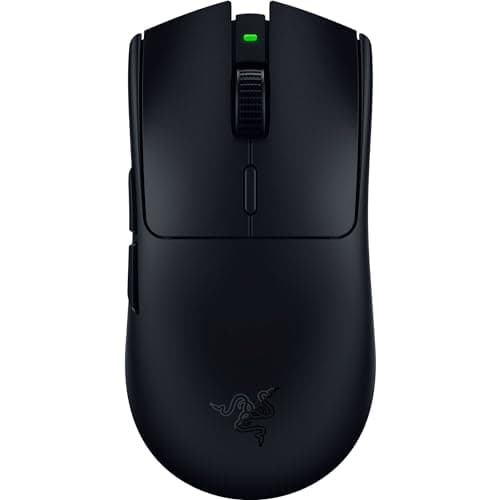
The single most useful piece of Fortnite gear is the mouse, and our pick is the Razer Viper V3 HyperSpeed: Razer lists it at 82 grams on a single AA cell with its HyperSpeed wireless link. It is for the player whose hand is doing a lot of work per minute — build, edit, reset, aim — because mass is the variable that decides how that hand feels in the third hour.

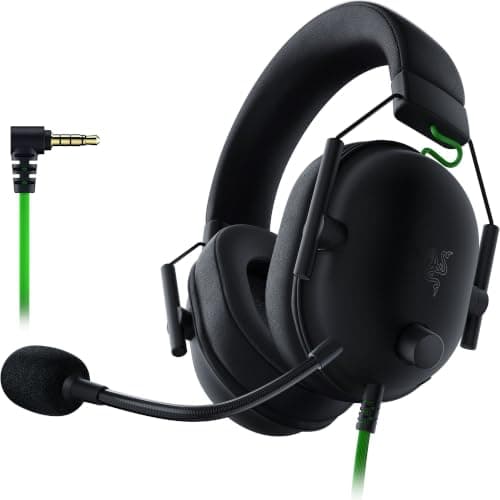
The budget pick is the SteelSeries QcK Large — the cheapest item on this page, and the one that changes the most per dollar if you are currently on a small or slick pad. Between those, the AOC 24G51F2 is the display pick at 24 inches and a rated 180Hz, the Razer Huntsman Mini is the 60% optical keyboard that frees the desk space a low-sensitivity player needs, and the Razer BlackShark V2 X is the inexpensive wired headset to buy if you cannot currently hear where footsteps are coming from.

Compare

Specs and prices at a glance

#ProductKey specsBest forPrice
01Razer Viper V3 HyperSpeed

Razer

  • Razer Focus Pro sensor
  • Wireless HyperSpeed
  • 82g
  • AA battery
Esports hardware without the flagship price$39.99 on Amazon →
02AOC 24G51F2

AOC

  • 24"
  • 1920x1080 Fast IPS
  • AOC rates 180Hz / 0.5ms MPRT
  • Adaptive Sync
The best all-round pick$74.99 on Amazon →
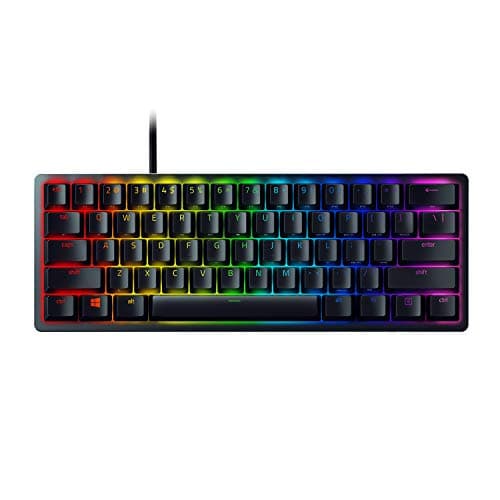
03Razer Huntsman Mini

Razer

  • Linear optical switches
  • 60% layout
  • Aluminum top
  • PBT keycaps
FPS players who want maximum mouse room$65.54 on Amazon →
04Razer BlackShark V2 X

Razer

  • Wired 3.5mm
  • 50mm drivers
  • Memory-foam cushions
  • PC · PS5 · Switch
Best cheap comfort pick$32.99 on Amazon →
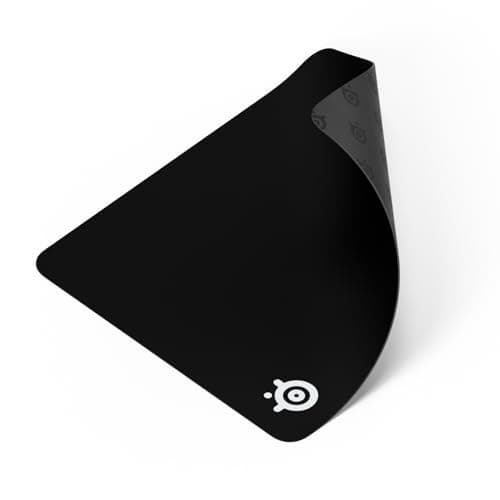
05SteelSeries QcK Large

SteelSeries

  • Cloth surface
  • Large (~450x400mm)
  • Non-slip rubber base
  • ~2mm thick
Best for most people$28.80 on Amazon →

#ad · Specs as published by the manufacturer or the Amazon listing. Live prices from the Amazon Creators API, as of November 22, 2026. Where we have no verified live price we show none, rather than print a number that has rotted.

Fortnite is not a normal shooter, and the gear that helps reflects that. Building and editing mean a high number of deliberate inputs per second, from both hands, under pressure. Aim still matters, but the thing that separates players at every level above beginner is how fast and how repeatably they can execute a sequence. That makes input hardware and frame delivery more important here than in a game where you mostly hold an angle.

This page ranks five things in the order we would buy them, not by price. Every price comes from the live price layer and carries the date we retrieved it. We do not run a testing lab and make no claim to have measured any of these — our methodology page states exactly what our scores are and are not.

Why the mouse comes first

In a building game your mouse hand does two jobs at once: it aims, and it is part of the sequence that places and edits structures. Weight is the specification that governs how that feels, because every flick has to start and stop a physical object. A mouse 40 grams lighter does not make you more accurate in a single shot; it makes the hundredth build sequence of a session feel the same as the first.

That is the entire case for the Viper V3 HyperSpeed here, at a listed 82 grams with a dedicated wireless link and an AA cell, which means it is never out of action. If budget is tight, the honest advice is that almost any modern lightweight mouse beats a heavy old one — our lightweight roundup and FPS mouse roundup cover the cheaper end properly.

One more thing, and it costs nothing: set your sensitivity so a full 180-degree turn is a single comfortable sweep rather than a wrist snap. Our DPI and sensitivity guide has the method, and it is a bigger change than any purchase on this page.

The monitor, and why 24 inches

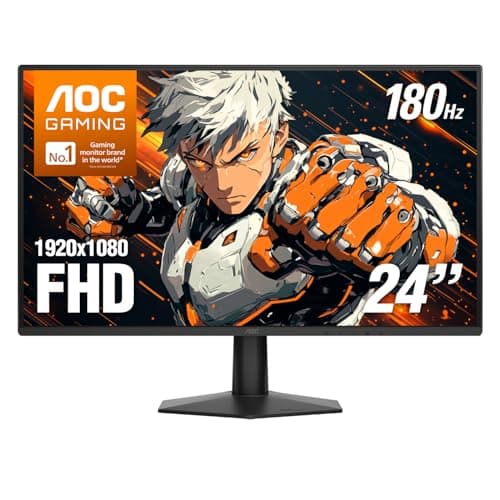
Two specifications matter and one does not. Refresh rate matters: more frames shown per second means less time between something happening and you seeing it, and in a game where you are reacting to a structure appearing, that is directly useful. The AOC panel here is rated at 180Hz on a Fast IPS panel, which is the sensible bracket — the returns above that are real but increasingly small, as our 240Hz question sets out.

Resolution does not matter much here, and this is where competitive players and enthusiasts disagree with each other. A smaller, faster 1080p panel is a better Fortnite monitor than a larger, slower 1440p one, because 1080p is easier for a mid-range graphics card to hold at a high frame rate and because at 24 inches the whole screen sits inside the area your eyes cover without moving your head. Go to 27 or 32 inches and you are turning your head to check the edges of your own screen. Our 24-inch roundup has the pixel density arithmetic, and our FPS monitor roundup covers the wider field.

The keyboard, and the desk-space argument

Fortnite binds a lot of keys: four building pieces, edit, reset, confirm, weapon slots, utility. People assume that means you need a big keyboard. It means the opposite — every key you actually use in a fight is within reach of your left hand, and the rest of the board is taking up desk that your mouse arm wants.

A 60% board like the Huntsman Mini removes the number pad, the function row, the arrows and the navigation cluster, and gives that space back. For a player at a low sensitivity whose mouse sweeps a wide arc, that is a real mechanical advantage rather than an aesthetic preference. Its optical switches also actuate on a light-beam break rather than a metal contact, which shortens travel slightly. The honest caveat is the one our sizes explainer makes: if you also work on this keyboard, arrows and function keys move behind a held layer, and you pay that tax every day.

For the wider field, including boards that keep the arrows, our FPS keyboard roundup is the page.

The headset, judged on one thing

Footsteps and build audio. Fortnite gives away an enormous amount through sound — a player repositioning above you, a wall going up behind you — and the headset’s job is to let you place that in space, not to sound impressive on music.

What helps is a clean mid-treble, which is where footstep transients live, and the absence of a heavy bass boost smearing over them. What does not help is virtual surround processing, which on most headsets makes the image vaguer rather than more precise. The BlackShark V2 X is here because it is inexpensive, wired, and tuned in a way that suits this job rather than a cinema one. Our FPS headset roundup ranks the category properly, and our footstep audio explainer covers why EQ beats hardware here.

The mousepad, which is the cheapest real upgrade

Last on the list and first on value. If you are playing at a low sensitivity on a small pad, you are starting turns near an edge and running out of surface mid-fight, and no mouse fixes that. A large cloth pad gives you the whole arc, a consistent surface, and a predictable amount of friction to stop against.

Size it from measurement rather than taste: multiply your DPI by your in-game sensitivity to work out how far your hand travels for a 180-degree turn, and buy a pad that comfortably contains it. Our pad size guide has the sum, and our mousepad roundup covers surfaces. If you want the whole-desk version, the large pad roundup is the page.

What we are deliberately not recommending

No controller, no capture card, no chair, no streaming kit. They are all real products and we rank several of them elsewhere, but none of them will make you better at Fortnite, and the point of this page is the gear that will.

Two free changes beat four of the five purchases above. Turn off every post-processing effect the game offers and cap your frame rate below your monitor’s refresh rather than letting it run unlimited — Epic publishes the performance settings and they are the first place to look. And check what else in your chain is adding delay: our input lag guide walks the whole path from your click to a pixel changing, and most people find at least one setting costing them more than a hardware upgrade would save.

The short answer

Quick picks

#ProductBest forScorePrice
01
Razer Razer Viper V3 HyperSpeed
Razer Viper V3 HyperSpeed

Genuine tournament hardware running off a single AA — the esports sensor and switches without the flagship shell. This is the one to stretch for.

Esports hardware without the flagship price
8.6
$39.99 on Amazon →
02
AOC AOC 24G51F2
AOC 24G51F2

The one to buy. 24in, 1080p, Fast IPS, 180Hz — the competitive-gaming standard, cheap.

The best all-round pick
8.0
$74.99 on Amazon →
03
Razer Razer Huntsman Mini
Razer Huntsman Mini

Optical switches and a 60% footprint. The most 'competitive FPS' board here.

FPS players who want maximum mouse room
7.6
$65.54 on Amazon →
04
Razer Razer BlackShark V2 X
Razer BlackShark V2 X

Plush memory-foam cushions and a light clamp for well under $50 — the cheapest genuinely comfortable pick here.

Best cheap comfort pick
7.4
$32.99 on Amazon →
05
SteelSeries SteelSeries QcK Large
SteelSeries QcK Large

The default cloth pad the whole category is measured against. Cheap, consistent, and good enough to end the search.

Best for most people
7.8
$28.80 on Amazon →

#ad · Live prices from the Amazon Creators API, as of November 22, 2026. Where we have no verified live price, we show none — we would rather leave a gap than print a number that has rotted.

In detail

The picks, in full

01
Razer Razer Viper V3 HyperSpeed

Esports hardware without the flagship price

Razer Viper V3 HyperSpeed

Razer Focus Pro sensorWireless HyperSpeed82gAA battery
8.6/10

Genuine tournament hardware running off a single AA — the esports sensor and switches without the flagship shell. This is the one to stretch for.

Sensor quality
10
Build quality
9
Ergonomics
8
Features
7
Value
9

Pros

  • This is genuine tournament-grade hardware — the same line pros use, at a budget price
  • 82g wireless is lighter than most wired mice in this list
  • Optical switches, so it will not develop the double-click fault that kills cheap mice

Cons

  • Not the cheapest route to wireless — the money went into the sensor and the switches, not the shell
  • AA-powered like the G305, so same weight-balance caveat
  • No RGB and a plain look — all the money went into the internals

Don't buy this if…

…you don't play shooters. The things that make this special — weight, sensor, switch latency — are things you will never notice in a strategy game. Buy the G502 and get more buttons.

$39.99View on Amazon

$69.9943% off

Price as of November 22, 2026. Prices change — Amazon's is the one that counts.

#ad · we may earn a commission from this link to Razer Viper V3 HyperSpeed

02
AOC AOC 24G51F2

The best all-round pick

AOC 24G51F2

24"1920x1080 Fast IPSAOC rates 180Hz / 0.5ms MPRTAdaptive Sync
8.0/10

The one to buy. 24in, 1080p, Fast IPS, 180Hz — the competitive-gaming standard, cheap.

Panel quality
8
Build quality
8
Ergonomics
6
Features
8
Value
10

Pros

  • Fast IPS at 180Hz for close to VA money — you get the color and the viewing angles without paying the usual premium
  • 24in/1080p is the size and resolution competitive players actually use, and it is not a compromise
  • DisplayPort 1.4 and HDMI 2.0 both carry the full 180Hz, and AOC backs the panel with a three-year zero-bright-dot warranty

Cons

  • 1080p on a 24in panel is not sharp by modern standards — you will see pixels
  • IPS contrast is mediocre; blacks are gray in a dark room
  • The slim stand tilts only — no height adjustment, no swivel, no pivot, so raising it means a VESA arm

Don't buy this if…

…you mostly play story games in the dark. IPS blacks will disappoint you — the KOORUI's VA panel is the better tool for that, and it costs about the same.

$74.99View on Amazon

$84.9912% off

Price as of November 22, 2026. Prices change — Amazon's is the one that counts.

#ad · we may earn a commission from this link to AOC 24G51F2

03
Razer Razer Huntsman Mini

FPS players who want maximum mouse room

Razer Huntsman Mini

Linear optical switches60% layoutAluminum topPBT keycaps
7.6/10

Optical switches and a 60% footprint. The most 'competitive FPS' board here.

Switch quality
9
Build quality
9
Ergonomics
6
Features
7
Value
7

Pros

  • Optical switches actuate on a light beam — no debounce delay, and they cannot develop chatter
  • 60% frees an enormous amount of desk for low-sensitivity aim
  • PBT keycaps that will not go shiny

Cons

  • No arrow keys, no F-row, no nav cluster — everything is a Fn layer, and it is a real adjustment
  • Right at the top of this page's budget

Don't buy this if…

…you use the keyboard for work as well as games. Losing the arrows and F-keys is genuinely painful in a spreadsheet, and you will resent it by Wednesday.

$65.54View on Amazon

$129.9950% off

Price as of November 22, 2026. Prices change — Amazon's is the one that counts.

#ad · we may earn a commission from this link to Razer Huntsman Mini

04
Razer Razer BlackShark V2 X

Best cheap comfort pick

Razer BlackShark V2 X

Wired 3.5mm50mm driversMemory-foam cushionsPC · PS5 · Switch
7.4/10

Plush memory-foam cushions and a light clamp for well under $50 — the cheapest genuinely comfortable pick here.

Positional accuracy
7
Footstep clarity
7
Mic quality
6
Comfort
8
Value
9

Pros

  • Razer's memory-foam cushions are thick enough to close around glasses arms rather than press them into your head
  • Light for a 50mm-driver headset, so it does not build pressure over a long session
  • Plain 3.5mm connection with no software required to get sound

Cons

  • Fixed, non-detachable cable and non-detachable mic
  • The 7.1 surround on the box is a software feature on PC, not something the hardware does on its own
  • Build is plastic throughout

Don't buy this if…

…you want a removable cable. Everything on this headset is fixed, so a cable failure means a new headset rather than a new cable.

$32.99View on Amazon

$39.9918% off

Price as of November 22, 2026. Prices change — Amazon's is the one that counts.

#ad · we may earn a commission from this link to Razer BlackShark V2 X

05
SteelSeries SteelSeries QcK Large

Best for most people

SteelSeries QcK Large

Cloth surfaceLarge (~450x400mm)Non-slip rubber base~2mm thick
7.8/10

The default cloth pad the whole category is measured against. Cheap, consistent, and good enough to end the search.

Surface & glide
8
Build quality
7
Stability
8
Edges & finish
6
Value
10

Pros

  • A balanced cloth surface that suits almost every sensor and grip without drama
  • A grippy rubber base that stays put through fast flicks
  • The reference pad — reliable, widely available and inexpensive

Cons

  • No stitched edge, so the border can fray after heavy long-term use
  • A speed/control middle ground rather than the fastest or the most controlled
  • One thickness only; there's no plush, cushioned option here

Don't buy this if…

…you want a full desk mat under the keyboard too. The Large covers a mouse, not the whole desk — step up to the XXL for that.

$28.80View on Amazon

Price as of November 22, 2026. Prices change — Amazon's is the one that counts.

#ad · we may earn a commission from this link to SteelSeries QcK Large

Buy in this order, and stop when the money runs out.

First, the mouse: the Razer Viper V3 HyperSpeed, at a listed 82 grams on one AA. Your mouse hand does the most work in this game.

Second, the display: the AOC 24G51F2, 24 inches and a rated 180Hz. Smaller and faster beats bigger and slower here.

Third, the keyboard: the Razer Huntsman Mini, 60% and optical, for the desk space as much as the switches.

Fourth, the headset: the Razer BlackShark V2 X, if you cannot currently tell which floor a footstep is on.

Cheapest upgrade of the five: the SteelSeries QcK Large. If your pad is small or slick, do this one first regardless of the order above.
How we picked

We do not run a testing lab

We researched published specifications, third-party lab measurements, manufacturer documentation and aggregated owner reviews, then scored each product against a published rubric. The scores are judgments from documented research — they are not measurements we took, because we do not have a lab and we are not going to pretend we do. Where a number came from someone else's lab, we name them and link them in Sources.

Questions

Frequently asked

What gear actually improves Fortnite performance?
In order: a lighter mouse, a higher-refresh monitor, a keyboard that frees desk space, and a headset tuned for footsteps. Before any of those, set your sensitivity so a 180-degree turn is one comfortable sweep and turn off post-processing effects in game — both are free and both matter more than a mid-tier upgrade.
Is 1080p or 1440p better for Fortnite?
1080p, for competitive play. It is easier for a mid-range graphics card to hold at a high frame rate, and on a 24-inch panel the pixel density is already good. 1440p is the better choice if you also want the monitor for single-player games and desktop work.
Do I need a 240Hz monitor for Fortnite?
No. The jump from 60Hz to 144 or 180Hz is large and obvious; the jump from 180 to 240 is real but much smaller, and only worth paying for if your graphics card can actually deliver that many frames in this game at your settings. Spend the difference on the mouse.
Is a 60% keyboard good for Fortnite?
Yes, if you play at a low sensitivity — every key you use in a fight is within reach of your left hand anyway, and the removed keys give your mouse arm the desk back. The cost is that arrows and function keys move behind a held layer, which is a daily annoyance if you also work on the same board.
Mouse or monitor first?
Mouse, unless you are still on a 60Hz display — in which case the monitor is the bigger single step. Past 120Hz, the mouse is where the next improvement comes from, because in a building game your hand is the bottleneck more often than the screen is.

Keep reading

Receipts

Sources

We do not run a testing lab, and we do not pretend to. Where a measured number came from someone else's lab, we name them and link them. Where we could not verify something, we say so on the page rather than quietly leaving it out. Read our full method.