Skip to content
GEAREDGAMING

HUB 03 · Best Value

The Best Keyboards for Gaming and Typing

Competitive keyboards optimize for one key press at a time. Typing wants the opposite. Here is the overlap, ranked — and the three specifications that decide it.

By Stephen V.Updated How we research
#ad

We earn a commission when you buy through our Amazon links, at no extra cost to you. It never affects our rankings, and we say so when the cheaper product is the better buy. How this works.

Top pick · Best for Gaming and Typing

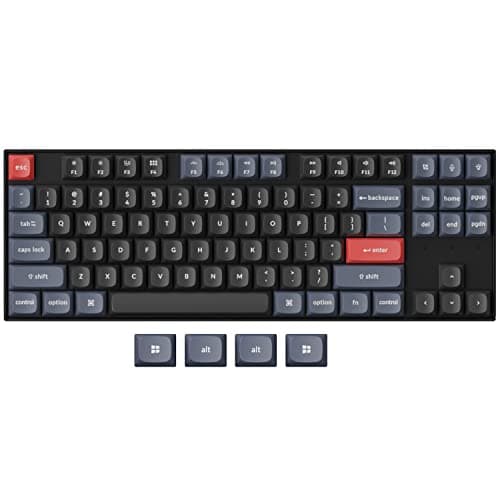
Keychron Keychron K8 Pro (QMK/VIA)

Keychron K8 Pro (QMK/VIA)

8.2/10

The enthusiast pick: hot-swap sockets, full QMK/VIA remapping and an aluminum frame, wireless or wired. The board that grows with you.

Price as of October 21, 2026. Prices change — Amazon's is the one that counts. #ad · we may earn a commission from this link to Keychron K8 Pro (QMK/VIA)

Verdict

The short version

Buy the Keychron K8 Pro — a hot-swappable TKL with PBT keycaps and full QMK/VIA remapping, wireless or wired. It is the pick because it is the only board here that lets you change your mind: if the switches you chose turn out to be wrong for typing, you pull them out with no soldering and fit different ones. It is the right buy for someone who works at the same desk they play at and does not want to own two keyboards.

If you want the quietest board for a shared room, buy the Logitech G515 LIGHTSPEED TKL. Low-profile keys are shorter-travel and less percussive than full-height mechanical switches, and LIGHTSPEED is genuine low-latency 2.4GHz wireless rather than Bluetooth. The Royal Kludge RK96 is the value pick and the one to buy if you need a number pad without giving up hot-swap sockets, and the Redragon K582 SEis the budget full-size answer — PBT keycaps and linear switches for less than half the price of the board above it. One warning: do not buy a 60% board for this job. It is a fine gaming layout and it will fight you every time you need arrow keys or a function row at work.

Compare

Specs and prices at a glance

#ProductKey specsBest forPrice
01Keychron K8 Pro (QMK/VIA)

Keychron

  • Bluetooth + USB-C wired
  • Hot-swappable · TKL
  • QMK/VIA programmable
  • PBT keycaps
Best for tinkerers$89.24 on Amazon →
02Logitech G515 LIGHTSPEED TKL

Logitech G

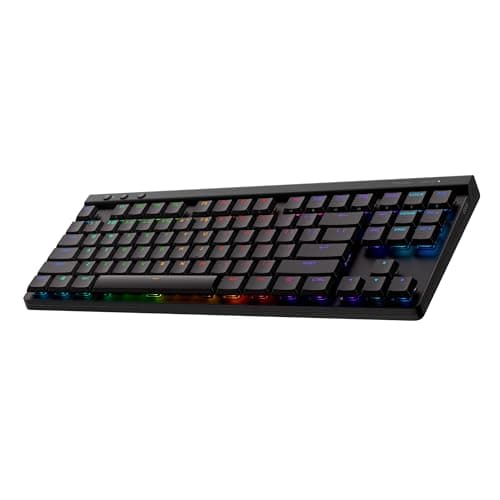
  • LIGHTSPEED 2.4GHz + Bluetooth
  • Low-profile · TKL
  • Tactile switches
  • LIGHTSYNC RGB
Best wireless all-rounder$109.99 on Amazon →
03RK ROYAL KLUDGE RK96

Royal Kludge

  • BT 5.0 / 2.4G / USB-C
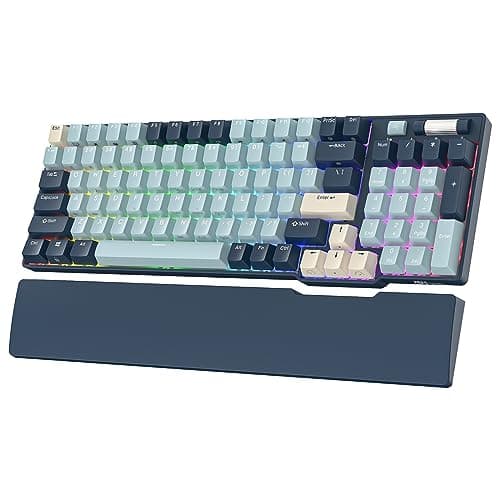
  • 96% · hot-swappable
  • Keeps the number pad
  • RGB + wrist rest
Best value / keeps the numpad$65.99 on Amazon →
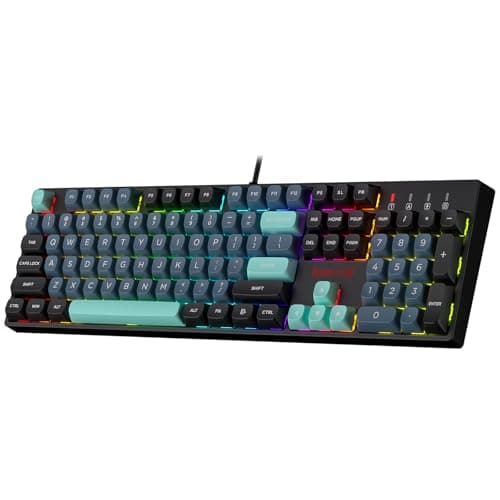
04Redragon K582 SE

Redragon

  • Mechanical · linear red
  • Full-size · 104-key
  • PBT keycaps
  • Per-key RGB
Anyone who needs the number pad$41.99 on Amazon →

#ad · Specs as published by the manufacturer or the Amazon listing. Live prices from the Amazon Creators API, as of October 21, 2026. Where we have no verified live price we show none, rather than print a number that has rotted.

Gaming and typing pull a keyboard in different directions. Gaming rewards a light, fast, single-key actuation and as much desk room for the mouse as possible. Typing rewards feedback you can feel, a layout with the keys work actually uses, and a sound your room can live with. A dual-purpose board is a compromise, and the three specifications that decide whether it is a good one are the switch, the layout and the keycap material. Brand is not on that list, and neither is RGB.

If you only care about one of the two jobs, we have the specialist pages: best keyboards for FPS for competitive play and best mechanical keyboards for the general ranking.

Switches: linear is not automatically the typing answer

The received wisdom is that linear (“red”) switches are for gaming and tactile (“brown”) switches are for typing. The mechanism behind that is real: a tactile switch has a bump partway down the travel, and a linear switch does not. The bump tells your finger the key has registered, which reduces the number of keys you bottom out on when typing fast. Linear switches give a smoother press with nothing to push through, which is why double-tap and counter-strafe inputs feel cleaner on them.

Where the received wisdom goes wrong is in treating it as a rule. Plenty of fast typists prefer linears, and plenty of competitive players prefer tactiles because the bump stops accidental presses. The honest version: if you type for a living, start tactile; if you play competitively more than you type, start linear; and if you cannot decide, buy a hot-swap board so the decision is reversible for the price of a switch set. Our keyboard switch types guide has the full taxonomy, and hot-swappable keyboards explained covers what the sockets do and do not let you change.

Layout: this is where the compromise actually bites

A gaming-first answer is to go small. A 60% board frees enormous mouse space and removes the number pad, the function row, the arrow keys and the navigation cluster. For low-sensitivity shooter players that trade is worth it — see best 60% keyboards.

For a board you also work on, that same trade is painful. Arrow keys and a function row are not optional in a spreadsheet, an IDE or a video timeline, and a layered shortcut is slower than a key. That is why three of the four picks here are TKL or larger. TKL — a full-size board with the number pad removed — is the balanced default: you keep everything work uses daily and reclaim roughly 15cm of mouse room. If you enter numbers for a living, the 96% and full-size picks keep the pad; the keyboard sizes guide maps every layout against what it removes.

Keycaps: PBT is the spec nobody puts on the box

Two plastics dominate keycaps. ABS is cheaper, slightly brighter under RGB, and develops a greasy shine where your fingers land — a gaming board you use for two hours a night takes a long time to show it. PBT is denser, more textured, and resists that shine for years.

If you type on a board for eight hours a day, you will reach that wear point in months rather than years, which is why PBT is the single most underrated specification on a dual-purpose keyboard. It also changes the sound: PBT caps are deeper and less clacky, which matters if you share a room or take calls. Our PBT vs ABS guide has the detail. Two of the four boards here ship PBT as standard, including the cheapest one.

Noise, and the people you live with

A tall mechanical board with ABS caps and no sound dampening is loud, and open-mic voice chat broadcasts every key press. Three things reduce it: PBT keycaps, a low-profile switch with less travel to slam, and lubrication. Switching from a stock full-height board to a low-profile one is the biggest single change — which is exactly why the G515 is the pick for a shared room — and our switch lubrication guide covers the cheaper route if you already own a board you like.

Wireless: which kind matters

“Wireless” on a keyboard listing means one of two very different things. Bluetooth is convenient, pairs with anything, and adds enough latency that competitive players notice it. A dedicated 2.4GHz dongle — LIGHTSPEED on the Logitech, the dongle in the triple-mode Royal Kludge boards — is effectively indistinguishable from wired for input purposes. Boards that offer both let you keep a work laptop on Bluetooth and the gaming PC on the dongle, which is the genuinely useful configuration for this use case. Our wired vs wireless keyboard guide has the latency detail.

How we ranked these

Scores are judgments from documented research — published manufacturer specifications from sources like Keychron and Logitech G, independent lab measurements from RTINGS where a board has been tested, and owner reports — not our own measurements. We weight reversibility heavily on this page: a dual-purpose board is a compromise, and a board whose switches you can change is a compromise you can correct.

The short answer

Quick picks

#ProductBest forScorePrice
01
Keychron Keychron K8 Pro (QMK/VIA)
Keychron K8 Pro (QMK/VIA)

The enthusiast pick: hot-swap sockets, full QMK/VIA remapping and an aluminum frame, wireless or wired. The board that grows with you.

Best for tinkerers
8.2
$89.24 on Amazon →
02
Logitech G Logitech G515 LIGHTSPEED TKL
Logitech G515 LIGHTSPEED TKL

The wireless board most people should buy: low-profile, genuinely fast LIGHTSPEED wireless, and it looks like it belongs on a grown-up desk.

Best wireless all-rounder
8.0
$109.99 on Amazon →
03
Royal Kludge RK ROYAL KLUDGE RK96
RK ROYAL KLUDGE RK96

The value champion: a 96% layout that keeps the number pad, triple-mode wireless and hot-swap sockets, all for the price of a plain wired board.

Best value / keeps the numpad
7.6
$65.99 on Amazon →
04
Redragon Redragon K582 SE
Redragon K582 SE

The full-size option: a numpad, linear red switches and PBT keycaps for the price of a TKL.

Anyone who needs the number pad
7.0
$41.99 on Amazon →

#ad · Live prices from the Amazon Creators API, as of October 21, 2026. Where we have no verified live price, we show none — we would rather leave a gap than print a number that has rotted.

In detail

The picks, in full

01
Keychron Keychron K8 Pro (QMK/VIA)

Best for tinkerers

Keychron K8 Pro (QMK/VIA)

Bluetooth + USB-C wiredHot-swappable · TKLQMK/VIA programmablePBT keycaps
8.2/10

The enthusiast pick: hot-swap sockets, full QMK/VIA remapping and an aluminum frame, wireless or wired. The board that grows with you.

Switch quality
8
Build quality
9
Ergonomics
8
Features
9
Value
7

Pros

  • Hot-swap sockets let you change switches with no soldering, so the board is a platform, not a fixed appliance
  • Full QMK/VIA support means you remap every key and layer at the firmware level — deeper than any gaming-brand software
  • A gasket-adjacent, well-built TKL that works with Mac and Windows out of the box

Cons

  • Bluetooth-and-wired only — there is no dedicated low-latency 2.4GHz dongle, so hardcore competitive players will want the cable
  • QMK/VIA has a learning curve if you just want plug-and-play
  • Heavier and taller than a low-profile board like the G515

Don't buy this if…

…you specifically want a low-latency 2.4GHz wireless link for competitive play. The K8 Pro is Bluetooth-or-wired — the G515 LIGHTSPEED or an RK triple-mode board give you the 2.4GHz dongle.

$89.24View on Amazon

$104.9915% off

Price as of October 21, 2026. Prices change — Amazon's is the one that counts.

#ad · we may earn a commission from this link to Keychron K8 Pro (QMK/VIA)

02
Logitech G Logitech G515 LIGHTSPEED TKL

Best wireless all-rounder

Logitech G515 LIGHTSPEED TKL

LIGHTSPEED 2.4GHz + BluetoothLow-profile · TKLTactile switchesLIGHTSYNC RGB
8.0/10

The wireless board most people should buy: low-profile, genuinely fast LIGHTSPEED wireless, and it looks like it belongs on a grown-up desk.

Switch quality
8
Build quality
8
Ergonomics
9
Features
8
Value
7

Pros

  • LIGHTSPEED is the same low-latency 2.4GHz wireless Logitech's pro mice use — you cannot feel it versus wired
  • The low-profile design is slim, quiet and far kinder on the wrists than a tall gaming board
  • A restrained, non-gamery look with per-key RGB that suits a work-and-play desk

Cons

  • The switches are soldered — there is no hot-swap here, so you live with the tactile choice you buy
  • Costs meaningfully more than a triple-mode board from Royal Kludge that does the wireless part for less
  • Low-profile keys feel different from full-height switches — try the feel before you commit if you can

Don't buy this if…

…you want to swap switches later or you are on a tight budget. This is a sealed, premium low-profile board — for tinkering or value, the RK84 or Keychron K8 Pro are the hot-swap picks.

$109.99View on Amazon

$159.9931% off

Price as of October 21, 2026. Prices change — Amazon's is the one that counts.

#ad · we may earn a commission from this link to Logitech G515 LIGHTSPEED TKL

03
Royal Kludge RK ROYAL KLUDGE RK96

Best value / keeps the numpad

RK ROYAL KLUDGE RK96

BT 5.0 / 2.4G / USB-C96% · hot-swappableKeeps the number padRGB + wrist rest
7.6/10

The value champion: a 96% layout that keeps the number pad, triple-mode wireless and hot-swap sockets, all for the price of a plain wired board.

Switch quality
7
Build quality
6
Ergonomics
7
Features
9
Value
9

Pros

  • The 96% layout squeezes in a full number pad while still freeing more mouse room than a full-size board
  • Genuine triple-mode wireless and hot-swap sockets at a price where most boards are wired and soldered
  • Ships with a wrist rest, which is a rare extra at this money

Cons

  • The crowded 96% layout puts some keys tight against each other — there is an adjustment period
  • Stock switches and stabilizers are mediocre, the usual RK compromise
  • Royal Kludge's configuration software is rough around the edges

Don't buy this if…

…you play low-sensitivity shooters and want maximum desk space for mouse sweeps. A 96% board still has a numpad in the way — a TKL or 60% frees more room.

$65.99View on Amazon

$89.8927% off

Price as of October 21, 2026. Prices change — Amazon's is the one that counts.

#ad · we may earn a commission from this link to RK ROYAL KLUDGE RK96

04
Redragon Redragon K582 SE

Anyone who needs the number pad

Redragon K582 SE

Mechanical · linear redFull-size · 104-keyPBT keycapsPer-key RGB
7.0/10

The full-size option: a numpad, linear red switches and PBT keycaps for the price of a TKL.

Switch quality
7
Build quality
7
Ergonomics
7
Features
6
Value
8

Pros

  • A full 104-key layout with a real number pad — the only board here for spreadsheets, accounting or MMO keybinds
  • PBT keycaps at this price are unusual and genuinely better — they resist the greasy shine that kills cheap ABS caps
  • Linear red switches are a sensible, quieter default for gaming

Cons

  • Full-size, so it eats the desk space a 60% board would free up for your mouse
  • Not hot-swap — the switches are soldered in
  • Redragon's configuration software is functional and no more

Don't buy this if…

…you play low-sensitivity shooters and want room to swing the mouse. A full-size board is the wrong tool for that — go TKL or 60%.

$41.99View on Amazon

Price as of October 21, 2026. Prices change — Amazon's is the one that counts.

#ad · we may earn a commission from this link to Redragon K582 SE

How to choose between these four

Work out your split first. If you spend more hours typing than playing, buy tactile switches, PBT keycaps and at least a TKL layout. If it is the other way round, a linear-switch TKL is the better compromise and a 60% board becomes defensible.

Count the number pad honestly. Numbers entered daily means keeping it: the 96% layout is the best of both, squeezing the pad in while still freeing more mouse room than a full-size board. Numbers entered occasionally means a TKL plus a separate numeric pad, which is cheaper and more flexible than you would expect.

Decide whether you want this to be your last keyboard.Hot-swap sockets turn a board into a platform — you can change the feel for the price of a switch set instead of a new keyboard. Sealed boards like the G515 are better finished and quieter, and you live with the switch you bought.

Check what the wireless actually is. Bluetooth-only is fine for work and marginal for competitive play. If the listing does not name a 2.4GHz dongle, assume it does not have one.
How we picked

We do not run a testing lab

We researched published specifications, third-party lab measurements, manufacturer documentation and aggregated owner reviews, then scored each product against a published rubric. The scores are judgments from documented research — they are not measurements we took, because we do not have a lab and we are not going to pretend we do. Where a number came from someone else's lab, we name them and link them in Sources.

Questions

Frequently asked

What is the best keyboard for both gaming and typing?
The Keychron K8 Pro. It is a TKL with PBT keycaps and hot-swap sockets, so if the switches turn out to be wrong for one of the two jobs you can change them without soldering or buying another board. For a quieter shared room, the low-profile Logitech G515 LIGHTSPEED TKL is the better buy.
Are linear or tactile switches better for typing?
Tactile is the safer starting point for typing, because the bump partway down the travel tells your finger the key registered and reduces how often you bottom out. Linear switches are smoother and marginally better for repeated competitive inputs. Neither is a rule, and a hot-swap board makes the choice reversible.
Should I buy a TKL or a full-size keyboard for work and gaming?
TKL unless you enter numbers daily. Removing the number pad reclaims roughly 15cm of mouse room and keeps every key work actually uses — the function row, arrows and navigation cluster. If you need the pad, a 96% layout keeps it while still being narrower than a full-size board.
Do PBT keycaps matter?
On a board you type on all day, yes. ABS caps develop a greasy shine where your fingers land, and heavy typing reaches that point in months rather than years. PBT is denser and more textured, resists the shine, and sounds deeper — which also helps if you share a room or use an open microphone.
Is a 60% keyboard bad for typing?
It is a bad choice for work typing specifically. A 60% layout removes the function row, arrow keys and navigation cluster, so every one of those becomes a two-key layer shortcut. That is tolerable in games with custom binds and slow in a spreadsheet, an IDE or a document.

Keep reading

Receipts

Sources

We do not run a testing lab, and we do not pretend to. Where a measured number came from someone else's lab, we name them and link them. Where we could not verify something, we say so on the page rather than quietly leaving it out. Read our full method.