Skip to content
GEAREDGAMING

HUB 03 · Best Value

The Best 24-Inch Gaming Monitors

Twenty-four inches is the size every competitive player quietly settled on, and the one size where 1080p is genuinely the right resolution rather than a compromise.

By Stephen V.Updated How we research
#ad

We earn a commission when you buy through our Amazon links, at no extra cost to you. It never affects our rankings, and we say so when the cheaper product is the better buy. How this works.

Top pick · Best 24-Inch Gaming Monitor

AOC AOC 24G51F2

AOC 24G51F2

8.0/10

The one to buy. 24in, 1080p, Fast IPS, 180Hz — the competitive-gaming standard, cheap.

Price as of November 7, 2026. Prices change — Amazon's is the one that counts. #ad · we may earn a commission from this link to AOC 24G51F2

Verdict

The short version

Buy the AOC 24G51F2 — a 24-inch 1080p Fast IPS panel AOC rates at 180Hz with a 0.5ms MPRT figure and adaptive sync. It is the pick for anyone who plays shooters and wants the whole playing field inside their field of view: the right size, the right resolution for that size, a high refresh rate, and an IPS panel so colors do not shift when you lean. It is also inexpensive enough that the remaining budget can go on a GPU that can feed it.

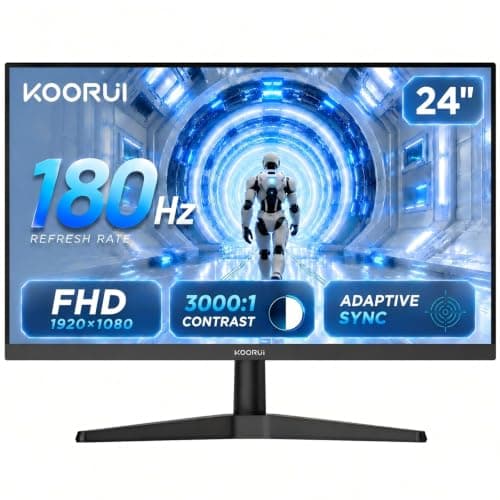
The budget pick is the KOORUI 24-inch — the cheapest monitor on this page, and the cheapest one here still rated at 180Hz. It trades IPS for a VA panel, which means deeper blacks but slower dark transitions. Beyond those two, the Acer Nitro KG241Y is usually the cheapest IPS on the shelf, the LG UltraGear 24G414B is the one to buy if you want a height-adjustable stand you will not have to replace, and the ASUS TUF VG249Q1A is a known-good panel for buyers who want the familiar name.

Compare

Specs and prices at a glance

#ProductKey specsBest forPrice
01AOC 24G51F2

AOC

  • 24"
  • 1920x1080 Fast IPS
  • AOC rates 180Hz / 0.5ms MPRT
  • Adaptive Sync
The best all-round pick$105.45 on Amazon →
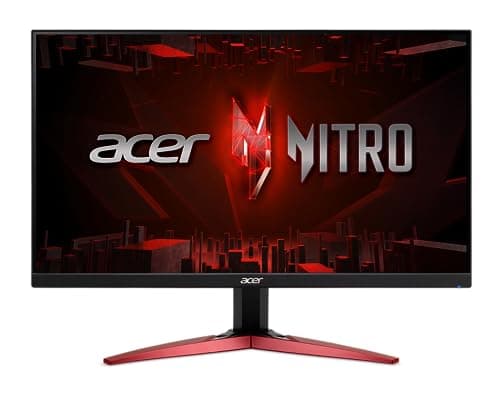
02Acer Nitro KG241Y

Acer

  • 23.8"
  • 1080p IPS
  • AMD FreeSync
  • Acer rates 180Hz
Cheapest IPS$99.99 on Amazon →
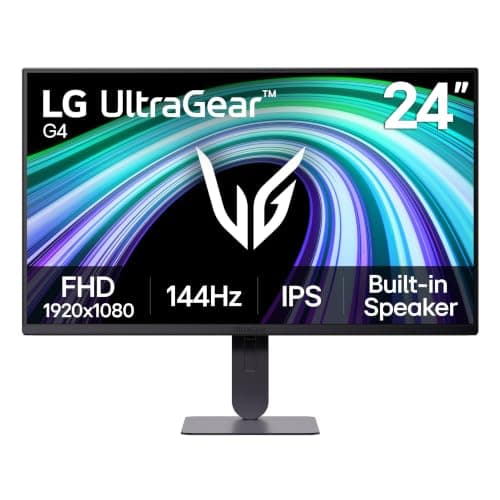
03LG UltraGear 24G414B-B

LG

  • 24"
  • 1080p IPS
  • UltraGear
  • Height-adjustable stand
The best-built budget IPS$139.99 on Amazon →
04KOORUI 24in Gaming Monitor

KOORUI

  • 24"
  • 1080p VA
  • KOORUI rates 180Hz / 1ms
  • 3000:1 contrast
Spending the least$89.99 on Amazon →
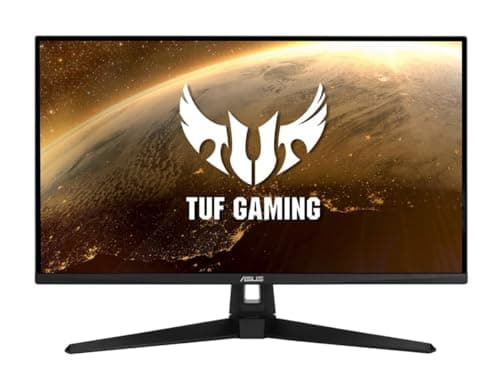
05ASUS TUF Gaming VG249Q1A

ASUS

  • 24"
  • 1080p IPS
  • ASUS rates 165Hz
  • ELMB
If you want the ASUS name$189.00 on Amazon →

#ad · Specs as published by the manufacturer or the Amazon listing. Live prices from the Amazon Creators API, as of November 7, 2026. Where we have no verified live price we show none, rather than print a number that has rotted.

Twenty-four inches is not the budget size. It is the competitive size, and the distinction matters. Esports tournaments have run on 24-inch panels for years for one practical reason: at normal desk distance, a 24-inch screen fits inside the area your eyes cover without moving your head. A 27-inch screen does not, so enemies appear in the part of the display your peripheral vision handles worst. Players who buy bigger and then sit further back have simply recreated a 24-inch monitor with extra steps.

Every price here is pulled live from Amazon and stamped with the date we retrieved it. We do not run a testing lab and never claim to — our methodology page states exactly what our scores are and are not.

Why 1080p is correct at this size, and nowhere else

Pixel density is pixels divided by physical size. A 24-inch 1080p screen lands near 92 pixels per inch, which is about the density where text stops looking stepped at arm’s length. The same 1080p stretched over 27 inches drops to roughly 82 PPI, and that is the gap people are describing when they say a 27-inch 1080p monitor “looks blurry”.

This is why the 24-inch class is the one place we recommend 1080p without hedging. You get the easiest frame rates in the market, the cheapest high-refresh panels, and no sharpness penalty. If you want more desktop space or more detail, the honest answer is to move up to 1440p and a 27-inch panel together, not to make 1080p bigger — our 1440p roundup covers that step, and 1080p vs 1440p covers the trade-off itself.

Refresh rate: what 180Hz asks of your PC

Four of these five panels are rated at 165Hz or 180Hz. The number on the box is the ceiling, not a promise — the monitor can only show what your GPU renders. The good news is that 1080p is the cheapest resolution to drive: competitive shooters at competitive settings routinely clear 200fps on mid-range hardware, which is exactly the workload these panels exist for.

Two notes on the fine print. Manufacturer response-time figures like 0.5ms MPRT are measured under conditions you will not use, usually with a strobing backlight mode that dims the screen; treat them as a rough class indicator, not a spec. And adaptive sync is the feature that actually makes variable frame rates look clean — all of these panels have it, and you should turn it on in your GPU control panel, because it does not always enable itself.

IPS or VA at 24 inches

IPS panels hold color and brightness steady as your viewing angle changes and handle dark transitions better, which is why four picks here are IPS. VA panels, like the KOORUI, trade that for far higher contrast — a VA panel with a rated 3000:1 contrast shows genuinely darker blacks in a dim room than any IPS at this price. What VA costs you is smearing on dark moving objects, which is most visible in horror games and night maps.

The practical split: if you play competitively in a lit room, take IPS. If you mostly play single-player in the dark and want the picture to look rich for the least money, VA is a real argument. There is no TN panel on this page because at this price IPS has simply absorbed that tier — our IPS vs VA guide has the long version.

The spec nobody checks: the stand

Budget monitors save money on the stand before they save it on the panel. A tilt-only stand parks the screen at a fixed height, which is usually too low, and the fix is either a stack of books or a VESA arm. The LG pick here includes a height-adjustable stand, and that is the main thing you are paying its small premium for. If you intend to wall- or arm-mount anyway, ignore this entirely and buy on panel.

The short answer

Quick picks

#ProductBest forScorePrice
01
AOC AOC 24G51F2
AOC 24G51F2

The one to buy. 24in, 1080p, Fast IPS, 180Hz — the competitive-gaming standard, cheap.

The best all-round pick
8.0
$105.45 on Amazon →
02
Acer Acer Nitro KG241Y
Acer Nitro KG241Y

IPS, fast, and usually the cheapest IPS on the shelf.

Cheapest IPS
6.8
$99.99 on Amazon →
03
LG LG UltraGear 24G414B-B
LG UltraGear 24G414B-B

LG's panel quality and a proper stand. Worth the small premium over the Acer.

The best-built budget IPS
8.4
$139.99 on Amazon →
04
KOORUI KOORUI 24in Gaming Monitor
KOORUI 24in Gaming Monitor

The cheapest 180Hz panel worth owning, and the VA contrast is a genuine plus.

Spending the least
6.6
$89.99 on Amazon →
05
ASUS ASUS TUF Gaming VG249Q1A
ASUS TUF Gaming VG249Q1A

A known-good panel at the top of the budget. Being outclassed by cheaper options.

If you want the ASUS name
7.4
$189.00 on Amazon →

#ad · Live prices from the Amazon Creators API, as of November 7, 2026. Where we have no verified live price, we show none — we would rather leave a gap than print a number that has rotted.

In detail

The picks, in full

01
AOC AOC 24G51F2

The best all-round pick

AOC 24G51F2

24"1920x1080 Fast IPSAOC rates 180Hz / 0.5ms MPRTAdaptive Sync
8.0/10

The one to buy. 24in, 1080p, Fast IPS, 180Hz — the competitive-gaming standard, cheap.

Panel quality
8
Build quality
8
Ergonomics
6
Features
8
Value
10

Pros

  • Fast IPS at 180Hz for close to VA money — you get the color and the viewing angles without paying the usual premium
  • 24in/1080p is the size and resolution competitive players actually use, and it is not a compromise
  • DisplayPort 1.4 and HDMI 2.0 both carry the full 180Hz, and AOC backs the panel with a three-year zero-bright-dot warranty

Cons

  • 1080p on a 24in panel is not sharp by modern standards — you will see pixels
  • IPS contrast is mediocre; blacks are gray in a dark room
  • The slim stand tilts only — no height adjustment, no swivel, no pivot, so raising it means a VESA arm

Don't buy this if…

…you mostly play story games in the dark. IPS blacks will disappoint you — the KOORUI's VA panel is the better tool for that, and it costs about the same.

$105.45View on Amazon

Price as of November 7, 2026. Prices change — Amazon's is the one that counts.

#ad · we may earn a commission from this link to AOC 24G51F2

02
Acer Acer Nitro KG241Y

Cheapest IPS

Acer Nitro KG241Y

23.8"1080p IPSAMD FreeSyncAcer rates 180Hz
6.8/10

IPS, fast, and usually the cheapest IPS on the shelf.

Panel quality
8
Build quality
6
Ergonomics
4
Features
7
Value
9

Pros

  • IPS color and viewing angles at close to VA prices
  • FreeSync works properly with both AMD and NVIDIA cards now

Cons

  • Tilt-only stand — no height adjustment, and it sits low
  • Thin, hollow-feeling plastic chassis

Don't buy this if…

…your desk is low or you're tall. The fixed stand will have you looking down at it all night, and a monitor arm erases the price advantage.

$99.99View on Amazon

Price as of November 7, 2026. Prices change — Amazon's is the one that counts.

#ad · we may earn a commission from this link to Acer Nitro KG241Y

03
LG LG UltraGear 24G414B-B

The best-built budget IPS

LG UltraGear 24G414B-B

24"1080p IPSUltraGearHeight-adjustable stand
8.4/10

LG's panel quality and a proper stand. Worth the small premium over the Acer.

Panel quality
8
Build quality
9
Ergonomics
9
Features
8
Value
8

Pros

  • LG's IPS panels are consistently better-calibrated out of the box than the cheap competition
  • A stand with real height and pivot adjustment, which the Acer lacks
  • UltraGear's on-screen tools (black stabilizer, crosshair) are actually useful

Cons

  • Costs more than the Acer for a similar panel
  • Still 1080p — no sharpness advantage

Don't buy this if…

…you want the most Hz per dollar. The AOC 24G51F2 is faster and cheaper — this is a build-quality and ergonomics purchase.

$139.99View on Amazon

Price as of November 7, 2026. Prices change — Amazon's is the one that counts.

#ad · we may earn a commission from this link to LG UltraGear 24G414B-B

04
KOORUI KOORUI 24in Gaming Monitor

Spending the least

KOORUI 24in Gaming Monitor

24"1080p VAKOORUI rates 180Hz / 1ms3000:1 contrast
6.6/10

The cheapest 180Hz panel worth owning, and the VA contrast is a genuine plus.

Panel quality
6
Build quality
6
Ergonomics
5
Features
7
Value
9

Pros

  • 3000:1 VA contrast makes dark scenes look far better than any IPS here
  • 180Hz at the lowest price on this page

Cons

  • VA smearing in dark, fast-moving scenes is real and you will see it in a shooter
  • Viewing angles and color shift are worse than IPS
  • Basic tilt-only stand

Don't buy this if…

…you play competitive shooters. VA's dark-transition smear is exactly the artifact that hurts you there — pay the small premium for the AOC's IPS panel.

$89.99View on Amazon

$119.9925% off

Price as of November 7, 2026. Prices change — Amazon's is the one that counts.

#ad · we may earn a commission from this link to KOORUI 24in Gaming Monitor

05
ASUS ASUS TUF Gaming VG249Q1A

If you want the ASUS name

ASUS TUF Gaming VG249Q1A

24"1080p IPSASUS rates 165HzELMB
7.4/10

A known-good panel at the top of the budget. Being outclassed by cheaper options.

Panel quality
8
Build quality
8
Ergonomics
7
Features
8
Value
6

Pros

  • ASUS's ELMB backlight strobing genuinely reduces motion blur, and few budget monitors have it
  • Reliable panel with a long track record

Cons

  • 165Hz where cheaper monitors here do 180Hz
  • The most expensive 1080p option on this page, and it is not the best one

Don't buy this if…

…you're optimizing for value. The AOC 24G51F2 is faster and cheaper, and the GIGABYTE gives you 1440p for less. This is here for completeness, not because we'd pick it.

$189.00View on Amazon

Price as of November 7, 2026. Prices change — Amazon's is the one that counts.

#ad · we may earn a commission from this link to ASUS TUF Gaming VG249Q1A

How to choose between these five in under a minute.

Play shooters, lit room, want the safe answer: the AOC. Fast IPS, 180Hz rated, cheap.

Spending as little as possible: the KOORUI. You keep the high refresh rate and gain contrast; you lose some dark-scene clarity.

Want the cheapest IPS: the Acer Nitro. Same idea as the AOC with less of the marketing.

Care about ergonomics:the LG UltraGear, for the height-adjustable stand and LG’s panel consistency.

Console player:none of these are the right starting point — a PS5 or Series X wants 120Hz over HDMI 2.1, so start with our gaming monitors for PS5 page instead.
How we picked

We do not run a testing lab

We researched published specifications, third-party lab measurements, manufacturer documentation and aggregated owner reviews, then scored each product against a published rubric. The scores are judgments from documented research — they are not measurements we took, because we do not have a lab and we are not going to pretend we do. Where a number came from someone else's lab, we name them and link them in Sources.

Questions

Frequently asked

Is 24 inches too small for gaming in 2026?
Not for competitive play. At a normal desk distance a 24-inch screen sits inside the area your eyes cover without head movement, which is exactly why esports events still use this size. For single-player games and films a bigger screen is more immersive — that is a genuine preference, not a performance argument.
Should a 24-inch gaming monitor be 1080p or 1440p?
1080p, in almost every case. At 24 inches, 1080p lands around 92 pixels per inch, which is sharp at arm’s length, and it is far cheaper to drive at high frame rates. A 24-inch 1440p panel exists but spends your money on pixels you will struggle to see at that size.
Do I need 180Hz, or is 144Hz enough?
144Hz captures most of the benefit; the step to 165Hz or 180Hz is small and gets smaller the higher you go. What matters more is whether your GPU can actually sustain frame rates near the panel’s ceiling. If it cannot, a cheaper 144Hz panel plus adaptive sync is the better spend. Our 144Hz vs 240Hz comparison shows where the curve flattens.
Are these prices current?
Every price on this page is pulled live from Amazon and stamped with the date it was retrieved, rather than typed in once and left to rot. Monitor prices move constantly, so check the live figure on each pick before you buy.

Keep reading

Receipts

Sources

We do not run a testing lab, and we do not pretend to. Where a measured number came from someone else's lab, we name them and link them. Where we could not verify something, we say so on the page rather than quietly leaving it out. Read our full method.